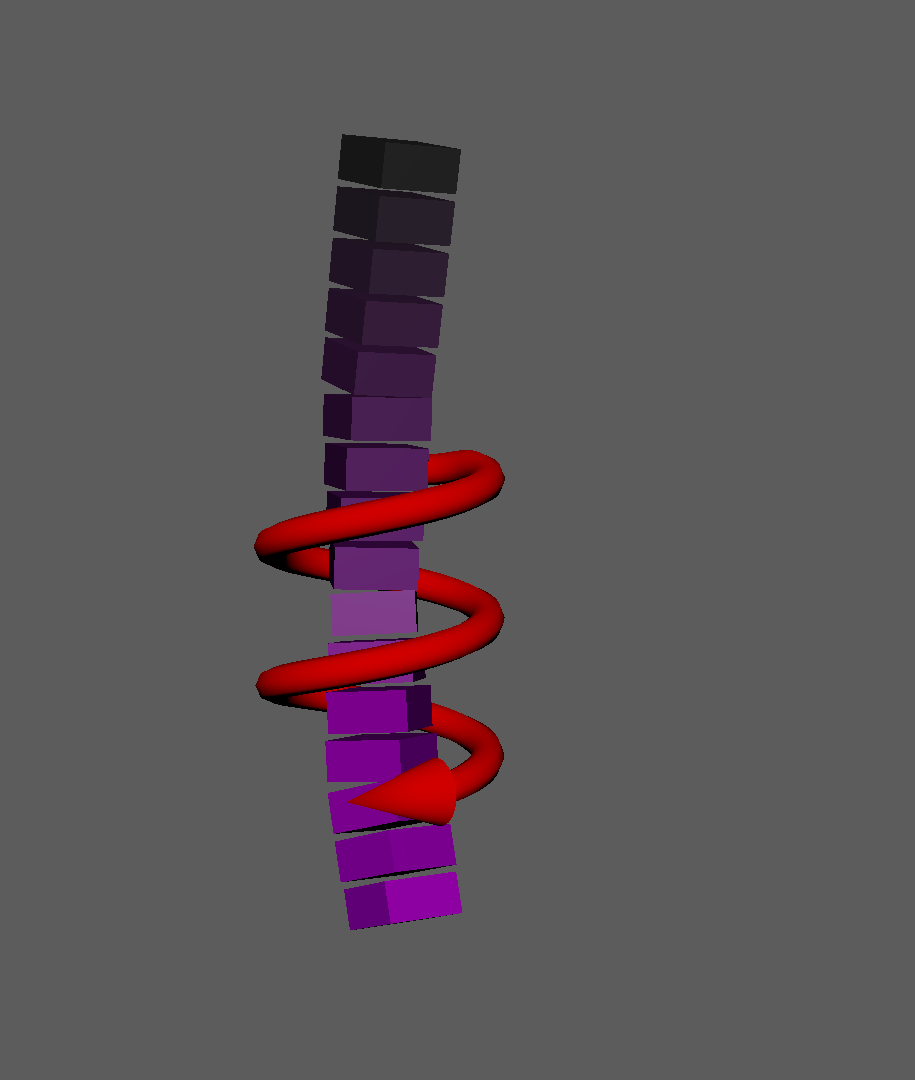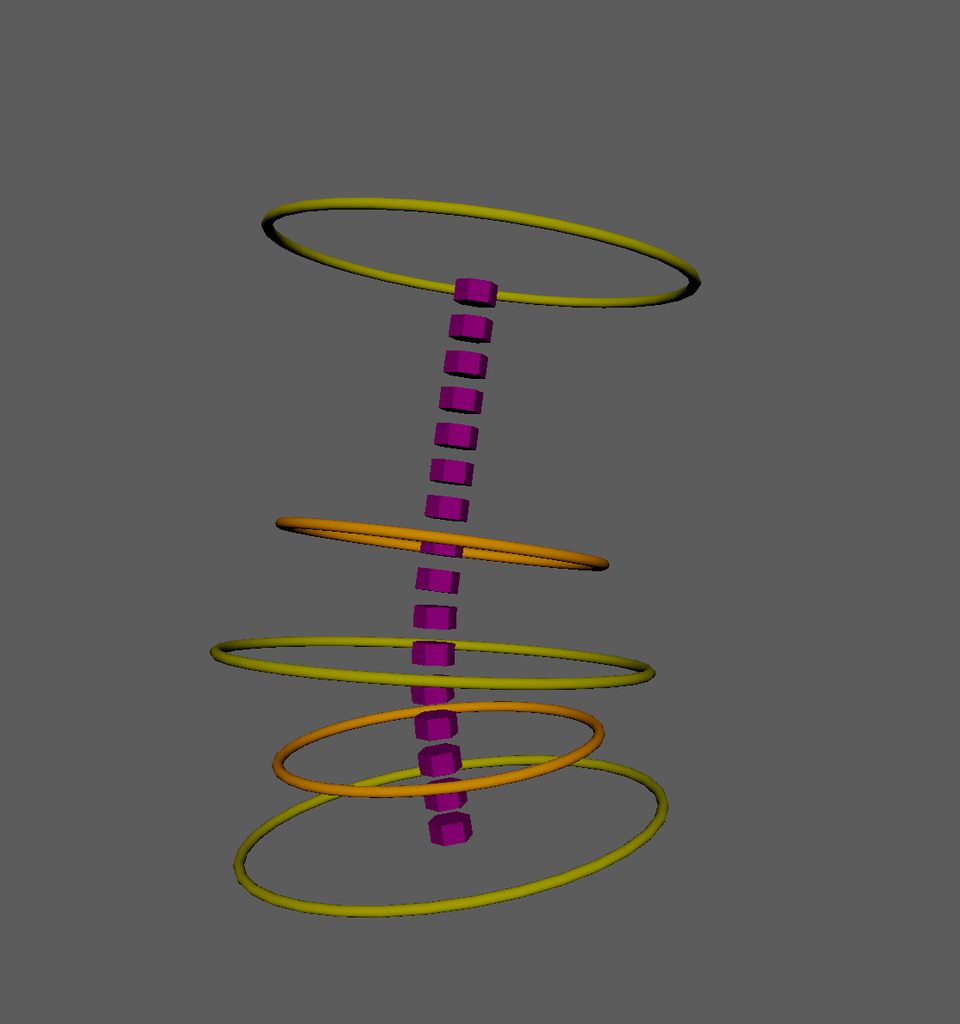
Modules referenced in this chapter:
If you find this retrospective informative, useful, enjoyable, or some other adjective, you can buy me a coffee here.
Spine
“Hybrid” ribbon-based spine
I wanted to build a spine component that was more complex than just pure FK, but I wasn’t sure what direction to go. I did a little research on different types of spines, and decided to give this “Hybrid” type spine a try. The first iteration had the controls evenly spaced, which felt very wrong, so I did some more work to be able to build the controls around where the major spine joints existed in the skeleton. I still don’t think I like how it behaves, so I tacked on an FK version that it can blend between for now. If I can get an animator to play with it, I might be able to salvage it through constructive feedback.
Though again I’ll reiterate that this is the strength of a component-based system, that I can build a new spine component and swap it in. Maybe there will be types of characters where this hybrid spine will shine, and other characters where some other type of spine component will be a better choice. Both can exist within this framework.
In the component, we offload the construction of the hybrid spine’s ribbon to a Ribbon class in CATS.classes.ribbon.
For a standard spine, the start parameter will be the hips, and the end will be the base of the neck. The mid parameter takes a 0-to-1 value of how far between start and end the middle controls of the ribbon will be constructed. Unlike in some other components, I can’t necessarily project an existing joint onto the start-to-end vector, because that joint may not exist or may not be in an ideal location for where we want the ribbon middle control. In my test skeleton, I use 0.3 as the mid value.
There’s a joints list, which contains an inclusive list of the joints from start to end for this skeleton. This seems redundant, but there is a potential configuration where a denser chain of deforming joints are separate from a sparse chain of control joints.
The output values control, out_joints, and out_connect are built in the Ribbon class. The FK controls are built in create_fk_spine() method in this Spine component.
class Spine(ComponentBase):
    def __init__(self):
        super().__init__()
        self.register_parameter("start", type_=str)
        self.register_parameter("end", type_=str)
        self.register_parameter("mid", type_=float, default=0.5)
        self.register_parameter("parent", type_=str)
        self.register_parameter("joints", type_=list)
        self.register_parameter("side",
                                 type_=str,
                                 items=["c", "l", "r"],
                                 default='c')
        self.register_parameter("axis",
                                 type_=str,
                                 items=["x", "y", "z"],
                                 default='x')
        self.register_parameter("hub", type_=str)

        self.register_output("controls", type_=list)
        self.register_output("out_joints", type_=list)
        self.register_output("out_connect", type_=Control)
        self.register_output("fk_controls", type_=list)

    @property
    def _component_name(self) -> str:
        """Return User-facing name of the component"""
        return "Spine"

    @property
    def _component_description(self) -> str:
        """Return User-facing information of the component"""
        return "Create a hybrid spine"

    def _build(self, *args) -> None:
        """run component"""
        ribbon = Ribbon(name=self.get_value('name'),
                        start=self.get_value('start'),
                        end=self.get_value('end'),
                        joints=self.get_value('joints'),
                        mid=self.get_value('mid'),
                        side=self.get_value('side'),
                        parent=self.get_value('parent'),
                        hub=self.get_value('hub'),
                        end_proxy=True)
        ribbon.build()

        fk_chain = self.create_fk_spine()
        blend_joints = self.get_value('joints')[:-1] + [ribbon.out_connect]
        self.blend_spine(fk_chain,
                          ribbon.out_joints,
                          blend_joints,
                          f'{ribbon.drivers["start_ctrl"]}.mode')

        self.set_output('controls', ribbon.drivers)
        self.set_output('out_joints', ribbon.out_joints)
        self.set_output('out_connect', ribbon.out_connect)
        self.set_output('fk_controls', fk_chain)
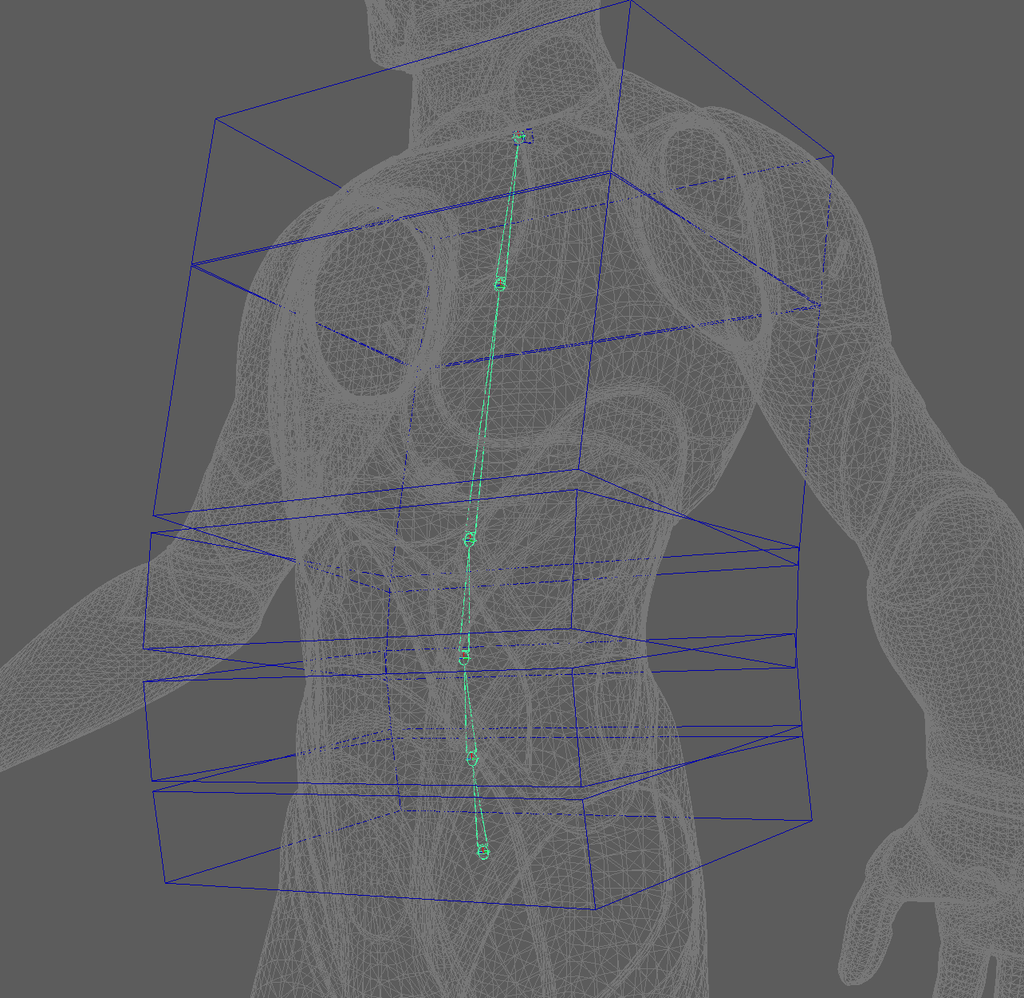
Let’s talk about this FK spine first. I could have inherited the Spine component from Chain like I do in the Limb component. However, I decided to add this FK control as an alternative control scheme after I had already implemented the ribbon part of the component.
    def create_fk_spine(self) -> list[Control]:
        hub = Hub(self.get_value('hub'))
        fk_controls = []
        last_parent = mobject(self.get_value('parent'))
        joints = self.get_value('joints')
        for i,joint in enumerate(joints[:-1]):
            fk_controls.append(Control.from_joint(joint,
                         name=Name(joint).change(node_type='ctrl').build(),
                         parent=last_parent,
                         hub=hub,
                         shape=DefaultShape.box,
                         attach=False))
            ctrl_matrix = om2.MTransformationMatrix().setRotation(
                                om2.MEulerRotation(0, 0, math.radians(-90),
                                order=om2.MEulerRotation.kZYX)).asMatrix()
            fk_controls[-1].set_shape_matrix(fk_controls[-1].get_shape(),
                                             ctrl_matrix, local=True)
            fk_controls[-1].stretch_shape(joints[i+1])
            fk_controls[-1].scale_shape([1,25,40])
            last_parent = fk_controls[-1]

        fk_controls.append(Control.create(
                                   name=Name(base=self.get_value('name')+"End",
                                     node_type='ctrl',
                                     side=self.get_value('side')).build(),
                                   parent=last_parent,
                                   hub=hub,
                                   transform=world_matrix(mobject(joints[-1])),
                                   shape=DefaultShape.box))

        return fk_controls
The blend_spine() method revolves around the ik_blend() function from the core.connect module, the same function we used in the Limb component to blend the IK and FK chains together.
    def blend_spine(self,
                    fk_chain: list[Control],
                    ik_chain: list[Joint],
                    blend_chain: list[Joint],
                    blend_attr: str):
        bnode, battr = blend_attr.split('.', maxsplit=1)
        if not cmds.attributeQuery(battr, node=bnode, exists=True):
            cmds.addAttr(bnode,
                         ln=battr,
                         at='float',
                         keyable=True,
                         minValue=0.0,
                         maxValue=1.0,
                         defaultValue=1.0)

        fk_objs = [o.node for o in fk_chain]
        ik_objs = [o.node for o in ik_chain]
        blend_objs = [o.node if hasattr(o,'node') else o for o in blend_chain]
        spine = ik_blend(fk_objs, ik_objs, blend_objs, blend_attr)

        neck_index = len(spine)
        neck_fk_mmx = spine[neck_index]['fk_mmx']
        neck_ik_mmx = spine[neck_index]['ik_mmx']

        neck_fk_parent1 = cmds.listConnections(f'{neck_fk_mmx}.matrixIn[1]',
                                               plugs=True)
        neck_fk_parent2 = cmds.listConnections(f'{neck_fk_mmx}.matrixIn[2]',
                                               plugs=True)
        neck_ik_parent1 = cmds.listConnections(f'{neck_ik_mmx}.matrixIn[1]',
                                               plugs=True)

        cmds.disconnectAttr(neck_fk_parent1[0], f'{neck_fk_mmx}.matrixIn[1]')
        cmds.disconnectAttr(neck_fk_parent2[0], f'{neck_fk_mmx}.matrixIn[2]')
        cmds.disconnectAttr(neck_ik_parent1[0], f'{neck_ik_mmx}.matrixIn[1]')
Ribbon
The Ribbon class is different from some of the other classes, as I didn’t design it to be able to wrap existing ribbons in the Maya scene. That could be added later if I find a use for it, but for now it’s just a place to separate the ribbon construction from the spine component. There’s also the possibility of re-using the Ribbon in other components.
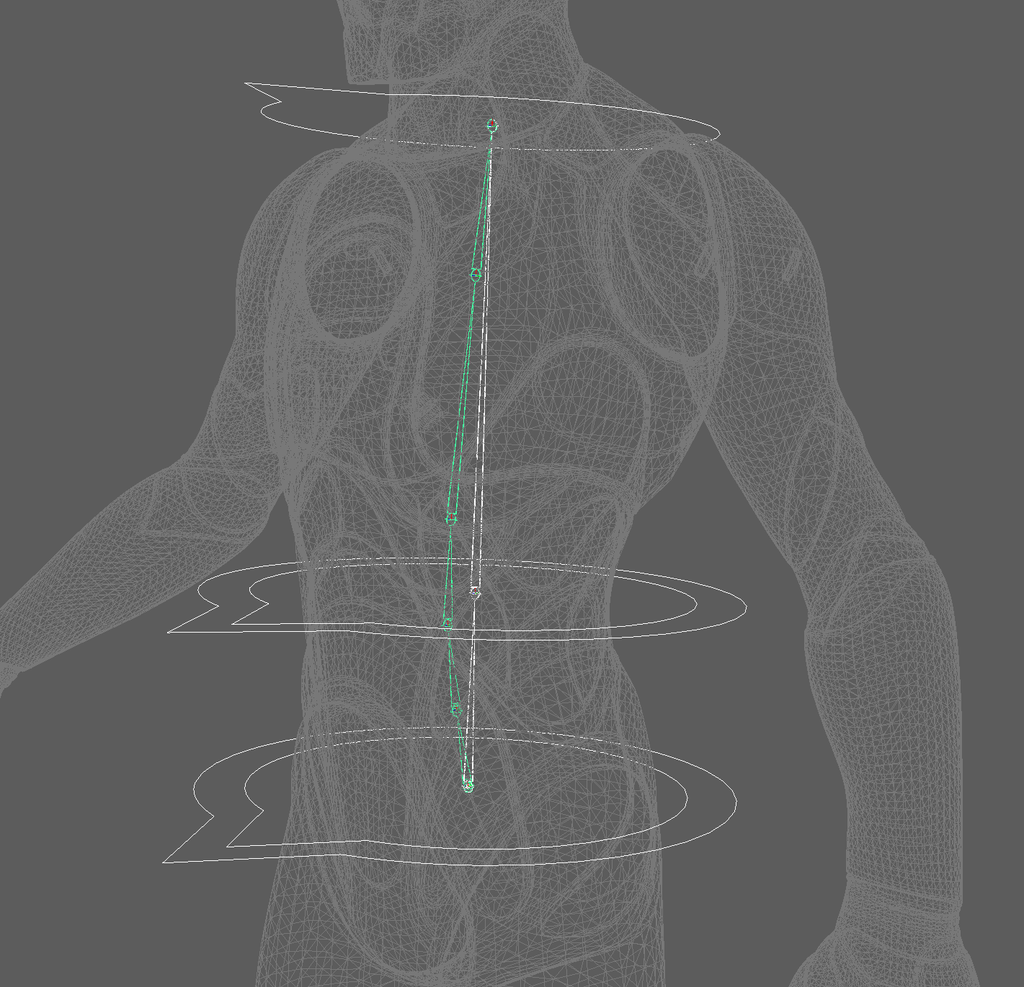
How this Hybrid Spine works
- “mesh1” is bound by skinCluster to the top and bottom controls
- “mesh2” is a duplicate of mesh1 and driven by mesh1 via blendShape
- The middle control drives mesh2 via a cluster deformer with falloff so it only affects a region of mesh2 near the middle control
- The resulting output joints (a duplicate of the input spine joints) are attached to mesh2 via Maya’s uvPin node
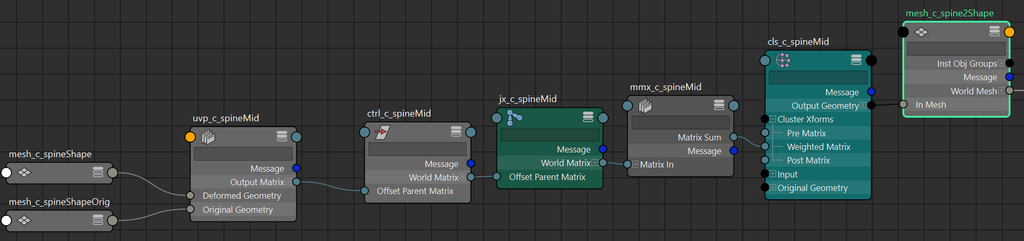
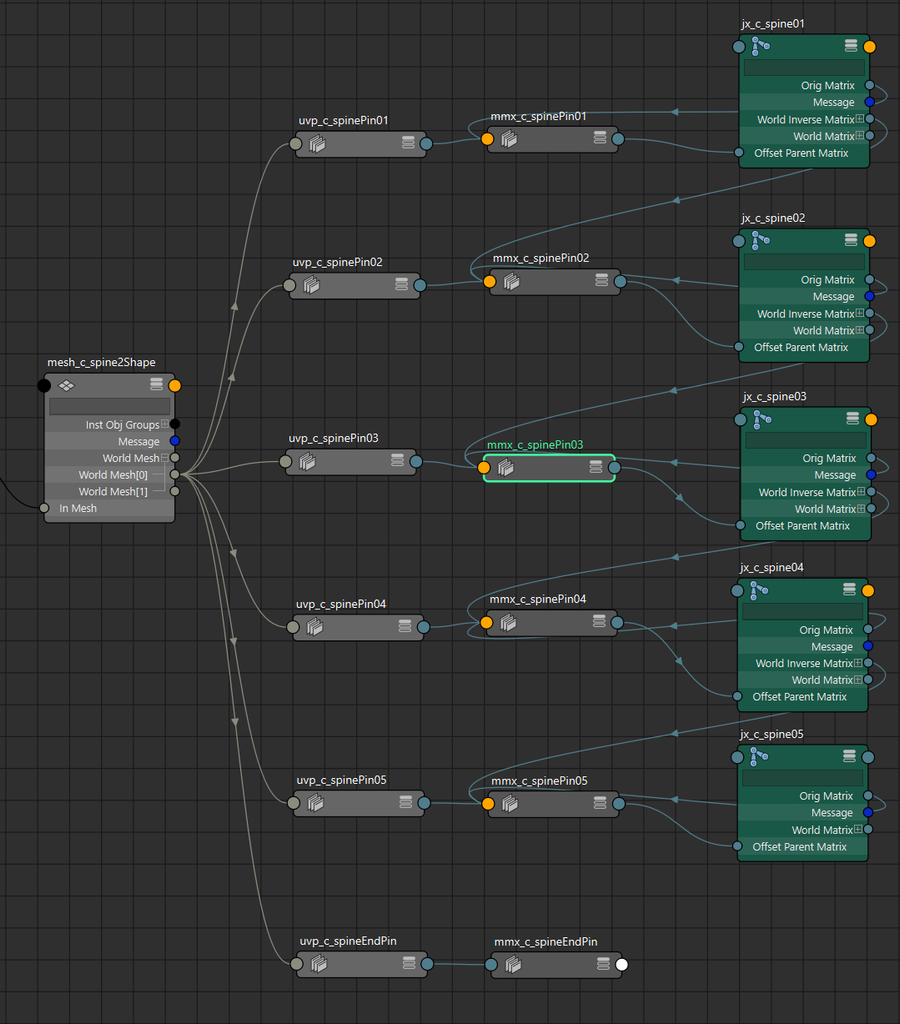
Additionally, the controls work like this:
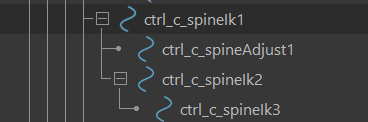
- The larger controls work like FK controls, the large control at the hips is the parent of the large control in the middle. The large middle control isn’t directly manipulating the ribbon geometry, it just acts as a pivot around the middle of the torso.
- The top control is a child of the large middle control. It follows the bottom and middle controls due to hierarchy (FK) but can also be translated (IK) to stretch or tweak the torso shape.
- The smaller bottom control can manipulate the ribbon without affecting the middle or top controls
- The smaller middle control gets its transformation from a uvPin node attached to mesh1, connected to the control’s offsetParentMatrix. The smaller middle control follows the other controls and can manipulate the spine around independently of the other controls
The init() method for Ribbon stores the input arguments and sets up variables for output and for other methods to pass between each other.
class Ribbon(object):
    """create and set up a ribbon component"""
    def __init__(self,
                 name: str,
                 start: str|om2.MObject,
                 end: str|om2.MObject,
                 joints: list[str|om2.MObject],
                 mid: float = 0.5,
                 parent: (str|om2.MObject|None) = None,
                 side: str = 'c',
                 hub: Hub = None,
                 end_proxy: bool = False):
        self.side = side
        self.base_name = name
        self.start = DagNode(start)
        self.end = DagNode(end)
        self.mid = mid
        self.joints = joints
        self.hub = hub
        self.parent = pathname(parent)

        self.num_segs = (len(self.joints)*2) + 1

        self.group = None
        self.mesh1 = None
        self.mesh2 = None
        self.drivers = {}
        self.out_joints = []
        self.out_connect = None
        self.uvpin = None
        self.cluster = None
        self.blendshape = None
        self.control_axes = self.get_control_axes()
        self.end_proxy = end_proxy
This Ribbon class isn’t a component and doesn’t inherit from the ComponentBase abstract class, but it does also happen to have a method named build(). In the Spine component, we created the Ribbon class instance, and then ran build() to do everything else.
    def build(self) -> None:
        # create group
        self.group = cmds.createNode('transform',
                                     name=Name(base=self.base_name,
                                               node_type='grp',
                                               side=self.side))
        cmds.setAttr(f'{self.group}.inheritsTransform', False)
        if self.parent:
            cmds.parent(self.group, pathname(self.parent))

        # create proxy attach joints
        self.create_attach()

        # create start/mid/end controls
        self.create_controls_main()

        # create mesh and dupe
        self.create_mesh()

        # blendshape mesh1 -> mesh2
        self.create_blendshape()

        # create adj control and
        self.create_mid_adjust()

        # pin joints list to mesh2
        self.pin_joints()
This method creates the “output” joints that the deformation skeleton will attach to. out_joints is a duplicate of the original input joints, and out_connect is a Control without a control shape at the end that will be the attachment point for a neck.
    def create_attach(self):
        self.out_joints = Joint.duplicate_chain(self.joints,
                                                self.group,
                                                prefix='jx')
        self.out_connect = Control.create(name=Name(base=self.base_name+'End',
                                                    node_type='grp',
                                                    side=self.side).build(),
                                          transform=world_matrix(self.end.node),
                                          parent=self.group, shape=None)
get_control_axes() is yet another variant of an axis-finding function that I should transplant into the Axis class. It returns a dictionary where the aim is the index of the axis of the start node that aims towards the end node, and normal is the axis that the ribbon plane’s normal should point. The following method get_ribbon_matrix() turns these axes and the start node’s worldMatrix into a matrix for the ribbon.
    def get_control_axes(self) -> dict[str, int]:
        """ aim, normal, cross """
        plane_axis = Axis.get_closest_axis(
                                (om2.MVector(self.end.world_position) -
                                om2.MVector(self.start.world_position)).normal(),
                              self.start.transform).to_int()
        normal_axis = plane_axis + 1 if plane_axis < 2 else 1
        cross_axis = list(set([0,1,2]).difference([plane_axis, normal_axis]))[0]
        return {'aim':plane_axis, 'normal':normal_axis, 'cross':cross_axis}

    def get_ribbon_matrix(self) -> list[float]:
        """build a matrix to orient ribbon mesh and controls"""
        plane_vector = ((om2.MVector(self.end.world_position) -
                        om2.MVector(self.start.world_position)).normal())
        upv_start = self.control_axes['normal'] * 4
        upv_end = (self.control_axes['normal'] * 4) + 3
        up_vector = om2.MVector(
                      list(self.start.transform)[upv_start:upv_end]).normal()
        cross_vector = (plane_vector ^ up_vector).normal()

        # make sure cross vector is consistent with start.z vector
        crsv_start = self.control_axes['cross'] * 4
        crsv_end = (self.control_axes['cross'] * 4) + 3
        if (cross_vector *
          om2.MVector(list(self.start.transform)[crsv_start:crsv_end]) <= 0):
            cross_vector *= -1.0
        up_vector = (plane_vector ^ cross_vector).normal()

        # make sure adjusted up vector is consistent with start.y vector
        nrmv_start = self.control_axes['normal'] * 4
        nrmv_end = (self.control_axes['normal'] * 4) + 3
        if (up_vector *
          om2.MVector(list(self.start.transform)[nrmv_start:nrmv_end]) <= 0):
            up_vector *= -1.0

        plane_matrix = [0]*12 + list(self.start.world_position) + [1]
        aim_start = self.control_axes['aim'] * 4
        aim_end = (self.control_axes['normal'] * 4) + 3
        plane_matrix[aim_start:aim_end] = list(plane_vector)
        plane_matrix[nrmv_start:] = list(up_vector)
        plane_matrix[crsv_start:crsv_end] = list(cross_vector)

        if om2.MMatrix(plane_matrix).det4x4() < 0:
            raise RuntimeError('Something went wrong: Ribbon matrix is negative')

        return plane_matrix
Because we’re going to drive a skinCluster directly with the controls, create_controls_main() does something a little different. Four out of the five ribbon controls are initially built as joints with Joint.create(), which creates them as Maya joint nodes in the scene, and then we can use the Control class to wrap the same nodes to set their control shapes. Yes, they’re joints that have shapes, instead of a standard control which would have been created as a transform node instead of a joint node.
    def create_controls_main(self):
        """create main animation controls for ribbon"""
        start_control_xform = self.get_ribbon_matrix()
        end_control_xform = (start_control_xform[0:12] +
                             list(self.end.world_position) + [1])
        mid_pos = (om2.MVector(self.start.world_position) +
                  ((om2.MVector(self.end.world_position) -
                    om2.MVector(self.start.world_position)) * self.mid))
        mid_control_xform = start_control_xform[0:12] + list(mid_pos) + [1]

        self.drivers['start_ctrl'] = Joint.create(
                                       name=Name(base=self.base_name+'Ik',
                                         node_type='ctrl',
                                         side=self.side,
                                         iterator=1),
                                       transform=start_control_xform,
                                       parent=self.group)
        self.drivers['start_adjust_ctrl'] = Joint.create(
                                       name=Name(base=self.base_name+"Adjust",
                                         node_type='ctrl',
                                         side=self.side,
                                         iterator=1),
                                       transform=start_control_xform,
                                       parent=self.group)
        self.drivers['mid_ctrl'] = Joint.create(name=Name(base=self.base_name+'Ik',
                                         node_type='ctrl',
                                         side=self.side,
                                         iterator=2),
                                       transform=mid_control_xform,
                                       parent=self.group)
        self.drivers['end_ctrl'] = Joint.create(
                                       name=Name(base=self.base_name+'Ik',
                                         node_type='ctrl',
                                         side=self.side,
                                         iterator=3),
                                       transform=end_control_xform,
                                       parent=self.group)

        self.drivers['start_adjust_ctrl'].parent = self.drivers['start_ctrl'].node
        self.drivers['end_ctrl'].parent = self.drivers['mid_ctrl'].node
        self.drivers['mid_ctrl'].parent = self.drivers['start_ctrl'].node

        start_ctrl = Control(self.drivers['start_ctrl'].node,
                             shape=DefaultShape.circle_dir)
        start_adjust_ctrl = Control(self.drivers['start_adjust_ctrl'].node,
                                    shape=DefaultShape.circle_dir)
        mid_ctrl = Control(self.drivers['mid_ctrl'].node,
                           shape=DefaultShape.circle_dir)
        end_ctrl = Control(self.drivers['end_ctrl'].node,
                           shape=DefaultShape.circle_dir)

        ctrl_matrix = om2.MTransformationMatrix().setRotation(
                             om2.MEulerRotation(math.radians(90),
                                                0,
                                                math.radians(90),
                             order=om2.MEulerRotation.kZYX)).asMatrix()
        start_ctrl.set_shape_matrix(start_ctrl.get_shape(),
                                    ctrl_matrix,
                                    local=True)
        mid_ctrl.set_shape_matrix(mid_ctrl.get_shape(), ctrl_matrix, local=True)
        end_ctrl.set_shape_matrix(end_ctrl.get_shape(), ctrl_matrix, local=True)
        start_adjust_ctrl.set_shape_matrix(start_adjust_ctrl.get_shape(),
                                           ctrl_matrix,
                                           local=True)

        start_ctrl.scale_shape([22, 22, 22])
        start_adjust_ctrl.scale_shape([18,18,18])
        mid_ctrl.scale_shape([22, 22, 22])
        end_ctrl.scale_shape([18, 18, 18])

        connect(start_ctrl.node, self.parent, keep_offset=True)

        if self.hub is not None:
            Hub(self.hub).add_node(self.drivers['mid_ctrl'].node,
                                   node_type=HubNodeType.controls)
We use core.connect.connect() so that the spine follows the rig. In the case of my prototype rig, it’s following a pelvis 1-joint chain.
This _remap_curve() method lets us set up the skinCluster so that the mid control’s weighting blends nicely to the start and end controls.
    @staticmethod
    def _remap_curve(value, old_mid=0.5, new_mid=0.5):
        """
        remap a 0-1 value skewed so that there is a new value midpoint
        using 'rational warp'.

        if new_mid==0.9, then 0 to 0.5 will span the first 90% of the 0-1 range,
        and 0.5 to 1.0 will be squeezed into the 0.9 to 1.0 range
        """
        # 'rational warp'
        if value == 0:
            return 0

        k = new_mid / (1-new_mid)
        g = value / (value + ((1-value) * k))
        return g**2 / ((2.0 * (g**2 - g)) + 1.0)
The next method, create_mesh(), does a few things to set up the ribbon geometry.
- Create the ribbon geometry mesh1
- Parent mesh1 to the ribbon group
- Transform mesh1 based on the result of get_ribbon_matrix()
- Duplicate mesh1 to create mesh2
- Skin mesh1 to the main controls
We’ll set up the blendShape for mesh2 in another method.
    def create_mesh(self):
        """create and skin ribbon driver meshes"""
        end_pos = om2.MVector(self.end.world_position)
        start_pos = om2.MVector(self.start.world_position)

        height = (end_pos - start_pos).length()
        self.mesh1 = cmds.polyPlane(name=Name(base=self.base_name,
                                              node_type='mesh',
                                              side=self.side),
                                    height=height,
                                    width=5.0,
                                    subdivisionsWidth=1,
                                    subdivisionsHeight=self.num_segs)[0]
        cmds.parent(self.mesh1, self.group)

        # move vertices so pivot is at edge
        cmds.xform(f'{self.mesh1}.vtx[*]', t=(0, 0, height/2.0), r=1)

        # default plane axis is z
        # if plane axis is x
        if self.control_axes['aim'] == 0:
            cmds.xform(f'{self.mesh1}.vtx[*]', ro=(0, 90, 0), r=1)
        # if plane axis is y
        elif self.control_axes['aim'] == 1:
            cmds.xform(f'{self.mesh1}.vtx[*]', ro=(-90, 0, 0), r=1)

        # align pivot to vector start->end
        cmds.xform(self.mesh1, m=self.get_ribbon_matrix())
        # dup mesh
        self.mesh2 = cmds.duplicate(self.mesh1,
                                    name=Name(base=self.base_name,
                                    node_type='mesh',
                                    side=self.side))[0]
        cmds.parent(self.mesh2, self.group)

        # skin mesh1 to controls
        skin_cluster = cmds.skinCluster(self.mesh1,
                               pathname(self.drivers['start_adjust_ctrl'].node),
                               pathname(self.drivers['end_ctrl']))[0]

        num_segs = int(om2.MFnMesh mobject(get_shape(self.mesh1))).numVertices / 2.0)
        for i in range(num_segs):
            t = float(i / (num_segs - 1))
            skin_curve = self._remap_curve(t, new_mid=(1.0 - self.mid))

            cmds.skinPercent(skin_cluster,
                             [f'{self.mesh1}.vtx[{i*2}]', f'{self.mesh1}.vtx[{(i*2)+1}]'],
                             normalize=True,
                             transformValue=[(pathname(self.drivers['start_adjust_ctrl']),
                               skin_curve),
                               (pathname(self.drivers['end_ctrl']), (1.0 - skin_curve))])
I did some research into creating deformers in the API, but it wasn’t going very well so I fell back to using maya.cmds for blendShapes and clusters.
    def create_blendshape(self):
        """creates blendShape driving mesh2 from mesh1's deformation"""
        self.blendshape = cmds.blendShape(self.mesh1,
                                          self.mesh2,
                                          name=Name(base=self.base_name,
                                            node_type='bshp',
                                            side=self.side))[0]
        cmds.blendShape(self.blendshape, e=1, weight=(0, 1.0))
The “mid adjust” control appears to follow the larger middle control, but it’s actually riding on a uvPin attached to mesh1. Then it deforms mesh2 via a cluster deformer with a falloff calculated using a cosine function towards the end of the method.
    def create_mid_adjust(self):
        """create adjustment controls for middle of ribbon"""
        self.drivers['mid_adjust_ctrl'] = Control.create(
                                 name=Name(base=self.base_name+"Mid",
                                           node_type='ctrl',
                                           side=self.side),
                                 transform=self.drivers['mid_ctrl'].transform,
                                 shape=DefaultShape.circle_dir,
                                 parent=self.group)
        self.drivers['mid_adjust_ctrl'].rotate_angle_axis(90, [1,0,0], local=True)
        self.drivers['mid_adjust_ctrl'].rotate_angle_axis(90, [0,1,0], local=True)

        self.drivers['mid_adjust_ctrl'].scale_shape([18, 18, 18])

        # uvpin
        self.uvpin = cmds.createNode('uvPin',
                                     name=Name(base=self.base_name+'Mid',
                                               node_type='uvp',
                                               side=self.side))
        cmds.setAttr(f'{self.uvpin}.coordinate[0]', 0.5, (1.0 - self.mid))
        cmds.setAttr(f'{self.uvpin}.normalAxis', 1) # y
        cmds.setAttr(f'{self.uvpin}.tangentAxis', 5) # -z
        skin_cluster = get_skin_cluster(self.mesh1)
        orig_mesh1 = cmds.listConnections(f'{skin_cluster}.originalGeometry',
                                          shapes=True)[0]
        deformed_mesh1 = get_shape(self.mesh1)
        cmds.connectAttr(f'{orig_mesh1}.outMesh',
                         f'{self.uvpin}.originalGeometry', force=True)
        cmds.connectAttr(f'{deformed_mesh1}.worldMesh',
                         f'{self.uvpin}.deformedGeometry', force=True)

        # create cluster and driver joint
        self.cluster = cmds.createNode('cluster',
                                       name=Name(base=self.base_name+'Mid',
                                         node_type='cls',
                                         side=self.side))
        driver_joint = cmds.createNode('joint',
                                       name=Name(base=self.base_name+'Mid',
                                                 node_type='jx',
                                                 side=self.side),
                                       parent=self.group)
        cmds.connectAttr(f'{self.drivers['mid_adjust_ctrl']}.worldMatrix',
                         f'{driver_joint}.offsetParentMatrix', force=True)

        # wire cluster to mesh2
        orig_mesh2 = cmds.listConnections(f'{self.blendshape}.originalGeometry',
                                          shapes=True)[0]
        deformed_mesh2 = get_shape(self.mesh2)

        cmds.connectAttr(f'{orig_mesh2}.outMesh',
                         f'{self.cluster}.originalGeometry[0]', force=True)
        cmds.connectAttr(f'{self.blendshape}.outputGeometry[0]',
                         f'{self.cluster}.input[0].inputGeometry', force=True)
        cmds.connectAttr(f'{self.cluster}.outputGeometry[0]',
                         f'{deformed_mesh2}.inMesh', force=True)

        inv = cmds.createNode('inverseMatrix',
                              name=Name(base=self.base_name+'Mid',
                                  node_type='imx',
                                  side=self.side))
        mmx = cmds.createNode('multMatrix',
                              name=Name(base=self.base_name+'Mid',
                                  node_type='mmx',
                                  side=self.side))

        # connect joint to control
        cmds.connectAttr(f'{self.uvpin}.outputMatrix[0]',
               f'{pathname(self.drivers['mid_adjust_ctrl'].node)}.offsetParentMatrix',
               force=True)
        cmds.setAttr(
             f'{pathname(self.drivers['mid_adjust_ctrl'].node)}.inheritsTransform',
             False)
        cmds.connectAttr(f'{self.uvpin}.outputMatrix[0]',
                         f'{inv}.inputMatrix', force=True)
        cmds.connectAttr(f'{driver_joint}.worldMatrix', f'{mmx}.matrixIn[0]', force=True)
        cmds.connectAttr(f'{inv}.outputMatrix', f'{mmx}.matrixIn[1]', force=True)
        cmds.connectAttr(f'{mmx}.matrixSum',
                         f'{self.cluster}.clusterXforms.weightedMatrix', force=True)

        # weight cluster
        seg_count = int(om2.MFnMesh(mobject(deformed_mesh2)).numVertices / 2.0)
        cls_weights = []
        for i in range(seg_count):
            t = float(i / (seg_count - 1))

            # remap val!
            if t <= (1.0 - self.mid):
                d = (1.0 - self.mid) / 0.5
                val = -(math.cos((math.pi / d) * t * 2.0) - 1) / 2.0
            else:
                val = ((math.cos((math.pi * t * (1.0/self.mid) -
                      ((1.0-self.mid)/self.mid) * math.pi)) + 1 ) / 2.0)

            cls_weights += [val,val]

        cmds.setAttr(f'{self.cluster}.weightList[0].weights[0:{(seg_count*2)-1}]',
                     *cls_weights)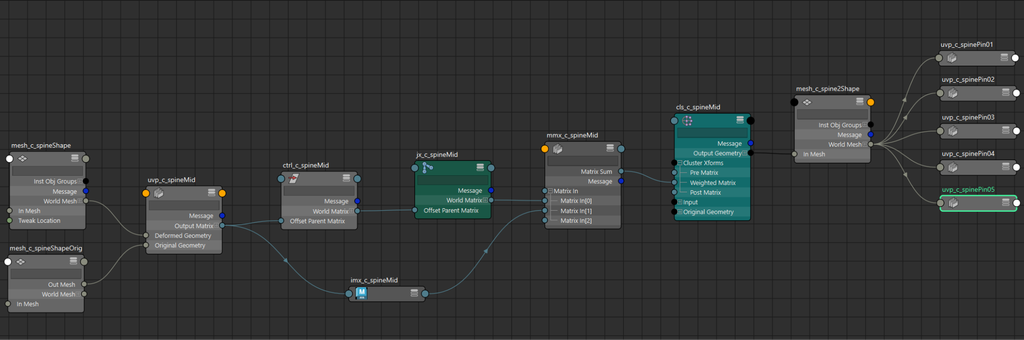
The pin_joints() method loops through the out_joints list we created earlier by duplicating the input joints and pins them to mesh2 with the CATS.core.connect.pin function.
    def pin_joints(self):
        """attach joints to ribbon surface with uvPin nodes"""
        out_joint_obj = [pathname(o.node) for o in self.out_joints]
        if self.end_proxy:
            out_joint_obj = out_joint_obj[:-1]
            out_joint_obj.append(pathname(self.out_connect.node))

        for joint in out_joint_obj:
            pin(joint, self.mesh2)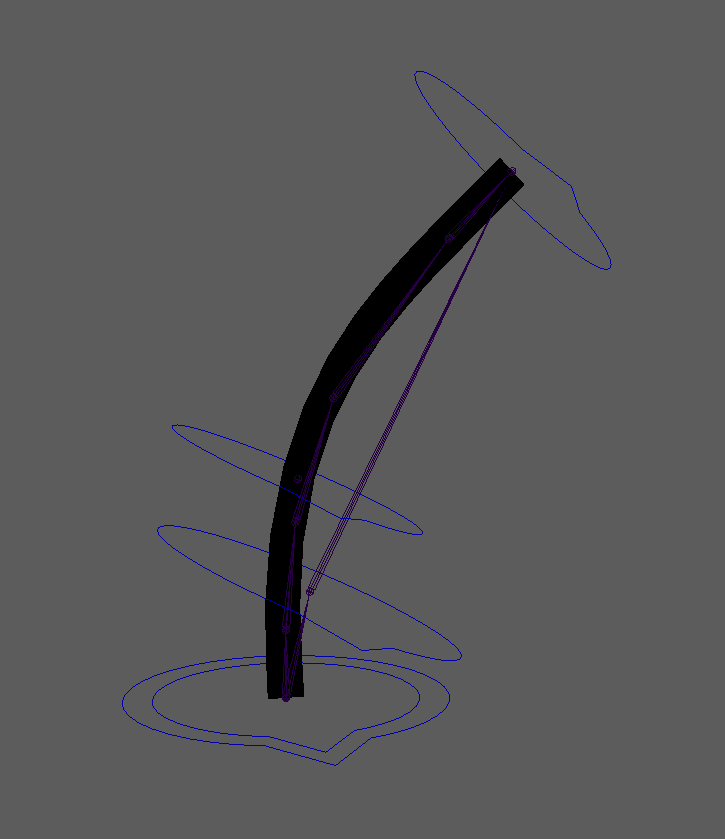
Head
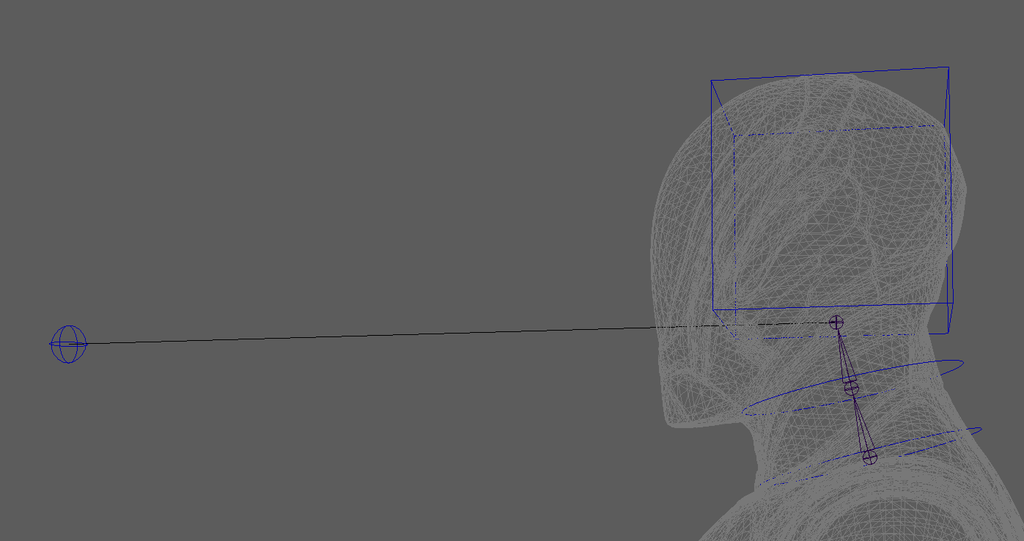
The Head component has an integrated aim system built in. Like the Limb component, there’s an FK system and an “IK” aim system, and we’re using the ik_blend() function from CATS.core.connect to join them via a blend attribute.
As part of the aim system, the component uses the aimMatrix node to do the aim and the quatSlerp node to blend from neutral pose to the rotation evaluated by the aimMatrix.
Something I discovered about the aimMatrix node is how it uses the primary and secondary Target Vectors for entirely different things. The Input Axis is always which axis of the calculated matrix should be used, so if you want the X axis of your aimed matrix to point at a target, the primaryInputAxis would be set to [1, 0, 0].
But the target axis behaves differently depending on the mode. If the primary mode is set to Align, and primaryTargetVector is set to [0,1,0], if will use the target matrix’s Y axis for the alignment operation. So you can align one axis of the output matrix to a different axis on the target matrix. This is useful.
However, if you set the mode to Aim, then your Input Axis is just pointing at a matrix’s position in space. In this situation, for some reason, the Target Axis becomes an offset translation of the Target Matrix. In Aim Mode, with a Target Vector of [5, 0, 0], the result matrix will be aiming at a point 5 units to the right of the Target Matrix.
The Head component builds the neck as well. This way each of the neck joints plus the head divide the aim rotation among themselves. How many neck joints should a humanoid rig have? The skeleton I’m using for prototyping has two neck joints, so the aim is split three ways: neck01, neck02, and head. The Head component has input parameters for neck start and neck end, so it should automatically adapt for as many neck segments as the guide skeleton has.
One thing that the head is missing is a Face. A face rig can be pretty complex, and I haven’t designed how a face would work yet for this rigging framework. It would definitely be its own component though, and not part of the Head component. Even if and when we have a face component in the future, there are many situations where we wouldn’t want to build it in every rig.
The Head component defines a module-level constant for the attribute name for the blend between aim and FK head mode.
AIM_ATTR: str = "aim"The Head component registers a few unique parameters in the init method.
class Head(ComponentBase):
    def __init__(self):
        super().__init__()
        self.register_parameter("neck_start", type_=str)
        self.register_parameter("neck_end", type_=str)
        self.register_parameter("head", type_=str)
        self.register_parameter("head_aim_distance", type_=float)
        self.register_parameter("basename", type_=str)
        self.register_parameter("parent", type_=str)
        self.register_parameter("side",
                                type_=str,
                                items=["c", "l", "r"],
                                default='c')
        self.register_parameter("axis", type_=str,
                                items=["x", "y", "z"],
                                default='x')
        self.register_parameter("scale", type_=CVector, default=[1,1,1])
        self.register_parameter("hub", type_=str)

        self.register_output('head_control', type_=str)
        self.register_output('neck_controls', type_=str)
        self.register_output('head_aim_control', type_=str)

    @property
    def _component_name(self) -> str:
        """Return User-facing name of the component"""
        return "Head"

    @property
    def _component_description(self) -> str:
        """Return User-facing information of the component"""
        return "Create Head and Neck controls"
The _build() method is straightforward, building the FK Head, the Aim/IK Head, creating the blend setup, and then assigning the output parameters.
    def _build(self, *args) -> None:
        """run component"""
        neck_start = self.get_value('neck_start')
        neck_end = self.get_value('neck_end')
        head = self.get_value('head')
        head_aim_distance = self.get_value('head_aim_distance')

        basename = self.get_value('basename')
        side = self.get_value('side')
        axis = self.get_value('axis')
        hub = self.get_value('hub')
        parent = self.get_value('parent')

        # fk head
        fk_output = self.head_fk(neck_start,
                                 neck_end,
                                 head,
                                 basename,
                                 parent=parent,
                                 axis=axis,
                                 side=side,
                                 hub=hub)
        # build head_aim
        aim_output = self.head_aim(neck_start,
                                   neck_end,
                                   head,
                                   head_aim_distance,
                                   basename,
                                   parent=parent,
                                   axis=axis,
                                   side=side,
                                   hub=hub)
        # add blendspaces for aim
        self.head_blend(fk_output, aim_output)

        self.set_output('head_control', fk_output['head_control'])
        self.set_output('neck_controls', fk_output['neck_controls'])
        self.set_output('head_aim_control', aim_output['head_aim_control'])
The Head component could have been subclassed from the Chain component like our Limb component is. There’s a possibility we may have duplicated some work here.
    def head_fk(self,
                neck_start: str,
                neck_end: str,
                head: str,
                basename: str,
                parent: str = None,
                axis: str = 'x',
                side: str = 'c',
                hub: str = None) -> dict[str, Any]:
        chain = get_chain(neck_start, neck_end)
        neck_controls: list[Control] = []

        for index, joint in enumerate(chain):
            control_name = Name(joint).change(node_type='ctrl').build()
            neck_controls.append(Control.from_joint(joint=joint,
                                                    name=control_name,
                                                    parent=parent,
                                                    hub=self.get_value('hub'),
                                                    shape=DefaultShape.circle,
                                                    attach=True))

            # orient and scale default control shape
            target = chain[index + 1] if index < len(chain) - 1 else head
            neck_controls[-1].orient_shape(target)
            if target:
                neck_controls[-1].stretch_shape(target)
            neck_controls[-1].scale_shape(self.get_value('scale').value)
            # next control's parent will be current control
            parent = neck_controls[-1].node

        # build head
        head_control = Control.from_joint(joint=head,
                           name=Name(head).change(node_type='ctrl').build(),
                           parent=neck_controls[-1].node,
                           hub=self.get_value('hub'),
                           shape=DefaultShape.box,
                           attach=True)
        head_control.scale_shape(self.get_value('scale').value)
        head_control.scale_shape([2,2,2])
        ctrl_matrix = om2.MTransformationMatrix().setRotation(
                             om2.MEulerRotation(0, 0, math.radians(-90),
                             order=om2.MEulerRotation.kZYX)).asMatrix()
        head_control.set_shape_matrix(head_control.get_shape(),
                                      ctrl_matrix,
                                      local=True)

        return {'neck_controls': neck_controls, 'head_control': head_control}
The head aim setup was fun and much more complex than I expected.
It does a few things:
- Create a group node to contain any controls it builds
- Calculate the position for the aim control
- Create the aim-at control, and a visual line between the head joint and the aim control
- Create a “reverse” aimMatrix for the up vector later use, aiming from the aim-at control toward the root of the neck. This is for creating a baseline up vector so that when the body moves around, the up vector for the aims for each joint in the neck and head continue to follow the body below them.
- Duplicate the input joints to create an “IK” joint chain for the aim system
- Then we loop through and create an aim setup for each joint in the ik chain.
    def head_aim(self,
                 neck_start: str,
                 neck_end: str,
                 head: str,
                 head_aim_distance: float,
                 basename: str,
                 parent: str = None,
                 axis: str = 'x',
                 side: str = 'c',
                 hub: str = None) -> dict[str, Any]:
        chain = get_chain(neck_start, head)
        _hub = Hub(hub) if hub else None

        # build parent group for head aim
        aim_group = cmds.createNode('transform',
                                    name=Name(base=basename+"Aim",
                                              node_type='grp',
                                              side=side).build())
        cmds.setAttr(f'{aim_group}.inheritsTransform', False)
        if hub:
            cmds.parent(aim_group, hub)

        # calculate position for aim control
        head_matrix = world_matrix(mobject(head))
        aim_axis = Axis.get_closest_axis(om2.MVector([0,0,1]),
                                         head_matrix).to_int()
        aim_vector = get_matrix_vector(matrix=head_matrix, row=aim_axis)
        if (aim_vector * om2.MVector(0,0,1)) < 0:
            aim_vector *= -1
        aim_pos = (om2.MVector(list(head_matrix)[12:15]) +
                   (aim_vector * head_aim_distance))
        aim_transform = (om2.MMatrix([1,0,0,0, 0,1,0,0, 0,0,1,0] +
                         list(aim_pos) + [1]))

        # build control and visual line
        aim_control = Control.create(name=Name(base=basename+"Aim",
                                               node_type='ctrl',
                                               side=side).build(),
                                     parent=aim_group,
                                     hub=_hub,
                                     transform=aim_transform,
                                     shape=DefaultShape.sphere)
        aim_control.scale_shape([3,3,3])
        create_line(head,
                    pathname(aim_control.node),
                    suffix='_link',
                    parent=aim_group,
                    allow_dupes=False)
        cmds.addAttr(f'{pathname(aim_control.node)}',
                     longName=AIM_ATTR,
                     attributeType='float',
                     minValue=0.0,
                     maxValue=1.0,
                     defaultValue=1.0,
                     keyable=True)

        # create reverse up aim
        aim_name = Name(aim_control.node)
        aim_up = cmds.createNode("aimMatrix",
                                 name=aim_name.change(base=aim_name.base+"Up",
                                                      node_type='aim').build())
        aim_up_axis = Axis.get_closest_axis(om2.MVector([1, 0, 0]),
                                            world_matrix(mobject(parent)))
        cmds.connectAttr(f'{pathname(aim_control.node)}.worldMatrix',
                         f'{aim_up}.inputMatrix')
        cmds.connectAttr(f'{pathname(parent)}.worldMatrix',
                         f'{aim_up}.primary.primaryTargetMatrix')
        cmds.connectAttr(f'{pathname(parent)}.worldMatrix',
                         f'{aim_up}.secondary.secondaryTargetMatrix')
        cmds.setAttr(f'{aim_up}.primary.primaryInputAxis', 1, 0, 0)
        cmds.setAttr(f'{aim_up}.primary.primaryTargetVector', 1, 0, 0)
        cmds.setAttr(f'{aim_up}.secondary.secondaryMode', 2) # align
        cmds.setAttr(f'{aim_up}.secondary.secondaryInputAxis',
                     *aim_up_axis.to_list())
        cmds.setAttr(f'{aim_up}.secondary.secondaryTargetVector',
                     *aim_up_axis.to_list())

        # create aim joint chain
        aim_chain = Joint.duplicate_chain(chain,
                                          parent,
                                          prefix='jx',
                                          suffix='HeadAim')
        aim_offsets = [self._get_aim_offset(aim_node, aim_control.node)
                       for aim_node in aim_chain]

        for index, aim_node in enumerate(aim_chain):
            value = 1.0 / (len(aim_chain) - index)
            driver = self._aim_node(aim_node.node,
                                    aim_control.node,
                                    aim_up,
                                    aim_offsets[index],
                                    value=value)
            cmds.connectAttr(f'{pathname(aim_control.node)}.{AIM_ATTR}',
                             driver, force=True)

        return {'head_aim_control': pathname(aim_control.node),
                'aim_joints': aim_chain}
_get_aim_offset() calculates a matrix which is the difference between a node‘s current orientation and an orientation that points the closest axis toward a target. We’ll use that matrix as an offset so that when we plug the aimMatrix into nodes that we want to be part of the aim system, we can add in this offset to keep the node’s current orientation and it doesn’t immediately point an axis toward the target.
    def _get_aim_offset(self,
                        node: (str | om2.MObject),
                        target: (str | om2.MObject)) -> om2.MMatrix:
        offset_matrix = world_matrix(mobject(node))
        offset_list = list(offset_matrix)

        # aim vector toward target (-y toward +z)
        offset_aim = ((world_position(mobject(target)) -
                       world_position(mobject(node))).normal())
        offset_aim_axis = Axis.get_closest_axis(offset_aim, offset_matrix).to_int()
        orig_aim_axis = get_matrix_vector(offset_matrix, offset_aim_axis)
        if (offset_aim * orig_aim_axis) < 0:
            offset_aim *= -1

        # up vector (+z toward -x)
        offset_up_axis = Axis.get_closest_axis(om2.MVector(-1,0,0),
                                               offset_matrix).to_int()
        offup_start = (offset_up_axis * 4)
        offup_end = ((offset_up_axis * 4) + 3)
        offset_up = om2.MVector(offset_list[offup_start:offup_end])

        # cross (+x toward +y)
        offset_cross = (offset_aim ^
                        om2.MVector(offset_list[offup_start:offup_end])).normal()
        offset_up_check = (offset_aim ^ offset_cross).normal()
        offset_up = (offset_up_check if ((offset_up_check * offset_up) > 0.9)
                                     else (offset_up_check * -1))
        offset_cross_axis = set([0,1,2]).difference(
                                         {offset_aim_axis,offset_up_axis}).pop()
        offcrs_start = (offset_cross_axis * 4)
        offcrs_end = ((offset_cross_axis * 4) + 3)
        if offset_cross * om2.MVector(offset_list[offcrs_start:offcrs_end]) < 0:
            offset_cross *= -1

        # offset_matrix is world space of node aimed toward target
        offset_list[(offset_aim_axis*4):((offset_aim_axis*4)+3)] = list(offset_aim)
        offset_list[(offset_up_axis*4):((offset_up_axis*4)+3)] = list(offset_up)
        offset_list[(offset_cross_axis*4):((offset_cross_axis*4)+3)] = list(offset_cross)
        offset_matrix = om2.MMatrix(offset_list).homogenize()

        # local_offset_matrix is offset_matrix in node's local space
        local_offset_matrix = (offset_matrix * world_matrix(mobject(node)).inverse())
        return local_offset_matrix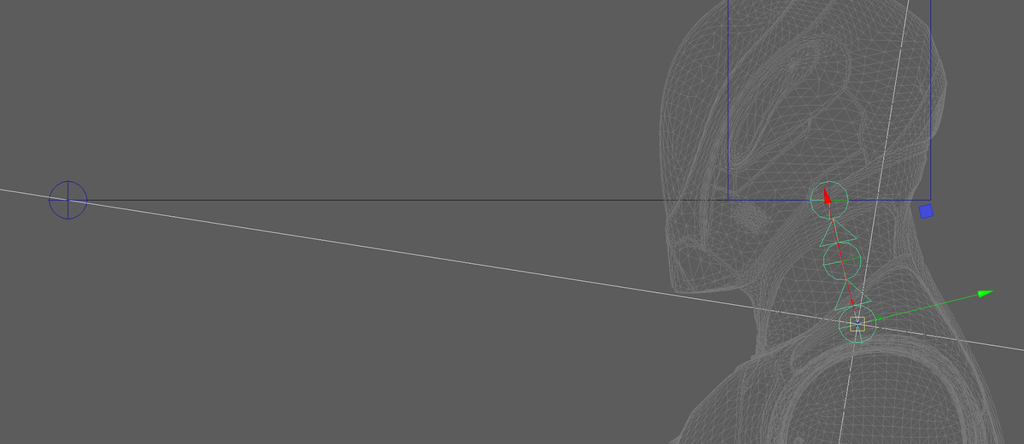
The _aim_node() method does a lot of the work to set up the aim system per joint.
   def _aim_node(self,
                 node: (str | om2.MObject),
                 target: (str | om2.MObject),
                 up: str,
                 aim_offset: om2.MMatrix,
                 value: float = 1.0) -> str:
        node_name = Name(node)
        node_parent = get_parent(node)
        # add ORIG_MATRIX_ATTR to target
        freeze(node)

        mmx_ws = cmds.createNode('multMatrix',
                                 name=node_name.change(base=node_name.base+"AimWS",
                                                       node_type='mmx').build())
        node_aim = cmds.createNode('aimMatrix',
                                   name=node_name.change(base=node_name.base+"Aim",
                                                       node_type='aim').build())

        mmx_local = cmds.createNode('multMatrix',
                                    name=node_name.change(base=node_name.base+"AimLocal",
                                                          node_type='mmx').build())
        dcm_aim = cmds.createNode('decomposeMatrix',
                                  name=node_name.change(base=node_name.base+"Aim",
                                                        node_type='dcm').build())
        dcm_no_aim = cmds.createNode('decomposeMatrix',
                                     name=node_name.change(base=node_name.base+"NoAim",
                                                           node_type='dcm').build())
        quat_slerp = cmds.createNode('quatSlerp',
                                     name=node_name.change(base=node_name.base+"Aim",
                                                           node_type='qsl').build())
        comp_mx = cmds.createNode('composeMatrix',
                                  name=node_name.change(base=node_name.base+"Aim",
                                                        node_type='cmp').build())
        pick_trans = cmds.createNode('pickMatrix',
                                 name=node_name.change(base=node_name.base+"AimTr",
                                                       node_type='pmx').build())
        hold_offset = cmds.createNode('holdMatrix',
                                 name=node_name.change(base=node_name.base+"AimOffset",
                                                       node_type='hold').build())
        mmx_add_trans = cmds.createNode('multMatrix',
                                 name=node_name.change(base=node_name.base+"AimTr",
                                                       node_type='mmx').build())
        mmx_value_mult = cmds.createNode('multiplyDivide',
                                 name=node_name.change(base=node_name.base+"AimValMult",
                                                       node_type='md').build())

        # get main aim axis from node
        aim_axis = Axis.get_closest_axis(om2.MVector([0, 0, 1]),
                                         world_matrix(mobject(node)))

        # get up axis from node
        node_up_axis = Axis.get_closest_axis(om2.MVector([1, 0, 0]),
                                             world_matrix(mobject(node)))

        # initial slerp at 1.0
        cmds.setAttr(f'{quat_slerp}.inputT', 1.0)

       # setup value mult - neck joints receive less influence from aim than head
        cmds.setAttr(f'{mmx_value_mult}.input2X', value)

        # set pick_trans to translation only
        cmds.setAttr(f"{pick_trans}.useScale", False)
        cmds.setAttr(f"{pick_trans}.useRotate", False)
        cmds.setAttr(f"{pick_trans}.useShear", False)

        # extract quaternion from ORIG_MATRIX_ATTR
        cmds.connectAttr(f'{pathname(node)}.{ORIG_MATRIX_ATTR}',
                         f'{dcm_no_aim}.inputMatrix')
        cmds.connectAttr(f'{dcm_no_aim}.outputQuat', f'{quat_slerp}.input1Quat')

        # set aimMatrix's input to be ORIG_MATRIX_ATTR in parent's current world space
        cmds.connectAttr(f'{pathname(node)}.{ORIG_MATRIX_ATTR}',
                         f'{mmx_ws}.matrixIn[0]', force=True)
        cmds.connectAttr(f'{pathname(node_parent)}.worldMatrix',
                         f'{mmx_ws}.matrixIn[1]', force=True)

        # set up main aimMatrix node
        cmds.connectAttr(f'{mmx_ws}.matrixSum', f'{node_aim}.inputMatrix')
        cmds.connectAttr(f'{pathname(node_parent)}.worldMatrix',
                         f'{node_aim}.preSpaceMatrix')
        cmds.connectAttr(f'{pathname(node_parent)}.worldInverseMatrix',
                         f'{node_aim}.postSpaceMatrix')
        cmds.connectAttr(f'{pathname(target)}.worldMatrix',
                         f'{node_aim}.primary.primaryTargetMatrix')
        cmds.connectAttr(f'{pathname(up)}.outputMatrix',
                         f'{node_aim}.secondary.secondaryTargetMatrix')
        cmds.setAttr(f'{node_aim}.primary.primaryInputAxis', *aim_axis.to_list())
        cmds.setAttr(f'{node_aim}.primary.primaryTargetVector', 0, 0, 0)
        cmds.setAttr(f'{node_aim}.secondary.secondaryInputAxis', *node_up_axis.to_list())
        cmds.setAttr(f'{node_aim}.secondary.secondaryTargetVector',
                     *node_up_axis.to_list())
        cmds.setAttr(f"{node_aim}.secondaryMode", 2) # align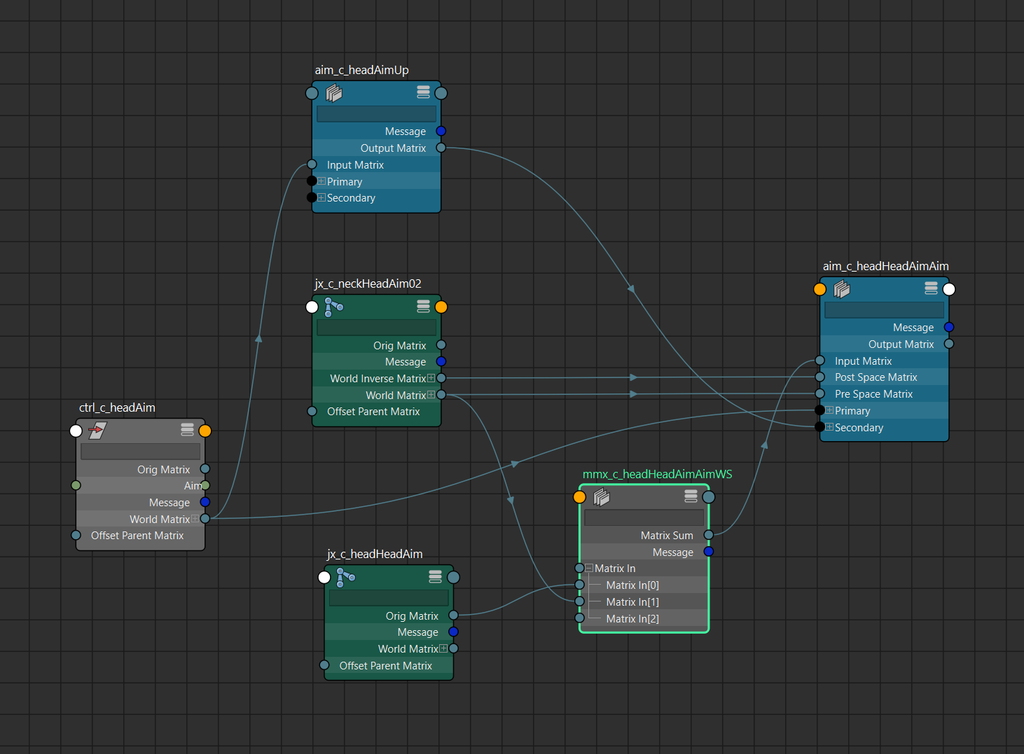
        # plug in previously-calculated aim offset
        cmds.setAttr(f'{hold_offset}.inMatrix',
                     list(aim_offset.inverse()),
                     type='matrix')

        # multiply aim offset, aimMatrix output,
        # parent world inverse to get node's local aim matrix with offset
        cmds.connectAttr(f'{hold_offset}.outMatrix',
                         f'{mmx_local}.matrixIn[0]',
                         force=True)
        cmds.connectAttr(f'{node_aim}.outputMatrix',
                         f'{mmx_local}.matrixIn[1]',
                         force=True)
        cmds.connectAttr(f'{pathname(node_parent)}.worldInverseMatrix',
                         f'{mmx_local}.matrixIn[2]', force=True)

        # decompose local aim matrix to quaternion,
        # blend with "noAim" decomposeMatrix quaternion
        cmds.connectAttr(f'{mmx_local}.matrixSum', f'{dcm_aim}.inputMatrix')
        cmds.connectAttr(f'{dcm_aim}.outputQuat', f'{quat_slerp}.input2Quat')

        cmds.connectAttr(f'{quat_slerp}.outputQuat', f'{comp_mx}.inputQuat')
        cmds.setAttr(f'{comp_mx}.useEulerRotation', 0) # composeMatrix quat mode

        # add translation back into matrix
        cmds.connectAttr(f'{comp_mx}.outputMatrix', f'{mmx_add_trans}.matrixIn[0]')
        cmds.connectAttr(f'{pathname(node)}.{ORIG_MATRIX_ATTR}',
                         f'{pick_trans}.inputMatrix')
        cmds.connectAttr(f'{pick_trans}.outputMatrix',
                         f'{mmx_add_trans}.matrixIn[1]')
        cmds.connectAttr(f'{mmx_add_trans}.matrixSum',
                         f'{pathname(node)}.offsetParentMatrix', force=True)

        # plug driver attribute into quatSlerp blend value
        cmds.connectAttr(f'{mmx_value_mult}.outputX', f"{quat_slerp}.inputT")

        # return f"{quat_slerp}.inputT"
        return f'{mmx_value_mult}.input1X'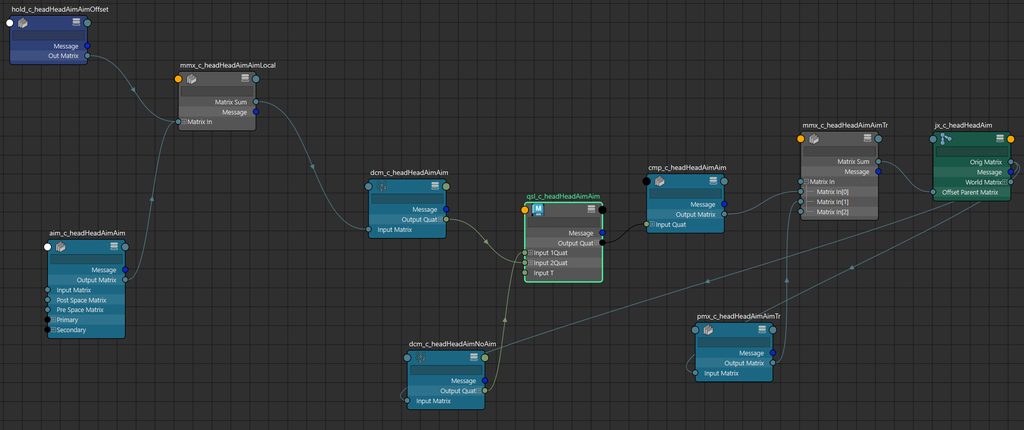
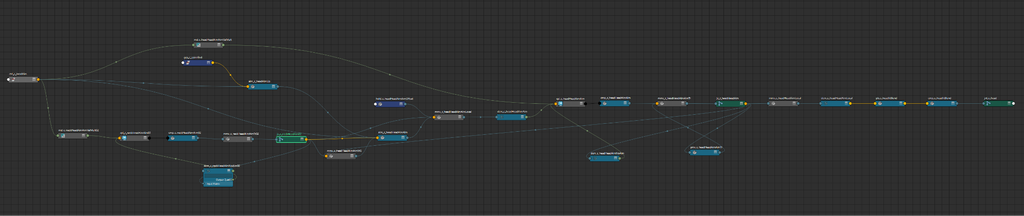
head_blend() takes the output from the head_fk() method and the head_aim() method and uses the ik_blend() function from CATS.core.connect to set up the blending. The blend attribute gets added to the aim-at control.
I’m duplicating the neck and head input joints because I want a clean separation of rigging nodes and bound skeleton nodes. This way, we can create a function that can easily detach the mesh and its bound joints from the rig if we need to. blend_objs are the targets that receive the blend output of the aim and FK systems, and input_joints are the source we want to follow.
   def head_blend(self,
                  fk_output: dict[str, Any],
                  aim_output: dict[str, Any]) -> dict[int, str]:
        """blend FK head/neck and aim head/neck chains"""
        fk_objs = fk_output['neck_controls']
        fk_objs += [fk_output['head_control']]
        ik_objs = aim_output['aim_joints']

        # create duplicate neck/head to receive blend output,
        # connect to source joints
        input_joints = get_chain(self.get_value('neck_start'),
                                 self.get_value('head'))
        blend_objs = Joint.duplicate_chain(input_joints,
                                           parent=self.aim_group,
                                           prefix='jx', suffix="Blend")
        for src, target in zip(input_joints, blend_objs):
            connect(src, target)

        blend_attr = f'{aim_output['head_aim_control']}.{AIM_ATTR}'
        blend = ik_blend(fk_objs, ik_objs, blend_objs, blend_attr)

        return blend
Summary
Probably the most important lesson for this chapter is to make sure that as the control systems become more complex, they always have an extremely simple fallback scheme. Both the Spine and the Head have integrated FK control systems that can blend to the ribbon or aim systems respectively. Future plans exist to build accompanying tools to snap and bake between the two control systems.
In the next chapter, we’ll take a look at the Foot and Hand components.