Root
Rig Root Control and Root Offset controls
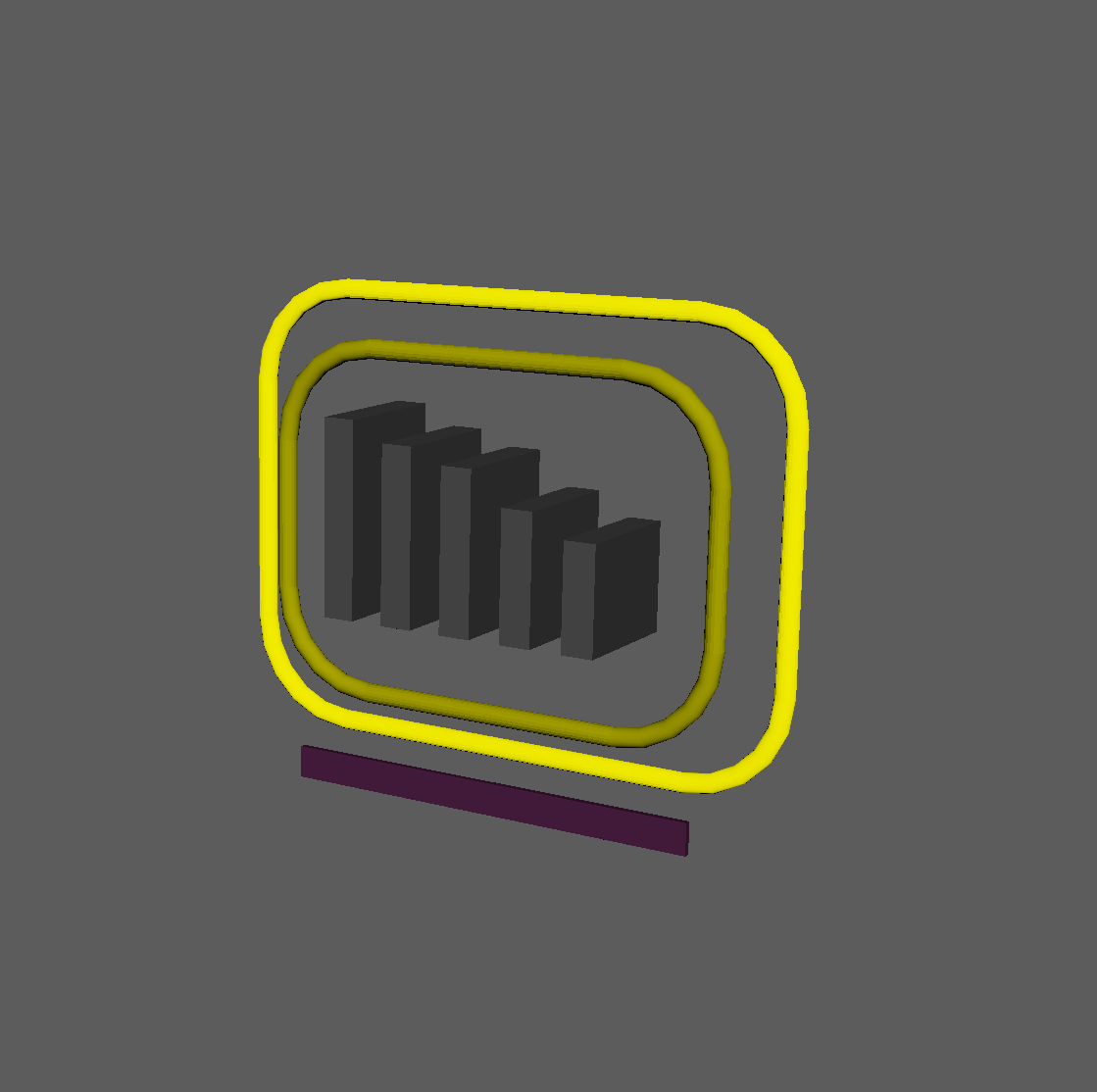
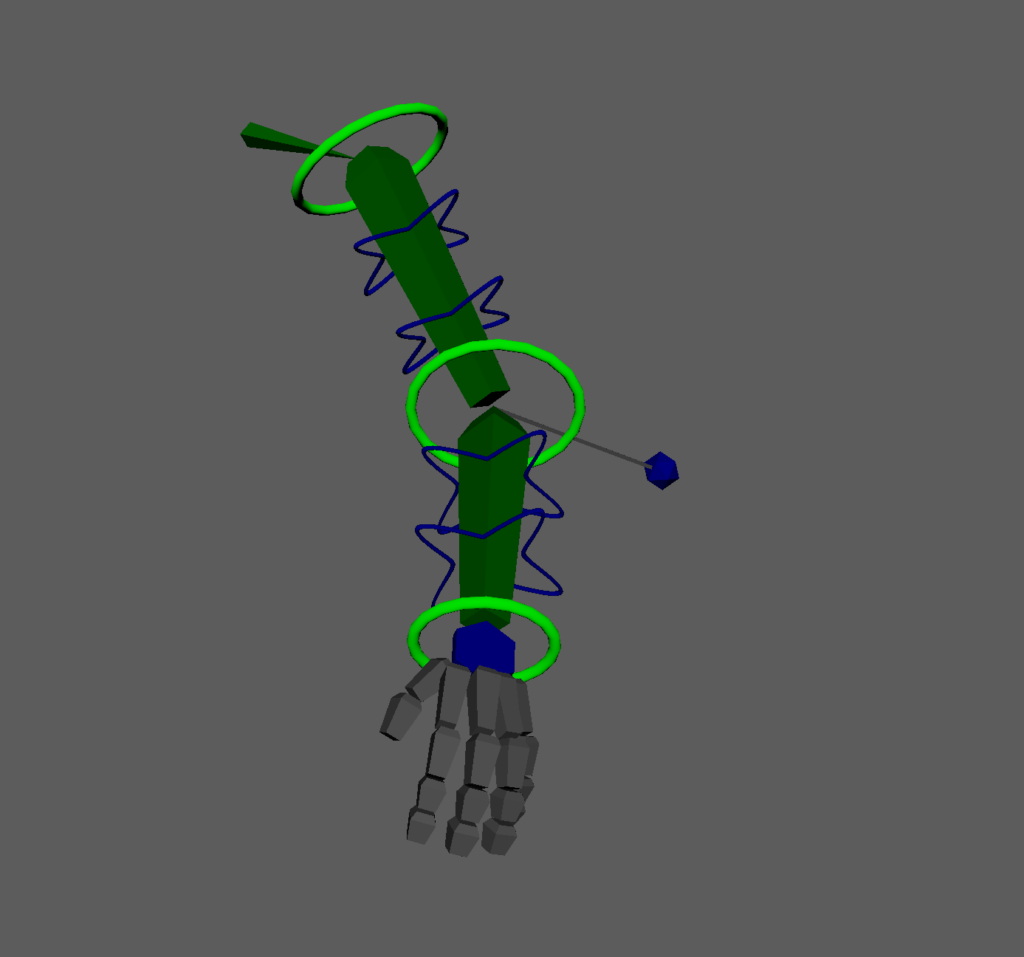
The first rig control we build is the Root. It’s more than just the circle around the character’s feet, it moves and rotates the whole character.
This root control includes an “offset” control. There are a few ways to set up an offset like this, depending on the needs of the rigs and what the animators want to get out of it. In this default setup, there is only one offset root control.
Some other rigs I’ve seen have more elaborate root systems:
- Offsets allow for additional animation to be layered on top of the root. Some rigs add 3 or 4 additional offset controls to get complex hierarchical movement.
- Some offsets allow for moving the location without affecting the translation of the children, allowing the animators to rotate the whole character from arbitrary pivots
- Some offsets only affect the root joint without actually translating the deforming skeletal joints. For some pipelines, the engine might require something like this.
- We can layer additional kinds of controls such as these in the Root component depending on the needs of the project.
- Some of the fancier behaviors can also be achieved with creative use of control spaces.
import traceback

from CATS.core.name import Name
from CATS.core.node import mobject, world_matrix
from CATS.core.connect import connect
from CATS.classes.control import Control
from CATS.classes.hub import Hub, HubNodeType
from CATS.classes.shape import DefaultShape
from CATS.core.parameter_types import CVector, CMatrix

from ..base import ComponentBase


class Root(ComponentBase):
    def __init__(self):
        super().__init__()
        self.register_parameter("joint",
                                type_=str,
                                default="jnt_c_root")
        self.register_parameter("transform",
                                type_=CMatrix,
                                default=[1,0,0,0,0,1,0,0,0,0,1,0,0,0,0,1])
        self.register_parameter("hub", type_=str)

        self.register_output("control", type_=Control)
        self.register_output("offset_control", type_=Control)

    @property
    def _component_name(self) -> str:
        """Return User-facing name of the component"""
        return "Root"

    @property
    def _component_description(self) -> str:
        """Return User-facing information of the component"""
        return "Creates Rig Root and offset controls"

    def _build(self, *args) -> None:
        """run component"""
        joint = mobject(self.get_value('joint'))
        name = Name(joint)
        hub = Hub.get_by_name(self.get_value('hub'))

        root_control = Control.create(name=name.change(node_type='ctrl'),
                                      transform=self.get_value('transform').value,
                                      shape=DefaultShape.circle_dir,
                                      hub=hub,
                                      parent=self.get_value('hub'))
        root_control.scale_shape([50,50,50])

        offset_control = Control.create(name=name.change(base=name.base+"Offset",
                                      node_type='ctrl'),
                                      transform=self.get_value('transform').value,
                                      shape=DefaultShape.circle_dir,
                                      hub=hub,
                                      parent=root_control.node)
        offset_control.scale_shape([40,40,40])

        connect(joint, offset_control.node, keep_offset=True)

        self.set_output('control', root_control)
        self.set_output('offset_control', offset_control)
The “CMatrix” and “CVector” parameter types (for the transform parameter on the Root component) are wrappers around fixed-length lists (16 or 3 elements respectively), primarily for UI purposes. It tells the UI that I want to open a specialized “Matrix Editor” or “Vector Editor” when editing a these values.
The base class here is basically just the CVector type, and the CMatrix type modifies it by inheritance. Structurally, however, it makes sense that they inherit from the same base class.
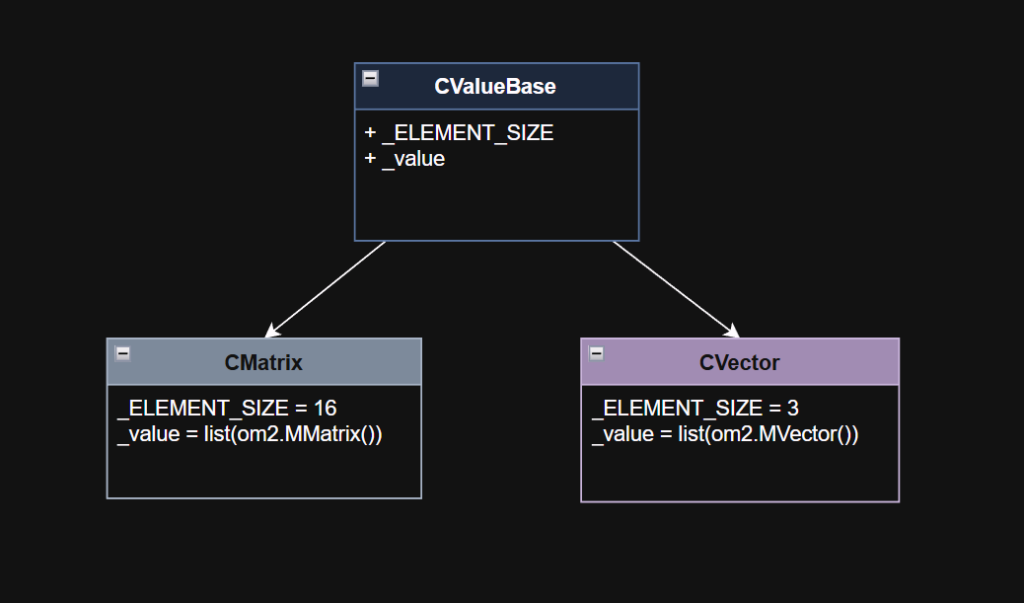
These classes live in the CATS.core.parameter_types module.
""" Matrix and Vector types for lists so that the properties view displays correct editors """
import typing

class CValueBase(typing.Iterable):
    _ELEMENT_SIZE = 3
    _DEFAULT_VALUE = [0,0,0]

    def __init__(self, value=None):
        self._value = value or self._DEFAULT_VALUE
        if len(self._value) != self._ELEMENT_SIZE:
            raise ValueError(
              f"{self.__class__.__name__} must have {self._ELEMENT_SIZE} elements")

    def __repr__(self):
        return f'{self.__class__.__name__}({self._value})'

    def __iter__(self):
        for element in self._value:
            yield element

    @property
    def x(self):
        return self._value[0]
    @x.setter
    def x(self, value):
        self._value[0] = value
    @property
    def y(self):
        return self._value[1]
    @y.setter
    def y(self, value):
        self._value[1] = value
    @property
    def z(self):
        return self._value[2]
    @z.setter
    def z(self, value):
        self._value[2] = value

    def __getitem__(self, index):
        if isinstance(index, int) and (index < len(self._value)):
            return self._value[index]
        raise IndexError

    def __setitem__(self, index, value):
        if isinstance(index, int) and (index < self._ELEMENT_SIZE):
            self._value[index] = value

    def __str__(self):
        return str(self._value)

    def __len__(self):
        return len(self._value)

    @property
    def value(self):
        return self._value


class CVector(CValueBase):
    _ELEMENT_SIZE = 3
    _DEFAULT_VALUE = [0,0,0]

    def __init__(self, value=None):
        super().__init__(value)
For the CMatrix, the x,y,z properties can be used to get or set the rows of the matrix, and the translation property to get/set the translation row.
class CMatrix(CValueBase):
    _ELEMENT_SIZE = 16
    _DEFAULT_VALUE = [1,0,0,0, 0,1,0,0, 0,0,1,0, 0,0,0,1]

    @property
    def x(self):
        return self._value[0:3]
    @x.setter
    def x(self, value):
        if len(value) == 3:
            self._value[0:3] = value
        else:
            raise RuntimeError(f"can't set row X to value {value}")

    @property
    def y(self):
        return self._value[4:7]
    @y.setter
    def y(self, value):
        if len(value) == 3:
            self._value[4:7] = value
        else:
            raise RuntimeError(f"can't set row Y to value {value}")

    @property
    def z(self):
        return self._value[8:11]
    @z.setter
    def z(self, value):
        if len(value) == 3:
            self._value[8:11] = value
        else:
            raise RuntimeError(f"can't set row Z to value {value}")

    @property
    def translation(self):
        return self._value[12:15]
    @translation.setter
    def translation(self, value):
        if len(value) == 3:
            self._value[12:15] = value
        else:
            raise RuntimeError(f"can't set translation to value {value}")
Chain
Variable-size FK Chain (can be 1 control)
The basic building block of a rig is an FK control, to which you can attach a joint. Then you can take it a step further and create a component that can be built to drive a number of joints in a simple linear hierarchy.
At one studio, I first created a “finger” control that could be 2 or 3 controls to support any finger on a hand. Then I expanded it to be more flexible, and support any number of controls based on the number of joints passed to the function that built the “finger”. As other needs came up like a tail or hair, we used the “finger” control to build those appendages. At a different studio, a similar FK chain component that originated as a finger became used for the Spine, Neck, Head, Pelvis, and anything else that the animators felt more comfortable animating in FK rather than wanting to experiment with more advanced control systems.
This Chain component can also be a single control, and it’s being used in the current rig setup for the pelvis and each clavicle.
class Chain(ComponentBase):
    def __init__(self):
        super().__init__()
        self.register_parameter("start", type_=str)
        self.register_parameter("end", type_=str)
        self.register_parameter("parent", type_=str)
        self.register_parameter("side",
                                type_=str,
                                items=["c", "l", "r"],
                                default='c')
        self.register_parameter("axis",
                                type_=str,
                                items=["x", "y", "z"],
                                default='x')
        self.register_parameter("tip", type_=bool, default=True)
        self.register_parameter("scale", type_=CVector, default=[1,1,1])
        self.register_parameter("hub", type_=str)

        self.register_output("controls", type_=list)

    @property
    def _component_name(self) -> str:
        """Return User-facing name of the component"""
        return "FK Chain"

    @property
    def _component_description(self) -> str:
        """Return User-facing information of the component"""
        return "Create an FK control chain from a list of joints"

    def _build(self, *args, **kwargs) -> None:
        """run component"""
        # get chain joints
        chain = get_chain(self.get_value('start'), self.get_value('end'))

        # build controls
        parent = self.get_value('parent')
        controls = []
        for index, joint in enumerate(chain):
            # if the tip parameter is False, don't build control for last digit
            if (index == len(chain) - 1) and not self.get_value('tip'):
                break

            attach = kwargs.get('attach', False)
            basename = Name(joint).change(name=kwargs.get('basename', None),
              node_type='ctrl').build() if 'basename' in kwargs.keys() else None

            controls.append(Control.from_joint(joint=joint,
                            name=basename,
                            parent=parent,
                            hub=self.get_value('hub'),
                            shape=DefaultShape.box,
                            attach=attach))

            # orient and scale default control shape
            target = chain[index + 1] if index < len(chain) - 1 else None
            if target:
                controls[-1].orient_shape(target)
                controls[-1].stretch_shape(target)
                controls[-1].scale_shape(self.get_value('scale').value)
            elif len(chain) > 1:
                vector = (om2.MVector(controls[-1].world_position) -
                          om2.MVector(controls[-2].world_position)).normal()
                project_axis = Axis.get_closest_index(vector,
                                                      controls[-1].transform)
                project_vector = get_matrix_vector(controls[-1].transform,
                                                   row=project_axis)
                if project_vector * vector < 0:
                    project_vector *= -1

                matrix = om2.MMatrix(list(controls[-1].transform)[0:12] +
                                     list(om2.MVector(controls[-1].world_position)
                                     + project_vector) + [1])
                controls[-1].orient_shape_matrix(matrix)

            # next control's parent will be current control
            parent = controls[-1].node

            # if a blend attribute is provided,
            # add a default control space driven by the attribute
            if self.get_value('blend'):
                add_blend_space(controls[-1],
                                self.get_value('blend'),
                                default_value=1.0,
                                explicit=True)

        self.set_output('controls', controls)
As a fairly simple component, all of its business is completed within the build() method. It gets a linear chain of joints from the start and end parameters by using the core.node.get_chain() utility function. Then it just loops through the chain and creates the controls.
The Control.from_joint() method takes care of a lot of the overhead of:
- Building the control aligned to a joint
- Parenting the control under the previous control in the chain
- Attaching the joint to the control
The Control.stretch_shape() method will scale the control’s curve shape to extend to the next control in the chain.
The Chain class is also used as the FK part of an IK/FK chain, as described in the next section.
Limb
The Limb component is a subclass of the Chain component. All of the parameters registered in the Chain component are inherited by Limb.
class Limb(Chain):
    def __init__(self):
        super().__init__()
        self.register_parameter("soft_ik_start", type_=float, default=0.95)
        self.register_parameter("soft_ik_end", type_=float, default=1.05)

        self.register_output('ik_root_ctrl', type_=Control)
        self.register_output('ik_ctrl', type_=Control)
        self.register_output('pv_ctrl', type_=Control)
        self.register_output('ik_attr', type_=str)
The only new parameters it adds are for setting the “Soft IK” start and end limits.
A standard IK chain without a Soft IK feature will be translating a linear value (the change in Y translation on the IK handle as it moves down and the IK chain becomes straighter) into a sine-like curve for the rotation of the joints in the chain.
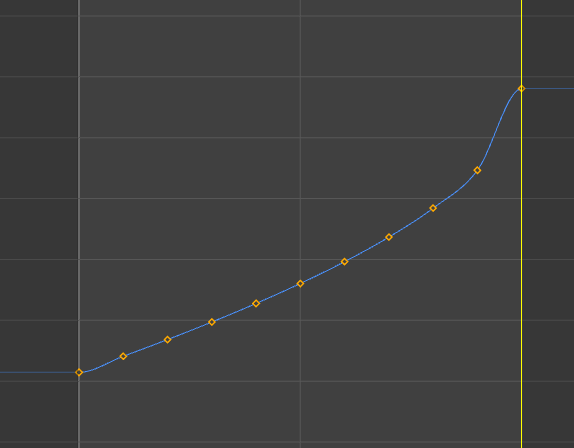
Here’s a baked animation of an IK knee’s rotation channel if the IK handle pulls the IK chain from a 90 degree bend into a straight line. Notice the large jump in value right before the knee locks out. What this translates to visually is a rapid acceleration in the rotation angle of the knee just before it locks out, which appears like a “pop”.
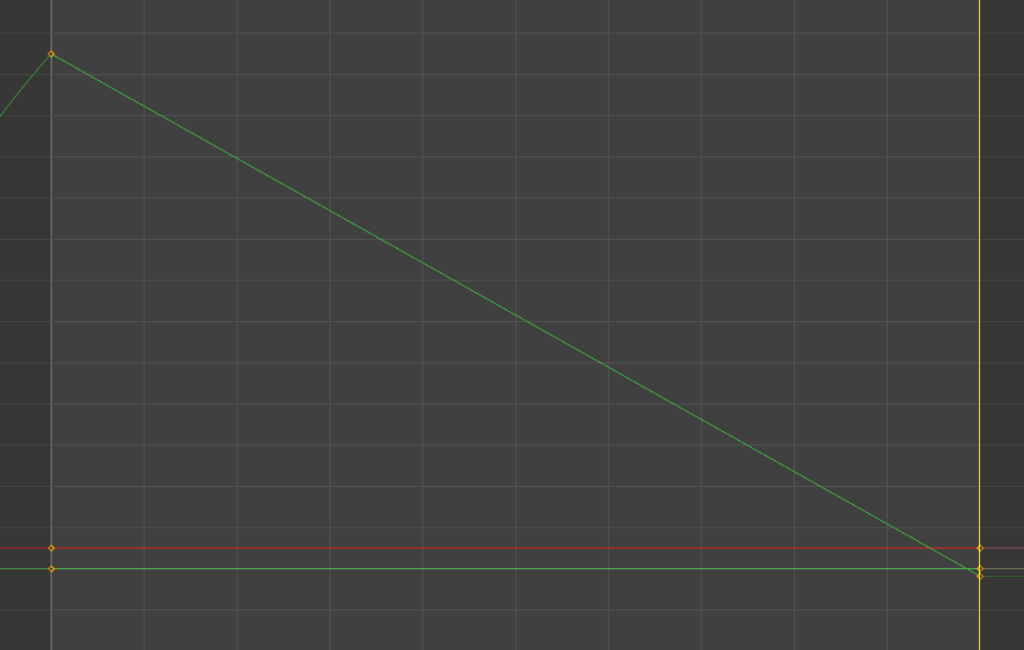
Here’s what a partial sine wave looks like in Desmos. Notice the similarity with the knee rotation above.
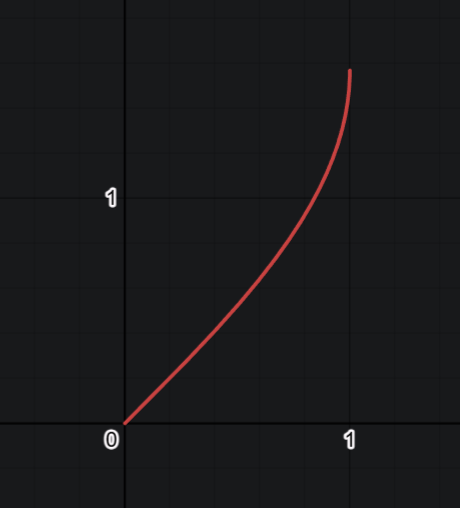
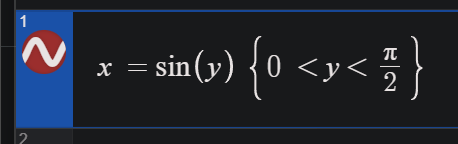
Desmos: x\ =\sin\left(y\right)\ \left\{0\ <y<\frac{\pi}{2}\right\}
link: PartialSine
The Soft IK in this Limb component works in a way that lags the IK chain’s End Effector behind the IK Control, and as the IK control’s distance moves away from the IK root joint (the hip/shoulder), it blends the end effector back towards the IK Control’s position.
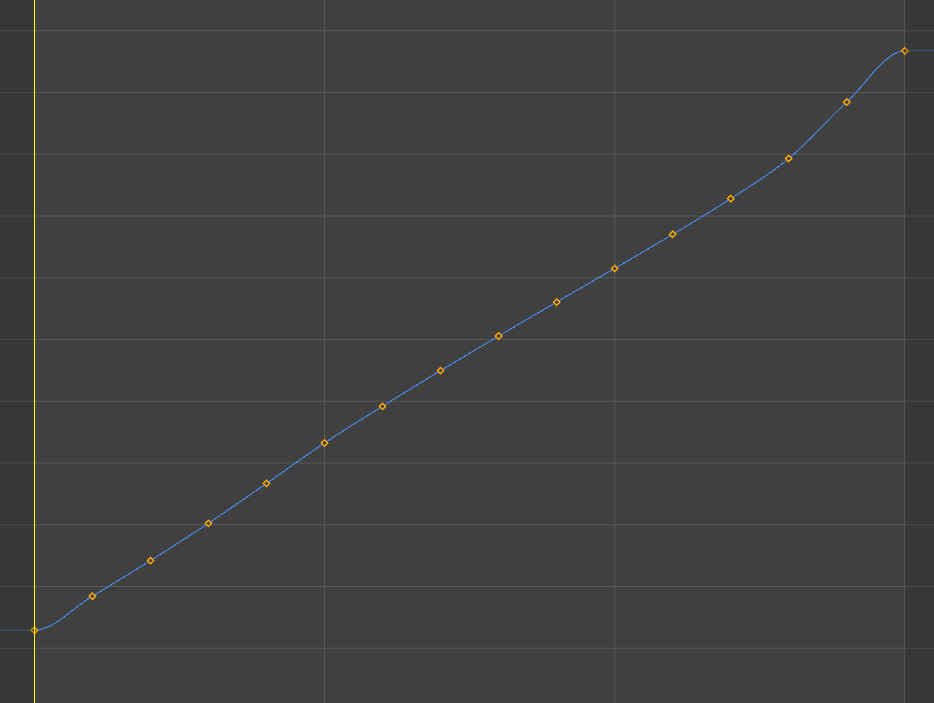
Here’s what the same knee looks like with Soft IK turned on. It more closely matches the linear value of the IK Control’s translation, and because of that the knee won’t suddenly “pop” just as the leg reaches a straight pose.
The Soft IK I built into this limb has adjustable start and end values that indicate the percentage of the full length of the IK chain. So if the IK Control is exactly the same distance from the hip as the length of the thigh and calf combined, the value is 1.0. Most of the time you might want to set a start value of 0.9 and an end value of 1.10, but this also means that the knee would retain some bend in it when the control is that full distance from the hip. Another consideration is the default bend angle of the knee in bind pose, if it’s already nearly straight, then you would want to have settings that favor a value below 1.0, like 0.85 start to 1.05 end perhaps.
Because they’re keyable attributes on the IK Control, the animator can adjust these Start and End values to get the results that look best for individual animations, or even key them with different values at different times within a single sequence.
Moving on, the Limb re-implements the abstract methods for _component_name and _component_description, though because it inherits from Chain, it’s actually overwriting Chain‘s concrete implementations of those methods.
    @property
    def _component_name(self) -> str:
        """Return User-facing name of the component"""
        return "Limb"

    @property
    def _component_description(self) -> str:
        """Return User-facing information of the component"""
        return "Creates an FK/IK humanoid arm or leg with softIK and stretch"
The build() override is pretty short, because the IK part is in another method within the Limb class.
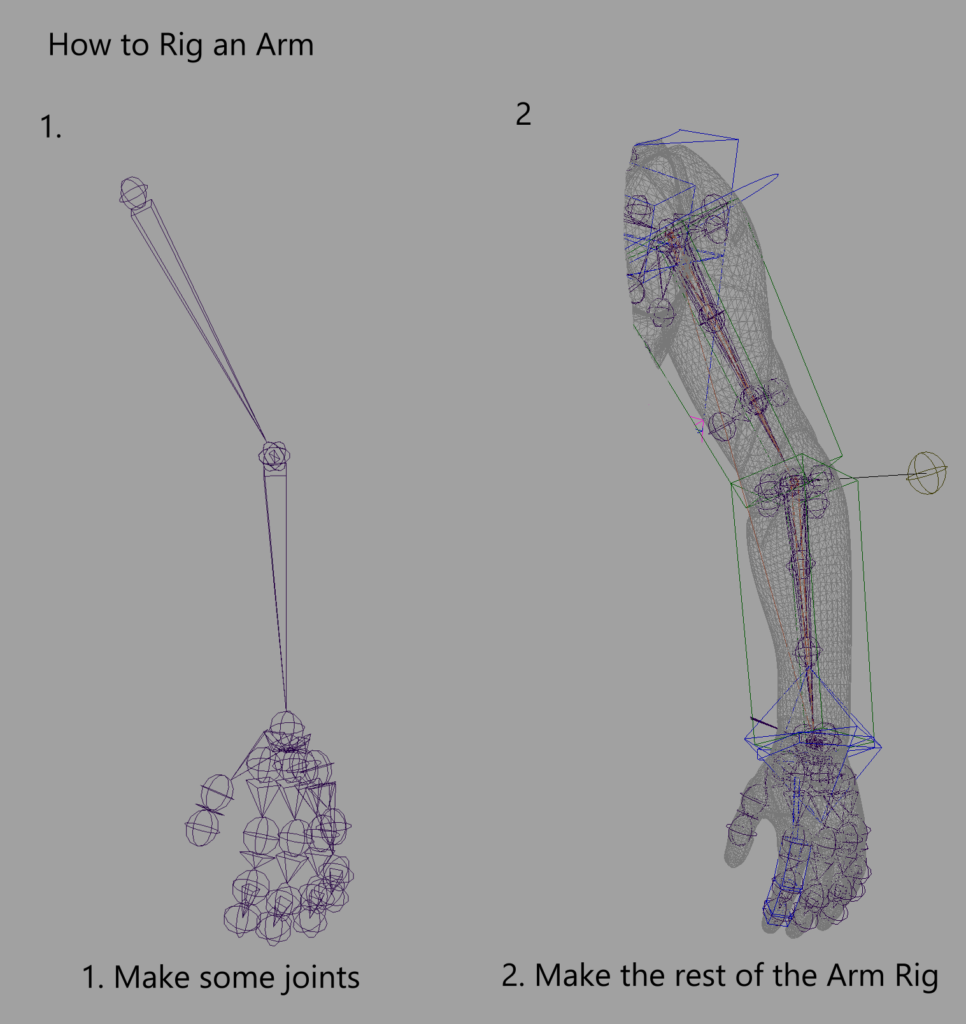
The super() call runs the build() method in all of the ancestor classes (like Chain) according to Python’s MRO (Method Resolution Order). In this situation, that builds the FK chain element of this compound component.
Once the FK controls are built, they’re immediately stored in the output parameter controls just like they are in the Chain component. We loop through the FK Controls and adjust the control shapes’ widths by a default value (so they aren’t skinny sticks).
Then we use core.node.get_chain() like we did in the Chain component to get the linear joint hierarchy between start and end. We didn’t have to register the start and end parameters in Limb because they were already registered in the parent Chain class, and therefore are also exposed as input parameters for Limb.
The current Limb component only builds for 3-joint chains, for example a standard humanoid arm or leg. In the future, this component can be expanded to support 4-joint “creature” legs.
The output of the ik2() method (2-segment IK / 3-joint IK), includes a chain that’s already built with the blending of soft IK, stretch, and IK/FK blending built-in. The final loop in the build() method calls the core.connect.connect() function to attach that output chain to the chain between the start and end joints, which would be bound to the mesh.
  def _build(self, *args, **kwargs) -> None:
        """run component"""
        soft_ik_start = self.get_value("soft_ik_start")
        soft_ik_end = self.get_value("soft_ik_end")

        # fk controls
        super()._build(*args, **kwargs, attach=False)

        for c in self.get_output('controls'):
            c.scale_shape([1,8,8])

        # get joint list
        chain = get_chain(self.get_value('start'), self.get_value('end'))

        # standard hip-knee-ankle / shoulder-elbow-wrist limb
        if len(chain) == 3:
            base_name = Name(chain[0]).base
            blend_nodes = self.ik2(chain=chain,
                                   base_name=base_name,
                                   soft_ik_start=soft_ik_start,
                                   soft_ik_end=soft_ik_end)
            for index, node in enumerate(blend_nodes):
                connect(chain[index], node)
Let’s look at the ik2() method, which is probably longer than it should be, but does most of the node creation and connections involved in the Limb. When developing alternative Limb configurations, like a 3-segment Limb, it would make sense to break this method into several more focused, smaller methods.
If you’re looking at this and wondering if I just wrote all of this Python code out of thin air, that’s not how it works. I built most of this manually in Maya’s UI mostly through the Node Editor and Connection Editor. Once I had something that worked, I deconstructed it into code. I translated the node graph into createNode and connectAttr calls and debugged it until it worked identically to the original hand-crafted version.
   def ik2(self,
           chain: list[om2.MObject],
           base_name: str,
           soft_ik_start: float = 0.95,
           soft_ik_end: float = 1.05) -> list[om2.MObject]:
We’re going to define the node names of the controls we’ll build later.
       # ik controls
        shldr_name = Name(chain[0])
        wrist_name = Name(chain[-1])
        grp_name = Name(base=base_name,
                        side=wrist_name.side,
                        node_type='grp',
                        iterator=None)
        ik_wrist_name = Name(chain[2]).change(node_type="ctrl",
                                       base=(wrist_name.base + "IK"), iterator=1)
        pv_name = Name(chain[1]).change(node_type="ctrl",
                                       base=(base_name + "_pv"), iterator=1)
First, let’s create an empty group for all of the controls and joints that will be created.
        # container null
        grp = cmds.createNode('transform',
                              name=grp_name,
                              parent=self.get_value('hub'))
        align(grp, chain[0])
The “IK Root” is a control at the other end of the chain from the end effector, so we can adjust the shoulder or hip translation if necessary. It might not get frequent use, but animators will be happy it’s there when they need it.
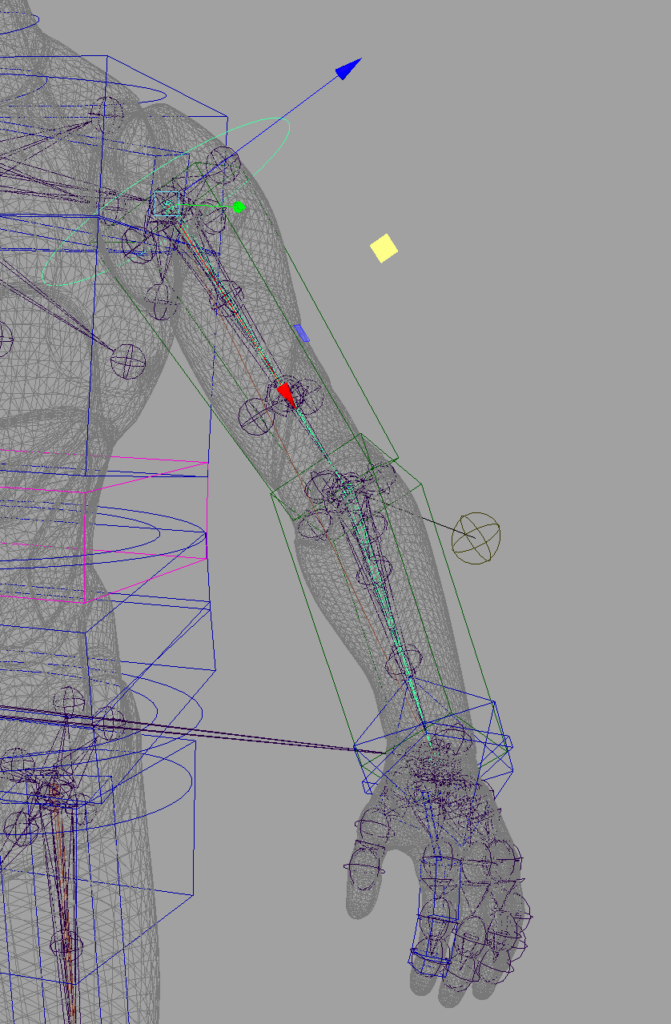
        # ik root control
        ik_ctrl_root = Control.create(
                         name=shldr_name.change(base=shldr_name.base+'Root'),
                         hub=Hub(self.get_value('hub')),
                         transform=world_matrix(chain[0]),
                         parent=grp,
                         shape=DefaultShape.circle)
        ik_ctrl_root.orient_shape(chain[1])
        ik_ctrl_root.scale_shape([12, 12, 12])
        connect(ik_ctrl_root.node, self.get_value('parent'), keep_offset=True)
The next control we build will be the IK Control, which will drive the ik handle for the system.
        # ik wrist control
        ik_ctrl_wrist = Control.create(name=ik_wrist_name,
                                       hub=Hub(self.get_value('hub')),
                                       transform=world_matrix(chain[2]),
                                       parent=grp,
                                       shape=DefaultShape.diamond)
        ik_ctrl_wrist.scale_shape([15, 15, 15])
Now that we have that IK Control node built in Maya, let’s add an attribute on it to drive the blend from FK to IK. Then we’ll set the ik_attr output parameter with the full name of the blend attribute.
        # ik blend attr
        IK_ATTR = 'ik'
        cmds.addAttr(pathname(ik_ctrl_wrist.node),
                     ln=IK_ATTR,
                     attributeType='double',
                     defaultValue=0.0,
                     minValue=0.0,
                     maxValue=1.0,
                     keyable=True)
        self.set_output('ik_attr', f'{pathname(ik_ctrl_wrist.node)}.{IK_ATTR}')
Most rigs use pole vector controls to calculate the rotation plane for the IK solver. To me, it has always seemed like a clumsy way of doing it, but it’s standard and all animators know how to use it to good effect. Here we get the position for a pole vector control from the core.node.pole_vector_position() function and then figure out rotations for the control so that it’s initially aligned with the plane.
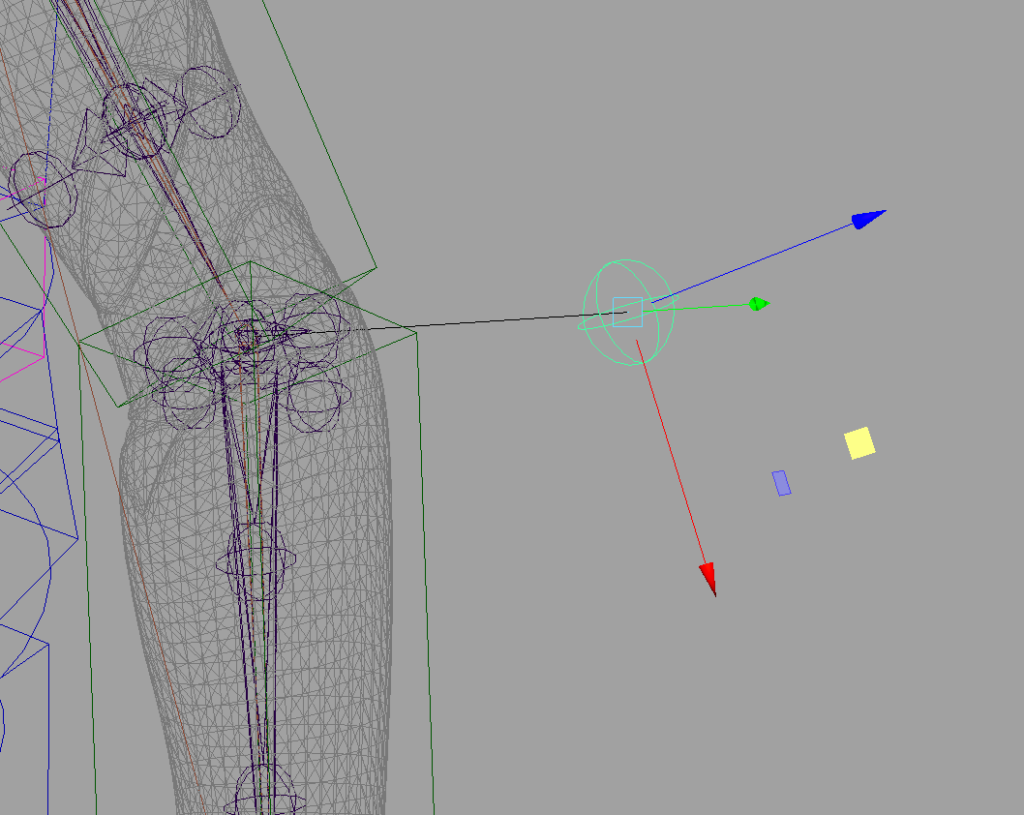
        # create PV matrix
        pv_pos = pole_vector_position(chain)
        pv_x = (world_position(chain[2]) - world_position(chain[0])).normal()
        pv_y = (pv_pos - world_position(chain[1])).normal()
        pv_z = pv_x ^ pv_y # cross product
        pv_x = pv_y ^ pv_z
        # build a matrix from vector rows
        pv_transform = om2.MMatrix(list(pv_x) + [0] +
                                   list(pv_y) + [0] +
                                   list(pv_z) + [0] +
                                   list(pv_pos) + [1])

        # pv control
        pv_control = Control.create(name=pv_name,
                                    hub=Hub(self.get_value('hub')),
                                    transform=pv_transform,
                                    parent=grp,
                                    shape=DefaultShape.sphere)
        pv_control.scale_shape([5, 5, 5])
We set the component’s output parameters for the three controls we created.
        # add controls to component output
        self.set_output('ik_root_ctrl', ik_ctrl_root)
        self.set_output('ik_ctrl', ik_ctrl_wrist)
        self.set_output('pv_ctrl', pv_control)
Now we create an IK joint chain, and an ikRPsolver system for it. We align the ik handle to the end joint, which will be important when we set up the soft IK later.
        # ik joints
        ikj_shoulder = Joint.create(name=Name(chain[0]).change(
                                    base=Name(chain[0]).base + "_ikj").build(),
                                    transform=world_matrix(chain[0]),
                                    parent=pathname(ik_ctrl_root.node),
                                    zero=True)
        ikj_elbow = Joint.create(name=Name(chain[1]).change(
                                 base=Name(chain[1]).base + "_ikj").build(),
                                 transform=world_matrix(chain[1]),
                                 parent=ikj_shoulder.node,
                                 zero=True)
        ikj_wrist = Joint.create(name=Name(chain[2]).change(
                                 base=Name(chain[2]).base + "_ikj").build(),
                                 transform=world_matrix(chain[2]),
                                 parent=ikj_elbow.node,
                                 zero=True)


        # ik handle
        ik_handle = cmds.ikHandle(
                      name=Name(chain[0]).change(node_type="ikh").build(),
                      solver="ikRPsolver",
                      startJoint=ikj_shoulder,
                      endEffector=ikj_wrist)


        # orient ik handle to match elbow orientation
        align(ik_handle[0], ikj_elbow.node, position=False, orientation=True)
        # parent ik handle under ik wrist control
        cmds.parent(ik_handle[0], pathname(ik_ctrl_wrist.node))

        # create a line indicator from elbow to pv
        create_line(ikj_elbow.node,
                    pv_control.node,
                    suffix='_link',
                    parent=grp,
                    allow_dupes=False)
        # constrain pv
        cmds.poleVectorConstraint(pathname(pv_control.node), ik_handle[0])
Now we create another joint chain on top of the ik joint chain. Remember, the FK joint chain already exists from calling the parent Chain component’s build() method via super(). This blend chain will be the third joint chain that blends between the FK and IK joint chains.
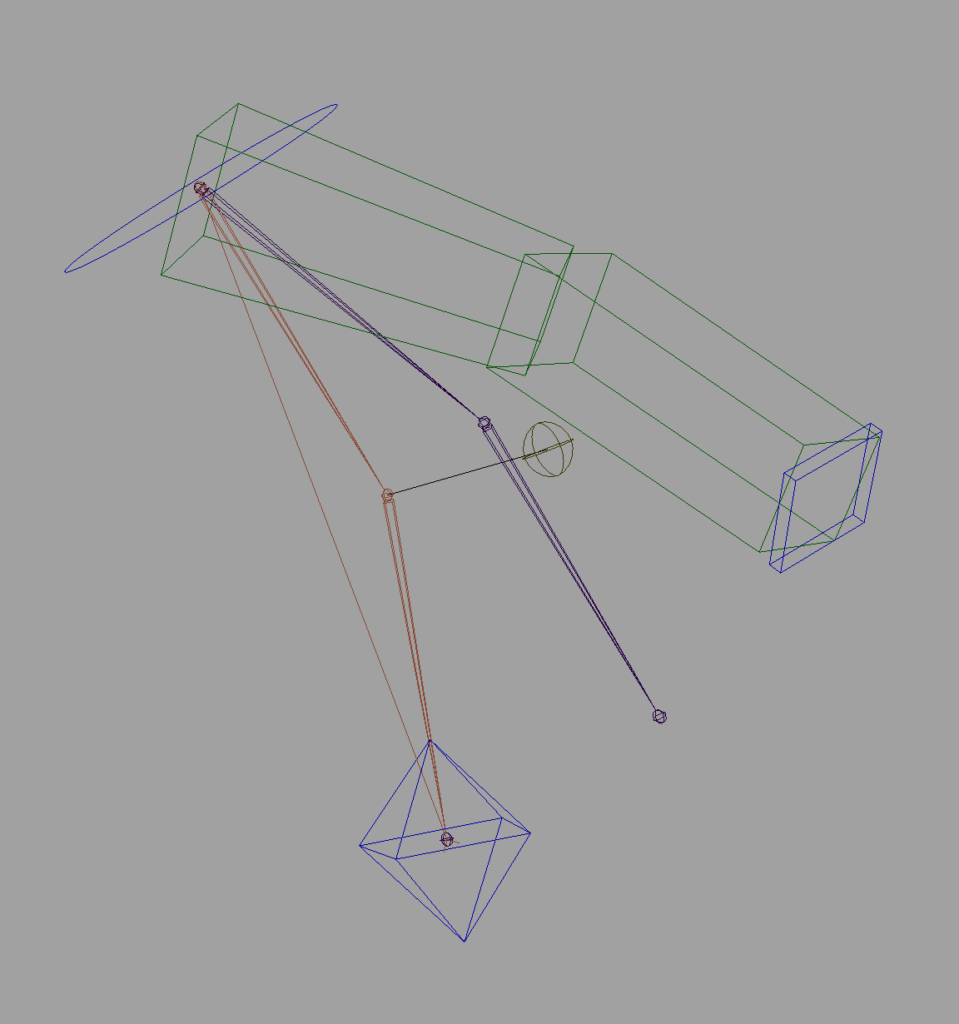
        # create blend chain
        ikb_shoulder = Joint.create(
            name=Name(chain[0]).change(base=Name(chain[0]).base + "_ikb").build(),
            transform=world_matrix(chain[0]),
            parent=grp,
            zero=True)
        ikb_elbow = Joint.create(
            name=Name(chain[1]).change(base=Name(chain[1]).base + "_ikb").build(),
            transform=world_matrix(chain[1]),
            parent=ikb_shoulder.node,
            zero=True)
        ikb_wrist = Joint.create(
            name=Name(chain[2]).change(base=Name(chain[2]).base + "_ikb").build(),
            transform=world_matrix(chain[2]),
            parent=ikb_elbow.node,
            zero=True)
The ik_blend() function is in the core.connect module. Blending two chains into a third chain is something we might have to do outside of this component. I’ll dive into it at the end of this section.
The inherited Chain class’s init() has already run, and it’s already populated the component’s controls output parameter with the FK controls for the limb. Here, we get those controls to set up the blend between the IK and FK controls.
        fk_controls = self.get_output('controls')
        blend_output = ik_blend(fk_chain=[fk_controls[0].node,
                                          fk_controls[1].node,
                                          fk_controls[2].node],
                                ik_chain=[ikj_shoulder.node,
                                          ikj_elbow.node,
                                          ikj_wrist.node],
                                blend_chain=[ikb_shoulder.node,
                                             ikb_elbow.node,
                                             ikb_wrist.node],
                                blend_attr=f'{ik_ctrl_wrist}.{IK_ATTR}')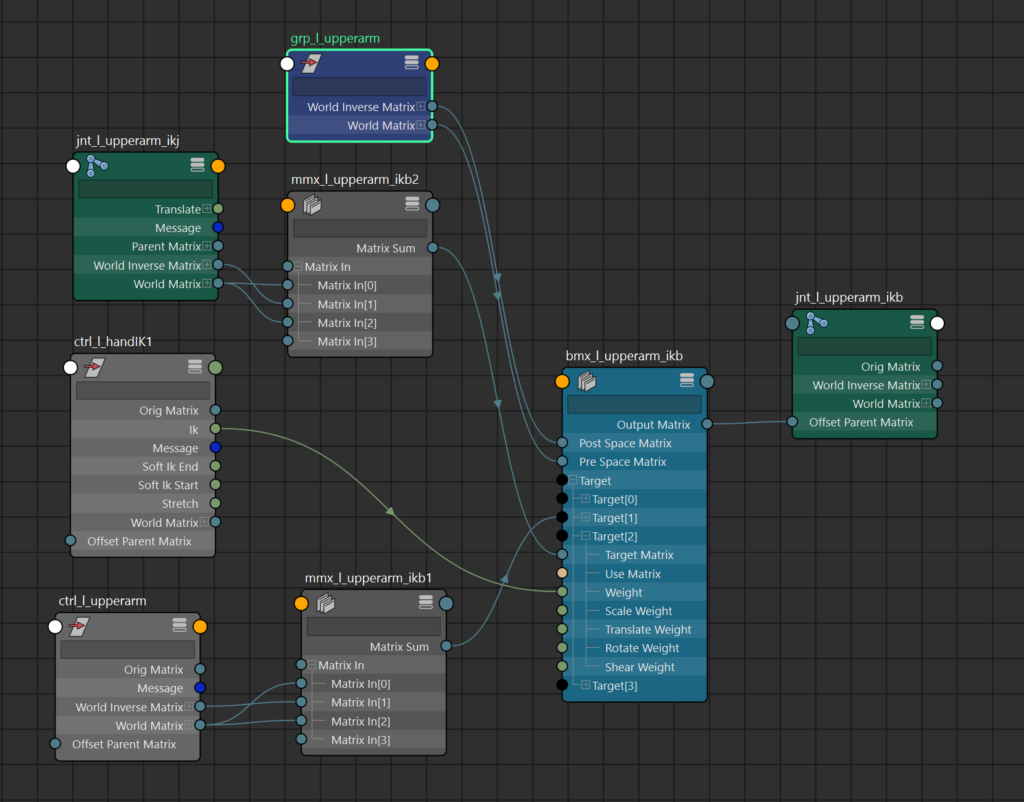
We want to drive the rotation of the ik chain’s “wrist” (or ankle) with the IK Control. So we create and connect some nodes between the control and joint rotation.
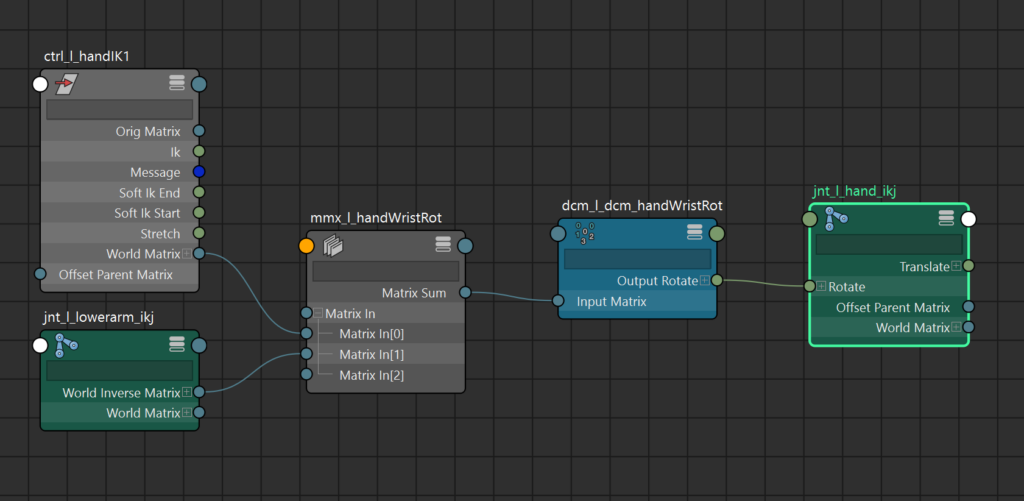
        # drive ik wrist rotation with ik control
        wrist_mmx = cmds.createNode("multMatrix",
                         name=Name(chain[2]).change(node_type='mmx',
                           base=Name(chain[2]).base + "WristRot").build())
        cmds.connectAttr(f'{ik_ctrl_wrist}.worldMatrix',
                         f'{wrist_mmx}.matrixIn[0]')
        cmds.connectAttr(f'{ikj_elbow}.worldInverseMatrix',
                         f'{wrist_mmx}.matrixIn[1]')
        cmds.connectAttr(f'{wrist_mmx}.matrixSum',
                         f'{wrist_dcm}.inputMatrix')

        # create and connect a decomposeMatrix node
        wrist_dcm = pathname(decompose(
                         source=f'{wrist_mmx}.matrixSum',
                         name=Name(chain[2]).change(
                           node_type='dcm',
                           base=Name(chain[2]).base + "WristRot").build()
                         )
                       )
        cmds.connectAttr(f'{wrist_dcm}.outputRotate', f'{ikj_wrist}.rotate')

        cmds.setAttr(f'{ikj_wrist}.jointOrient', 0, 0, 0)

        # add soft IK
        SOFT_IK_START_ATTR = "soft_ik_start"
        SOFT_IK_END_ATTR = "soft_ik_end"

        # get segment lengths
        upper_length = (om2.MVector(list(ikj_shoulder.transform)[12:15]) -
                        om2.MVector(list(ikb_elbow.transform)[12:15])).length()
        lower_length = (om2.MVector(list(ikj_wrist.transform)[12:15]) -
                        om2.MVector(list(ikb_elbow.transform)[12:15])).length()
As mentioned in the core.utility section, there are a few functions that create and connect a few specific utility nodes as a convenience. Here I’m creating Maya’s new translationFromMatrix nodes and connecting their inputs with the worldspace_position function. Maybe it would be better if I had named it the same as the node it’s creating?
        # create and connect translationFromMatrix nodes
        tfm_shoulder = pathname(worldspace_position(f'{pathname(ik_ctrl_root)}.worldMatrix',
               name=Name(ik_ctrl_root.node).change(node_type='tfm').build()))
        tfm_wrist = pathname(worldspace_position(f'{pathname(ik_ctrl_wrist.node)}.worldMatrix',
               name=Name(ik_ctrl_wrist.node).change(node_type='tfm').build()))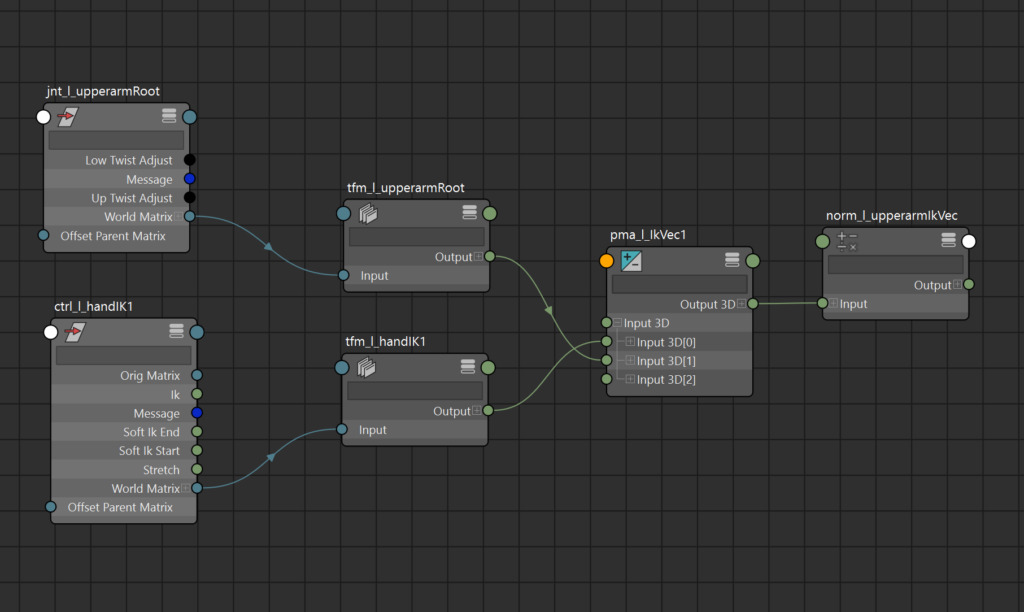
normalize is a new node added to Maya within the last few versions as part of a set of new math-oriented nodes. It takes a vector as an input and returns a normalized version. I used to do this with vectorProduct nodes with the “normalize” option turned on.
       pma_ikvector = cmds.createNode('plusMinusAverage',
            name=Name(ik_ctrl_wrist.node).change(node_type='pma', base='IkVec').build())
        norm_node = cmds.createNode('normalize',
            name=grp_name.change(node_type='norm', base=grp_name.base + "IkVec").build())
distance_between creates a distanceBetween node and makes the connections between the two nodes. It’s in the core.utility module.
        dist_node = distance_between(ik_ctrl_root.node, ik_ctrl_wrist.node, name=grp_name)
        pma_total = cmds.createNode('plusMinusAverage',
            name=grp_name.change(node_type='pma', base=grp_name.base + "Total").build())
        md_fraction = cmds.createNode('multiplyDivide',
            name=grp_name.change(node_type='md', base=grp_name.base + "Fraction").build())
        soft_remap = cmds.createNode('remapValue',
            name=grp_name.change(node_type='rmv', base=grp_name.base + "Fraction").build())

        md_curvedist = cmds.createNode('multiplyDivide',
            name=grp_name.change(node_type='md', base=grp_name.base + "CrvDist").build())
        md_ikcurve = cmds.createNode('multiplyDivide',
            name=grp_name.change(node_type='md', base=grp_name.base + "IkCrv").build())
        pma_shldr_crv = cmds.createNode('plusMinusAverage',
            name=grp_name.change(node_type='pma', base=grp_name.base + "Offset").build())

        cmds.connectAttr(f'{tfm_shoulder}.output', f'{pma_ikvector}.input3D[1]', force=True)
        cmds.connectAttr(f'{tfm_wrist}.output', f'{pma_ikvector}.input3D[0]', force=True)
        cmds.setAttr(f'{pma_ikvector}.operation', 2)  # subtract to get vector between
        cmds.connectAttr(f'{pma_ikvector}.output3D', f'{norm_node}.input', force=True)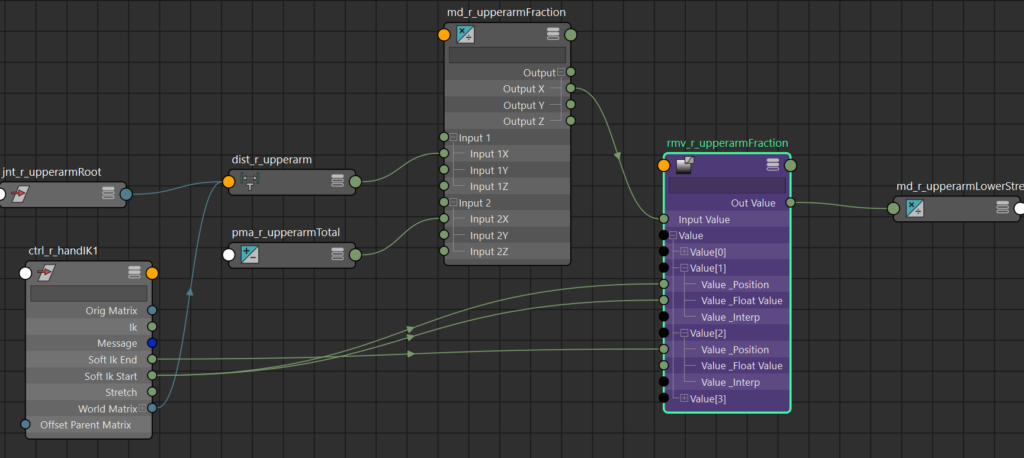
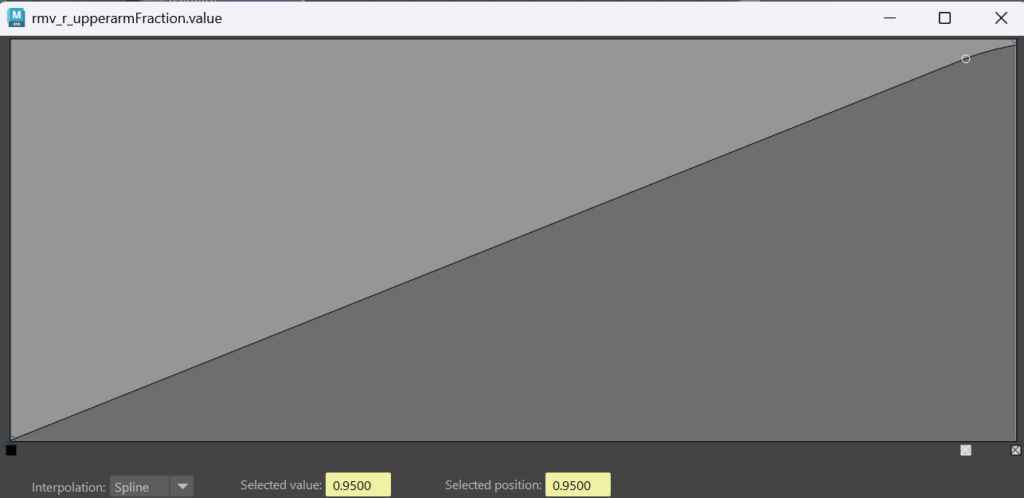
This section creates some nodes to compare the current distance from shoulder to wrist against the sum of the length of the two limb segments. We’ll use this fraction to figure out where the soft IK should turn on and turn off.
        # divide to get current portion of total length
        cmds.setAttr(f'{md_fraction}.operation', 2)
        cmds.connectAttr(f'{pathname(dist_node)}.distance',
                         f'{md_fraction}.input1X',
                         force=True)
        # total length could be a constant in md_fraction.input2 instead of a PMA,
        # but I may want to do something with it later for stretch
        cmds.setAttr(f'{pma_total}.input1D[0]', upper_length)
        cmds.setAttr(f'{pma_total}.input1D[1]', lower_length)
        cmds.connectAttr(f'{pma_total}.output1D', f'{md_fraction}.input2X', force=True)
        cmds.connectAttr(f'{md_fraction}.outputX', f'{soft_remap}.inputValue', force=True)

        # soft driver attrs
        wrist_ctrl_name = pathname(ik_ctrl_wrist.node)
        cmds.addAttr(wrist_ctrl_name,
                     ln=SOFT_IK_START_ATTR,
                     minValue=0.01,
                     maxValue=1.0,
                     attributeType='float',
                     keyable=True)
        cmds.addAttr(wrist_ctrl_name,
                     ln=SOFT_IK_END_ATTR,
                     minValue=0.01,
                     maxValue=2.0,
                     attributeType='float',
                     keyable=True)
        cmds.setAttr(f'{wrist_ctrl_name}.{SOFT_IK_START_ATTR}', soft_ik_start)
        cmds.setAttr(f'{wrist_ctrl_name}.{SOFT_IK_END_ATTR}', soft_ik_end)
Nudge the lowest value above 0 so we don’t get any divide by zero errors. We’ll use the value remap functionality to drive the Soft IK, which gives us some free soft interpolation between start and end keys.
        # remap curve
        # zero length = 0
        cmds.setAttr(f'{soft_remap}.value[0].value_FloatValue', 0.001)
        cmds.setAttr(f'{soft_remap}.value[0].value_Position ', 0.001)
        cmds.setAttr(f'{soft_remap}.value[0].value_Interp', 1)
        # soft ik start key
        cmds.connectAttr(f'{wrist_ctrl_name}.{SOFT_IK_START_ATTR}',
                         f'{soft_remap}.value[1].value_FloatValue', f=1)
        cmds.connectAttr(f'{wrist_ctrl_name}.{SOFT_IK_START_ATTR}',
                         f'{soft_remap}.value[1].value_Position', f=1)
        cmds.setAttr(f'{soft_remap}.value[1].value_Interp', 3)
        # soft ik end key
        cmds.setAttr(f'{soft_remap}.value[2].value_FloatValue', 1.0)
        cmds.connectAttr(f'{wrist_ctrl_name}.{SOFT_IK_END_ATTR}',
                         f'{soft_remap}.value[2].value_Position', f=1)
        cmds.setAttr(f'{soft_remap}.value[2].value_Interp', 2)

        cmds.connectAttr(f'{soft_remap}.outValue',
                         f'{md_curvedist}.input1X', force=True)
        cmds.connectAttr(f'{pma_total}.output1D',
                         f'{md_curvedist}.input2X', force=True)
        cmds.connectAttr(f'{md_curvedist}.outputX',
                         f'{md_ikcurve}.input1X', force=True)
        cmds.connectAttr(f'{md_curvedist}.outputX',
                         f'{md_ikcurve}.input1Y', force=True)
        cmds.connectAttr(f'{md_curvedist}.outputX',
                         f'{md_ikcurve}.input1Z', force=True)
        cmds.connectAttr(f'{norm_node}.output',
                         f'{md_ikcurve}.input2', force=True)
        cmds.connectAttr(f'{md_ikcurve}.output',
                         f'{pma_shldr_crv}.input3D[0]', force=True)
        cmds.connectAttr(f'{tfm_shoulder}.output',
                         f'{pma_shldr_crv}.input3D[1]', force=True)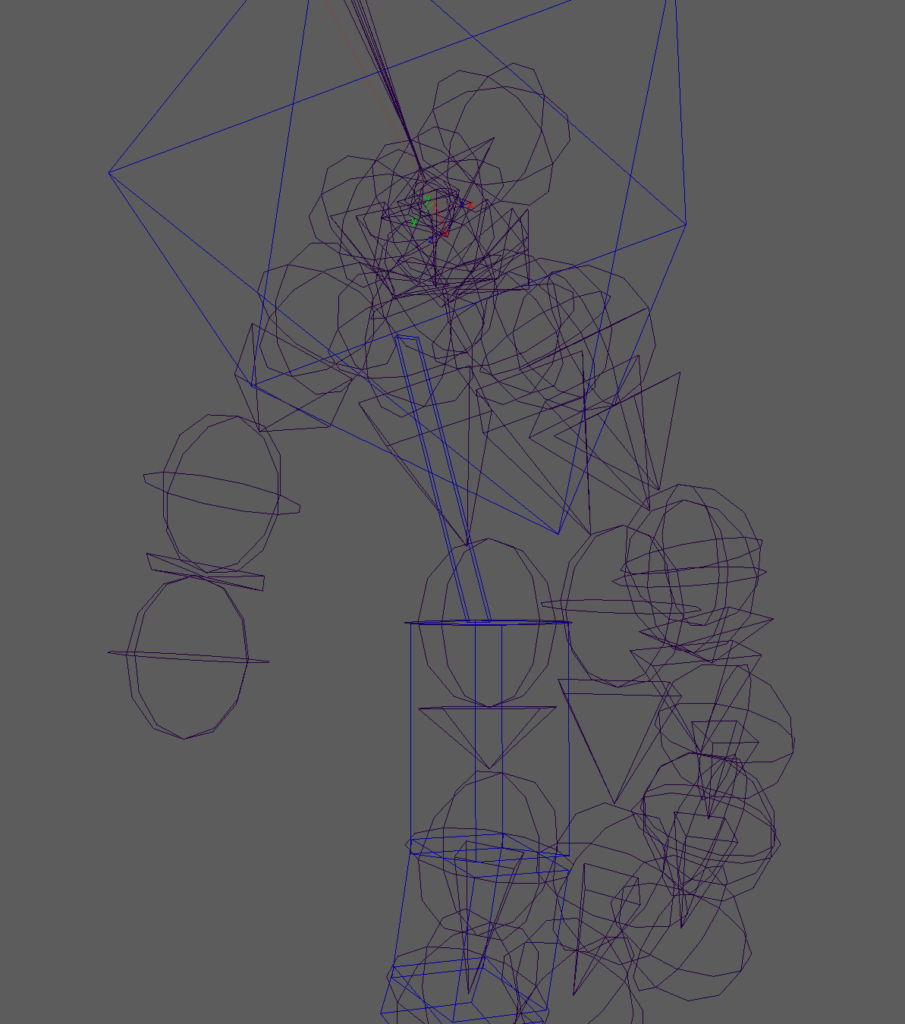
When the soft-IK is active, the IK Handle will lag behind the IK Wrist control as it approaches a fully straightened pose, then slowly catch up to the IK Wrist control as it continues to pull away from the shoulder.
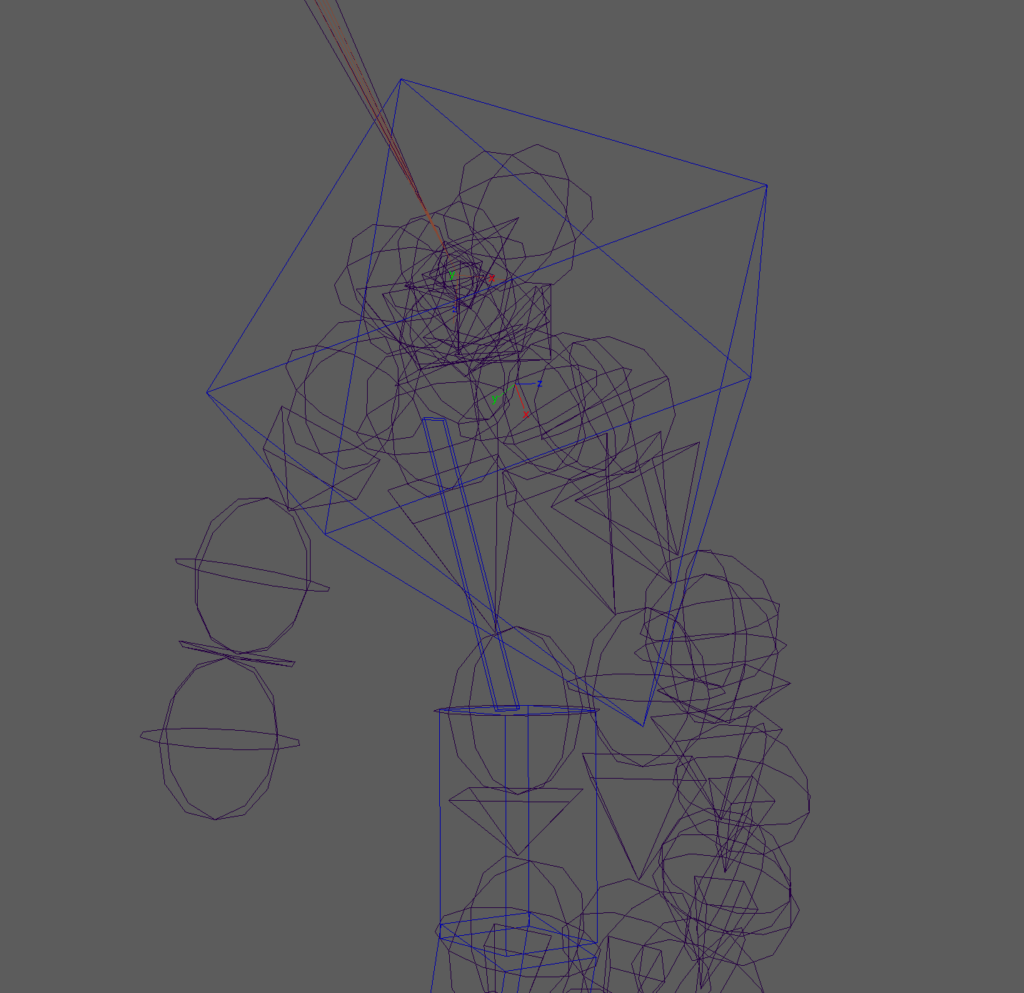
When Soft IK is active, we’ll be translating the IK Handle along the vector between the wrist and the shoulder.
        # connect to ikhandle
        cmds.setAttr(f'{ik_handle[0]}.inheritsTransform', False)
        cmds.connectAttr(f'{pma_shldr_crv}.output3D',
                         f'{ik_handle[0]}.translate', force=True)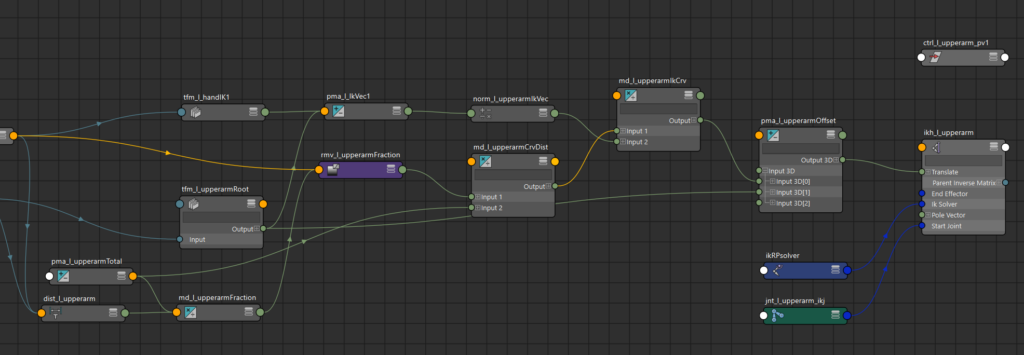
Now let’s add stretch. We’ll re-use some of the nodes we already created for the Soft IK.
       # add stretch attr
        cmds.addAttr(ik_ctrl_wrist, ln='stretch', minValue=0.0, maxValue=1.0,
                     attributeType='float', keyable=True)

        # ----- elbow stretch -----
        div_lower_ratio = cmds.createNode('divide',
                            name=grp_name.change(node_type='div',
                                                 base=grp_name.base + "ratio"))
        md_lower_current = cmds.createNode('multiplyDivide',
                            name=grp_name.change(node_type='md',
                                                 base=grp_name.base +
                                                 "LowerStretchCurrent"))
        md_lower_frac = cmds.createNode('multiplyDivide',
                            name=grp_name.change(node_type='md',
                                                 base=grp_name.base +
                                                 "LowerStretchFraction"))
        md_lower_vec = cmds.createNode('multiplyDivide',
                            name=grp_name.change(node_type='md',
                                                 base=grp_name.base +
                                                 "LowerStretchArmVec"))
        pma_lower_shldr = cmds.createNode('plusMinusAverage',
                            name=grp_name.change(node_type='pma',
                                                 base=grp_name.base +
                                                 "LowerStretchShldr"))
        cmp_elbow_matrix = cmds.createNode('composeMatrix',
                             name=grp_name.change(node_type='cmp',
                                                  base=grp_name.base +
                                                  "ElbowMatrix"))
        mmx_elbow_shldr = cmds.createNode('multMatrix',
                             name=grp_name.change(node_type='mmx',
                                                  base=grp_name.base +
                                                  "ElbowShdlr"))

        md_elbow_stretch_on = cmds.createNode('multiplyDivide',
                                 name=grp_name.change(
                                                  node_type='md',
                                                  base=grp_name.base +
                                                  "ElbowStretchOn"))
        md_elbow_stretch_off = cmds.createNode('multiplyDivide',
                                  name=grp_name.change(
                                                   node_type='md',
                                                   base=grp_name.base +
                                                        "ElbowStretchOff"))
        rev_elbow_stretch = cmds.createNode('reverse', name=grp_name.change(
            node_type='rev', base=grp_name.base + "Stretch"))
        pma_elbow_stretch_blend = cmds.createNode('plusMinusAverage',
                                                  name=grp_name.change(
                                                      node_type='pma',
                                                      base=grp_name.base +
                                                           "ElbowStretchBlend"))
The setRange node is an old favorite of mine. It works pretty similarly to the remapValue node I used in the soft IK above, but it’s simpler and works more linearly.
        sr_soft_stretch = cmds.createNode('setRange',
                                          name=grp_name.change(node_type='sr',
                                            base='ElbowSoftStretchBlend'))
I’m using the blendColors node to create a final blend between the Soft IK and the Stretch outputs.
        blcr_soft_stretch = cmds.createNode('blendColors',
                               name=grp_name.change(node_type='blcr',
                                 base=grp_name.base+"ElbowSoftStretchBlend"))

        cmds.setAttr(f'{div_lower_ratio}.input1', upper_length)
        cmds.setAttr(f'{div_lower_ratio}.input2', lower_length + upper_length)

        # get forearm length percentage of current total ik vector length
        cmds.connectAttr(f'{pathname(dist_node)}.distance',
                         f'{md_lower_current}.input1X', force=True)
        cmds.connectAttr(f'{div_lower_ratio}.output',
                         f'{md_lower_current}.input2X', force=True)

        # get upperarm length value of ik vector
        cmds.connectAttr(f'{md_lower_current}.outputX',
                         f'{md_lower_frac}.input1X', force=True)
        cmds.connectAttr(f'{soft_remap}.outValue',
                         f'{md_lower_frac}.input2X', force=True)

        # get ik vector X upperarm length
        cmds.connectAttr(f'{norm_node}.output',
                         f'{md_lower_vec}.input1', force=True)
        cmds.connectAttr(f'{md_lower_frac}.outputX',
                         f'{md_lower_vec}.input2X', force=True)
        cmds.connectAttr(f'{md_lower_frac}.outputX',
                         f'{md_lower_vec}.input2Y', force=True)
        cmds.connectAttr(f'{md_lower_frac}.outputX',
                         f'{md_lower_vec}.input2Z', force=True)

        # add vector to shoulder position to get world space position
        tfm_shldr = pathname(
                      worldspace_position(f'{ikb_shoulder}.worldMatrix',
                         name=grp_name.change(node_type='tfm',
                         base=grp_name.base+"ShoulderPos")))
        cmds.connectAttr(f'{tfm_shldr}.output',
                         f'{pma_lower_shldr}.input3D[0]', force=True)
        cmds.connectAttr(f'{md_lower_vec}.output',
                         f'{pma_lower_shldr}.input3D[1]', force=True)

        # compose to matrix and put in shoulder blend joint space
        cmds.connectAttr(f'{pma_lower_shldr}.output3D',
                         f'{cmp_elbow_matrix}.inputTranslate', force=True)
        cmds.connectAttr(f'{cmp_elbow_matrix}.outputMatrix',
                         f'{mmx_elbow_shldr}.matrixIn[0]', force=True)
        cmds.connectAttr(f'{ikb_shoulder}.worldInverseMatrix',
                         f'{mmx_elbow_shldr}.matrixIn[1]', force=True)
        tfm_elbow_shldr = pathname(
                            worldspace_position(f'{mmx_elbow_shldr}.matrixSum',
                              name=grp_name.change(node_type='tfm',
                              base=grp_name.base+"ElbowPos")))

        # stretch on
        cmds.connectAttr(f'{tfm_elbow_shldr}.output',
                         f'{md_elbow_stretch_on}.input1', force=True)
        cmds.connectAttr(f'{ik_ctrl_wrist}.stretch',
                         f'{md_elbow_stretch_on}.input2X', force=True)
        cmds.connectAttr(f'{ik_ctrl_wrist}.stretch',
                         f'{md_elbow_stretch_on}.input2Y', force=True)
        cmds.connectAttr(f'{ik_ctrl_wrist}.stretch',
                         f'{md_elbow_stretch_on}.input2Z', force=True)
        cmds.connectAttr(f'{md_elbow_stretch_on}.output',
                         f'{pma_elbow_stretch_blend}.input3D[0]', force=True)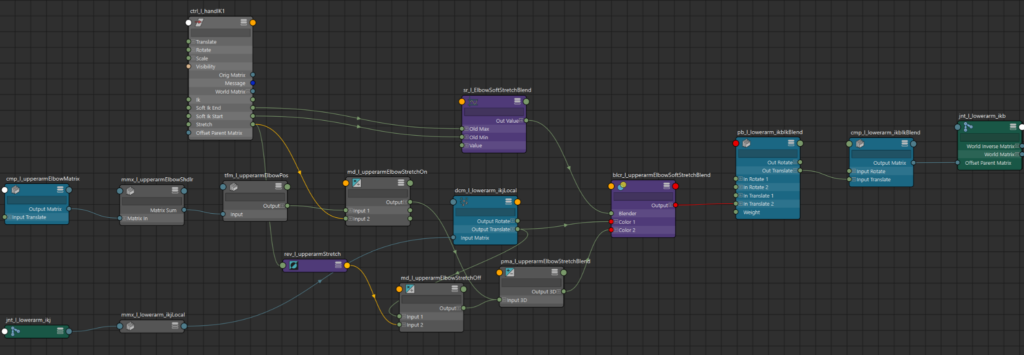
What we’re doing here is “hacking” into the output of the ik_blend() function, which created a Maya pairBlend node to do the blending of the two chains.
Maya’s pairBlend nodes are often the unwanted result of keying on top of a constraint, but we’re using it here on purpose. pairBlends allow for quaternion interpolation of the rotations so the segments won’t squish or distort when blending between FK and IK. When stretch is off, we’ll bypass the new functionality we’re building here and just pass along the original IK joint values through the blendColors node color2 attribute.
        # stretch off
        cmds.connectAttr(f'{ik_ctrl_wrist}.stretch',
                         f'{rev_elbow_stretch}.inputX', force=True)
        cmds.connectAttr(f'{blend_output[1]["ik_dcm"]}.outputTranslate',
                         f'{md_elbow_stretch_off}.input1', force=True)
        cmds.connectAttr(f'{rev_elbow_stretch}.outputX',
                         f'{md_elbow_stretch_off}.input2X', force=True)
        cmds.connectAttr(f'{rev_elbow_stretch}.outputX',
                         f'{md_elbow_stretch_off}.input2Y', force=True)
        cmds.connectAttr(f'{rev_elbow_stretch}.outputX',
                         f'{md_elbow_stretch_off}.input2Z', force=True)
        cmds.connectAttr(f'{md_elbow_stretch_off}.output',
                         f'{pma_elbow_stretch_blend}.input3D[1]', force=True)

        # blend soft and stretch
        cmds.connectAttr(f'{wrist_ctrl_name}.{SOFT_IK_START_ATTR}',
                         f'{sr_soft_stretch}.oldMinX')
        cmds.connectAttr(f'{wrist_ctrl_name}.{SOFT_IK_END_ATTR}',
                         f'{sr_soft_stretch}.oldMaxX')
        cmds.connectAttr(f'{md_fraction}.outputX', f'{sr_soft_stretch}.valueX')
        cmds.setAttr(f'{sr_soft_stretch}.minX', 1.0)
        cmds.setAttr(f'{sr_soft_stretch}.maxX', 0.0)

        cmds.connectAttr(f'{sr_soft_stretch}.outValueX',
                         f'{blcr_soft_stretch}.blender')
        cmds.connectAttr(f'{blend_output[1]["ik_dcm"]}.outputTranslate',
                         f'{blcr_soft_stretch}.color1', force=True)
        cmds.connectAttr(f'{pma_elbow_stretch_blend}.output3D',
                         f'{blcr_soft_stretch}.color2', force=True)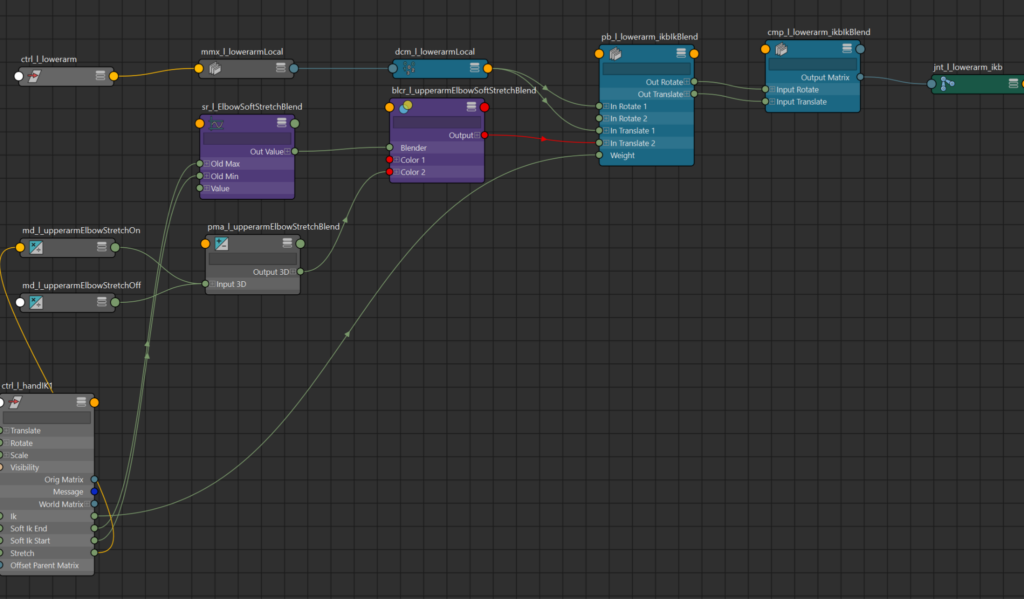
We overwrite the inTranslate2 (the IK translation) connection on the pairBlend with the results of all of this Soft IK and Stretch calculation.
        cmds.connectAttr(f'{blcr_soft_stretch}.output',
                         f'{blend_output[1]["pb"]}.inTranslate2', force=True)
The second segment is built similarly to the first.
        # ----- wrist stretch -----
        mmx_wrist_lower = cmds.createNode('multMatrix',
                            name=grp_name.change(node_type='mmx',
                              base=grp_name.base+"WristInLowerSpc"))
        # re-use rev_elbow_stretch
        md_wrist_stretch_on = cmds.createNode('multiplyDivide',
                                name=grp_name.change(node_type='md',
                                   base=grp_name.base+"WristStretchOn"))
        md_wrist_stretch_off = cmds.createNode('multiplyDivide',
                                  name=grp_name.change(node_type='md',
                                    base=grp_name.base+"WristStretchOff"))
        pma_wrist_stretch_blend = cmds.createNode('plusMinusAverage',
                                    name=grp_name.change(node_type='pma',
                                    base=grp_name.base+"WristStretchTranslate"))
        blcr_wrist_soft_stretch = cmds.createNode('blendColors',
                                     name=grp_name.change(node_type='blcr',
                                     base=grp_name.base+"WristStretchTranslate"))

        # wrist control in lower arm space
        cmds.connectAttr(f'{wrist_ctrl_name}.worldMatrix',
                         f'{mmx_wrist_lower}.matrixIn[0]', force=True)
        cmds.connectAttr(f'{ikb_elbow}.worldInverseMatrix',
                         f'{mmx_wrist_lower}.matrixIn[1]', force=True)
        cmds.connectAttr(f'{mmx_wrist_lower}.matrixSum',
                         f'{tfm_wrist_lower}.input', force=True)
        tfm_wrist_lower = pathname(
                            worldspace_position(f'{mmx_wrist_lower}.matrixSum',
                              name=grp_name.change(node_type='tfm',
                                base=grp_name.base+"WristInLowerSpc")))

        # stretch on
        cmds.connectAttr(f'{tfm_wrist_lower}.output',
                         f'{md_wrist_stretch_on}.input1', force=True)
        cmds.connectAttr(f'{ik_ctrl_wrist}.stretch',
                         f'{md_wrist_stretch_on}.input2X', force=True)
        cmds.connectAttr(f'{ik_ctrl_wrist}.stretch',
                         f'{md_wrist_stretch_on}.input2Y', force=True)
        cmds.connectAttr(f'{ik_ctrl_wrist}.stretch',
                         f'{md_wrist_stretch_on}.input2Z', force=True)

        # stretch off
        cmds.connectAttr(f'{blend_output[2]["ik_dcm"]}.outputTranslate',
                         f'{md_wrist_stretch_off}.input1', force=True)
        cmds.connectAttr(f'{rev_elbow_stretch}.outputX',
                         f'{md_wrist_stretch_off}.input2X', force=True)
        cmds.connectAttr(f'{rev_elbow_stretch}.outputX',
                         f'{md_wrist_stretch_off}.input2Y', force=True)
        cmds.connectAttr(f'{rev_elbow_stretch}.outputX',
                         f'{md_wrist_stretch_off}.input2Z', force=True)

        # add on and off together
        cmds.connectAttr(f'{md_wrist_stretch_on}.output',
                         f'{pma_wrist_stretch_blend}.input3D[0]', force=True)
        cmds.connectAttr(f'{md_wrist_stretch_off}.output',
                         f'{pma_wrist_stretch_blend}.input3D[1]', force=True)

        # blend soft and stretch together
        # re-use sr_soft_stretch
        cmds.connectAttr(f'{sr_soft_stretch}.outValueX',
                         f'{blcr_wrist_soft_stretch}.blender', force=True)
        cmds.connectAttr(f'{pma_wrist_stretch_blend}.output3D',
                         f'{blcr_wrist_soft_stretch}.color2', force=True)
        cmds.connectAttr(f'{blend_output[2]["ik_dcm"]}.outputTranslate',
                         f'{blcr_wrist_soft_stretch}.color1', force=True)

        cmds.connectAttr(f'{blcr_wrist_soft_stretch}.output',
                         f'{blend_output[2]["pb"]}.inTranslate2', force=True)

        return [ikb_shoulder.node, ikb_elbow.node, ikb_wrist.node]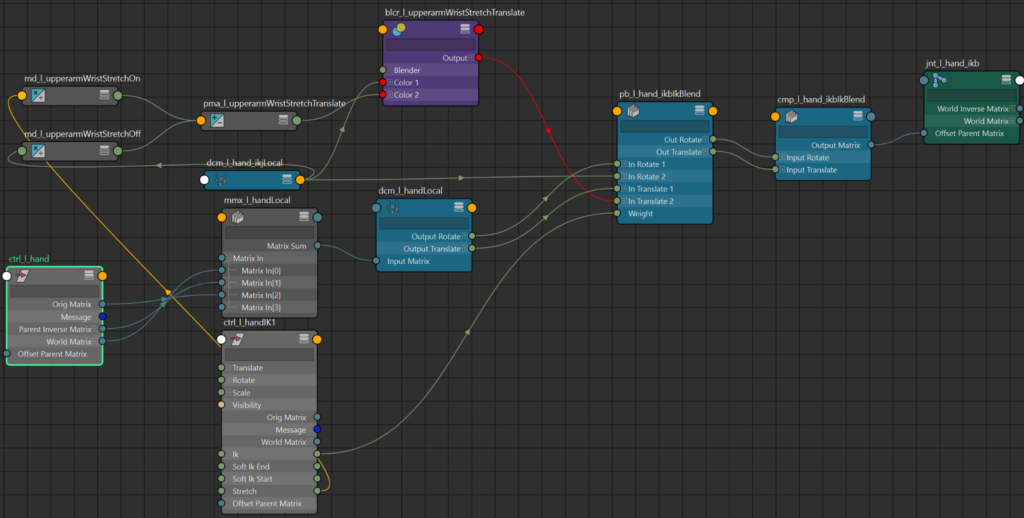
core.connect.ik_blend
The ik_blend function in core.connect loops through each joint in the three input chains and runs _ik_blend_setup on each corresponding element.
def ik_blend(fk_chain: list[str | om2.MObject],
             ik_chain: list[str | om2.MObject],
             blend_chain: list[str | om2.MObject],
             blend_attr: str) -> dict[int, str]:
    """create blend setup between fk and ik chains"""
    # shoulder just gets pinned between fk and ik
    add_blend_space(blend_chain[0], fk_chain[0], default_value=1.0)
    shldr_attr = add_blend_space(blend_chain[0], ik_chain[0], default_value=0.0)
    cmds.connectAttr(blend_attr, shldr_attr, force=True)

    # subsequent joints
    blend_out: dict[int, str] = {}
    for index in range(1, len(blend_chain)):
        _set_orig_matrix(fk_chain[index])
        _set_orig_matrix(ik_chain[index])
        freeze(blend_chain[index])
        blend_out[index] = _ik_blend_setup(fk_chain[index],
                                           ik_chain[index],
                                           blend_chain[index],
                                           blend_attr)

    return blend_out
Here in _ik_blend_setup() in the core.connect module, we’ll build all of the utility nodes and connections necessary to blend the two input chains into the third.
def ik_blend(fk_chain: list[str | om2.MObject],
             ik_chain: list[str | om2.MObject],
             blend_chain: list[str | om2.MObject],
             blend_attr: str) -> dict[int, str]:
    """create blend setup between fk and ik chains"""
    # shoulder just gets pinned between fk and ik
    add_blend_space(blend_chain[0], fk_chain[0], default_value=1.0)
    shldr_attr = add_blend_space(blend_chain[0], ik_chain[0], default_value=0.0)
    cmds.connectAttr(blend_attr, shldr_attr, force=True)

    # subsequent joints
    blend_out: dict[int, str] = {}
    for index in range(1, len(blend_chain)):
        _set_orig_matrix(fk_chain[index])
        _set_orig_matrix(ik_chain[index])
        freeze(blend_chain[index])
        blend_out[index] = _ik_blend_setup(fk_chain[index],
                                           ik_chain[index],
                                           blend_chain[index],
                                           blend_attr)

    return blend_out
The two multMatrix nodes, fk_mmx and ik_mmx, will create a local transformation from the input fk_joint and ik_joint world matrices. The multiplication is world matrix * inverse Parent Matrix * ORIG_MATRIX. ORIG_MATRIX is the node’s original offset from the parent set in core.connect._set_orig_matrix().
    fk_mmx = cmds.createNode('multMatrix',
                             name=fk_name.change(node_type='mmx',
                               base=fk_name.base + "Local"))
    ik_mmx = cmds.createNode('multMatrix',
                             name=ik_name.change(node_type='mmx',
                               base=ik_name.base + "Local"))
    fk_dcm = pathname(decompose(fk_joint,
                             name=fk_name.change(
                               base=fk_name.base + "Local")))
    ik_dcm = pathname(decompose(ik_joint,
                             name=ik_name.change(base=ik_name.base + "Local")))
    pb = cmds.createNode('pairBlend',
                             name=b_name.change(base=b_name.base + "IkBlend",
                               node_type='pb'))
    cmp = cmds.createNode('composeMatrix',
                             name=b_name.change(base=b_name.base + "IkBlend",
                               node_type='cmp'))

    # Rotation interpolation = Quaternion
    cmds.setAttr(f'{pb}.rotInterpolation', 1)

    cmds.connectAttr(f'{pathname(fk_joint)}.worldMatrix',
                     f'{fk_mmx}.matrixIn[0]', force=True)
    cmds.connectAttr(f'{pathname(fk_joint)}.parentInverseMatrix',
                     f'{fk_mmx}.matrixIn[1]', force=True)
    cmds.connectAttr(f'{pathname(fk_joint)}.{ORIG_MATRIX_ATTR}',
                     f'{fk_mmx}.matrixIn[2]', force=True)
    cmds.connectAttr(f'{fk_mmx}.matrixSum', f'{fk_dcm}.inputMatrix', force=True)
    cmds.connectAttr(f'{fk_dcm}.outputTranslate', f'{pb}.inTranslate1', force=True)
    cmds.connectAttr(f'{fk_dcm}.outputRotate', f'{pb}.inRotate1', force=True)

    cmds.connectAttr(f'{pathname(ik_joint)}.worldMatrix',
                     f'{ik_mmx}.matrixIn[0]', force=True)
    cmds.connectAttr(ik_parent_matrix, f'{ik_mmx}.matrixIn[1]', force=True)
    cmds.connectAttr(f'{ik_mmx}.matrixSum', f'{ik_dcm}.inputMatrix', force=True)
    cmds.connectAttr(f'{ik_dcm}.outputTranslate', f'{pb}.inTranslate2', force=True)
    cmds.connectAttr(f'{ik_dcm}.outputRotate', f'{pb}.inRotate2', force=True)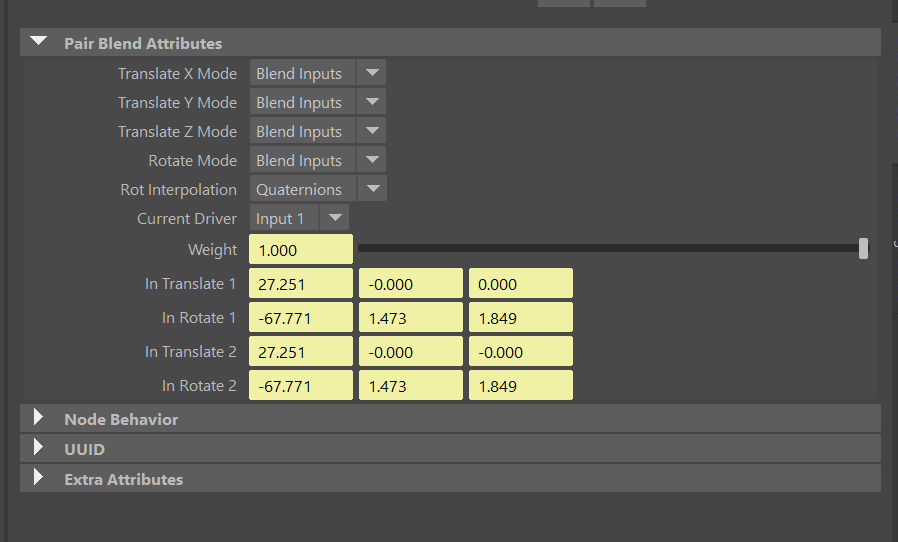
We use a composeMatrix node to recombine the translation and rotation from the pairBlend into a matrix and connect it to the blend_joint’s offsetParentMatrix attribute. Because the calculations were done in ik_joint and fk_joint’s local space, we don’t need to reconvert the matrix to world space, and works just fine in blend_joint.offsetParentMatrix’s local space too.
We’ll return a dictionary with the nodes we created in case the calling function/method needs to use them for other purposes.
    cmds.connectAttr(f'{pb}.outTranslate', f'{cmp}.inputTranslate', force=True)
    cmds.connectAttr(f'{pb}.outRotate', f'{cmp}.inputRotate', force=True)

    cmds.connectAttr(f'{cmp}.outputMatrix',
                     f'{pathname(blend_joint)}.offsetParentMatrix', force=True)

    cmds.connectAttr(blend_attr, f'{pb}.weight', force=True)


    return {
        'fk_mmx': fk_mmx,
        'ik_mmx': ik_mmx,
        'fk_dcm': fk_dcm,
        'ik_dcm': ik_dcm,
        'pb': pb,
        'cmp': cmp
    }
Summary
With the Limb component, we can nearly build a full rig already. Spine and Head controls can be simple FK chains. As with this 2-segment Limb, additional variations can be built on top of the parent Chain Component. In the future, I plan on building a 3-segment Limb for quadrupeds, and a spline-based Limb component for tentacles or more cartoon-style appendages.
I built twist functionality into a separate component that can ride on top of the Limb, and we’ll take a look at that in the next chapter.