As mentioned in my description of the “Core” section of the project, I knew there were going to be a bunch of utility functions that I wanted to put together before getting started on any of the major parts of the system. Some of the functions were updated re-writes of things I had created for previous rigging systems, and others were inspired by similar work I had been exposed to.
As I worked on the higher-level parts of the system, I found code snippets and functions that could be re-used between modules, so I transplanted them back into the core section.
Node
The first and probably largest module in the core package is CATS.core.node. In hindsight, it became a little messy as I added functionality to it that didn’t exactly fit anywhere else.
Objects and Names
The first group of functions are convenience methods for converting Maya’s string paths to the API’s MObject and MDagPath objects and back.
def mobject(object_path: (str | om2.MObject)) -> (om2.MObject | None):
"""returns a maya OpenMaya 2.0 MObject for a string or MObject"""
If the object_path being passed in is already an MObject, then just return it without doing anything.
# is object_path already an MObject?
if isinstance(object_path, om2.MObject):
    return object_path
Here we’re using this attribute _rig_sys to identify objects that are subclasses of BaseNode. I subclassed BaseNode for Joints, Controls, and potentially other Maya node types. I had to use this property instead of isinstance() for identifying the custom classes because Python would get confused during development as I reloaded the classes repeatedly.
# is object_path a descendant of BaseNode?
if hasattr(object_path, "_rig_sys") and hasattr(object_path, "node"):
    object_path = object_path.node
The chained command in the try clause here is a nice 1-line shortcut to get a MSelectionList in OpenMaya API 2.0. In the old API, it would be at least 2 lines since the MSelectionList had to be returned by an output parameter rather than return value.
try:
    selection_list = om2.MSelectionList().add(object_path)
except RuntimeError:
    raise RuntimeError(f"invalid object path: {object_path}")

obj = selection_list.getDependNode(0)
return obj
mdagpath() is nearly the same as mobject but returns a MDagPath instead of an MObject.
def mdagpath(object_path: (str | om2.MDagPath)) -> (om2.MDagPath | None):
    """return a maya MDagPath object for a string or MDagPath"""
    if isinstance(object_path, om2.MDagPath):
        return object_path

    try:
        selection_list = om2.MSelectionList().add(object_path)
    except RuntimeError:
        return None

    dag = selection_list.getDagPath(0)
    return dag
pathname() is the opposite of mobject(), and returns the name of the object passed to it as a string.
def pathname(obj: (str | om2.MObject | Any), full_path: bool = False) -> str:
    """return a pathname string for a string or MObject"""

    # BaseNode classes have a name attribute
    if hasattr(obj, "name"):
        return obj.name

    # if obj is a string, make sure it exists
    if isinstance(obj, str):
        if full_path:
            if not cmds.objExists(obj):
                raise RuntimeError(f"Object {obj} does not exist")
            return cmds.ls(obj, long=True)[0]
        else:
            return obj
If the object is an MObject and can be used with the API function MFnDagNode, then it can be part of a hierarchy and contain a long path. If it’s not a Dag Node, then it can still be a Dependency Node that lives in the DG and has a name, but can’t have parents or be part of a longer path name.
# if obj is an MObject, convert to string
elif isinstance(obj, om2.MObject):
    if obj.hasFn(om2.MFn.kDagNode):
        if full_path:
            return om2.MFnDagNode(obj).fullPathName()
        else:
            return om2.MFnDagNode(obj).name()
    else:
        return om2.MFnDependencyNode(obj).name()
else:
    raise TypeError
I use mobject() and pathname() everywhere, especially where I mixed API and maya.cmds calls. Right at the beginning, I’m calling myself out and admitting I don’t currently have mdagpath() used anywhere else in the project, but it’s there in case I ever need it!
I’ll admit it’s not very performant to convert strings back and forth to Maya API objects several times within a function call, as I’m sure I do in some places in the project, but it’s more about convenience. I wish I was more consistent in using the API and then I wouldn’t have to do so many conversions.
‘Get’ Helpers
The next grouping of utility functions in CATS.core.node are for getting related nodes: shape from a transform or transform from a shape, or getting a skinCluster from a mesh. These fully use maya.cmds.
get_skin_cluster() looks for any upstream history nodes of type “skinCluster”.
def get_skin_cluster(mesh: om2.MObject | str) -> str | None:
    """returns the skinCluster node attached to a mesh"""
    #TODO: support multiple skinClusters
    obj = pathname(mesh)
    sc = [s for s in cmds.listHistory(obj)
          if cmds.objectType(s, isType='skinCluster')]
    if len(sc) > 0:
        return sc[0]
    return None
In Maya, shape nodes describe the vertices or CVs of a mesh or curve, but not where that shape exists in world space. So shapes are children of transform nodes that define the shape’s transformation in space.
get_shape() takes a transform and returns the first shape node that is a direct child of that transform.
def get_shape(mesh: om2.MObject | str) -> str | None:
    """returns a shape node child of a transform"""
    #TODO: support multiple shape nodes
    obj = pathname(mesh)
    if cmds.objectType(obj) in ['mesh', 'shape']:
        return obj

    shapes = cmds.listRelatives(obj, shapes=True)
    if len(shapes) > 0:
        return shapes[0]

    return None
get_shape_transform() is the reverse of get_shape(). It returns the parent transform for the provided shape node (mesh or curve).
def get_shape_transform(shape: om2.MObject | str) -> str | None:
    """returns the parent transform for the given shape node"""
    obj = pathname(shape)
    if cmds.objectType(obj) in ['mesh', 'shape']:
        transforms = cmds.listRelatives(obj, parent=True)
        if len(transforms) > 0:
            return transforms[0]

    return None
Both the get_skin_cluster() and get_shape() functions contain “to do” notes to implement future features. get_skin_cluster() only currently supports a single skinCluster, but recent versions of Maya have included multiple skinCluster support. get_shape() only currently supports a single shape, which is a little limiting but fine for a first pass on this system.
Transforms
The next group of methods are probably better relocated to a “transform” module or something, maybe I’ll do that in the future.
Getting a world matrix from an MObject is pretty simple. Using the MFnDagNode function set, the inclusiveMatrix() method returns the object’s world matrix (including the object). exclusiveMatrix on the other hand is the parent’s world matrix (excluding the object).
def world_matrix(obj: om2.MObject) -> om2.MMatrix:
    """return a MMatrix transform of a DagNode MObject in world space"""
    dagnode = om2.MFnDagNode(obj).getPath()
    return dagnode.inclusiveMatrix()
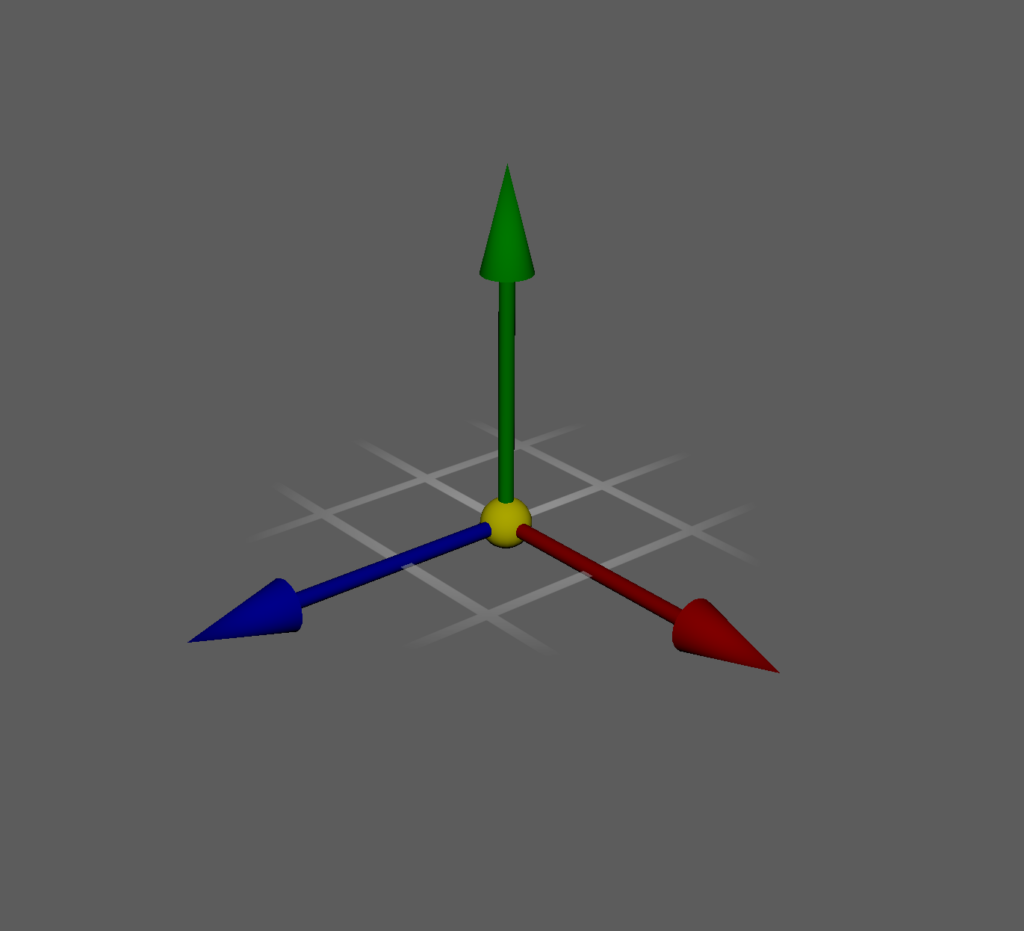
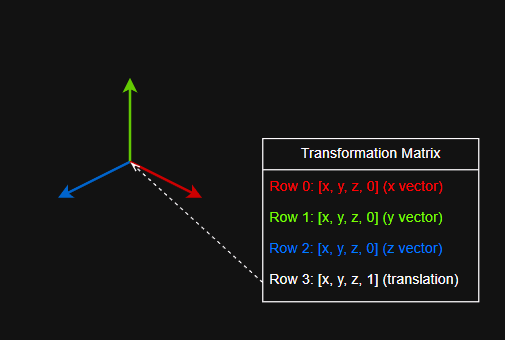
For world position, we’re casting the world matrix of the object to a list and returning the indices 12, 13, 14 of the list as an MVector.
- In a 4×4 transformation matrix, indices 0, 1, and 2 are the matrix’s X vector, and index 3 is 0.
- Indices 4, 5, and 6 are the matrix’s Y vector, and index 7 is 0.
- Indices 8, 9, and 10 are the matrix’s Z vector, and index 11 is 0.
- Indices 12, 13, and 14 are the matrix’s position, and index 15 is 1.
def world_position(obj: om2.MObject) -> om2.MVector:
   """return a MVector position of a DagNode MObject in world space"""
   return om2.MVector(list(world_matrix(obj))[12:15])
Setting the world matrix of an object using the API. I added this function later in the project development, I think I wrote it just to learn how to do it.
- Get the inverse parent matrix (exclusiveMatrixInverse), because we have to assign a local transformation value to the object.
- Multiply the target world space matrix by the inverse of the parent’s world matrix to get the MMatrix in local space that we want to set obj to.
- Then use the MFnTransform function set to set a MTransformationMatrix of the local matrix with the setTransformation method.
def set_world_matrix(obj: om2.MObject,
                     target: (om2.MObject | om2.MMatrix)) -> None:
   """set world transform with api"""
   obj_dag = om2.MFnDagNode(obj)
   obj_path = obj_dag.getPath()
   obj_parent_matrix = obj_path.exclusiveMatrixInverse()

   if isinstance(target, om2.MObject):
       target_matrix = om2.MFnDagNode(target).getPath().inclusiveMatrix()
   elif isinstance(target, om2.MMatrix):
       target_matrix = target
   else:
       raise TypeError('target must be a MObject or MMatrix')

   obj_mat = om2.MFnTransform(obj)
   local_matrix = target_matrix * obj_parent_matrix
   obj_mat.setTransformation(om2.MTransformationMatrix(local_matrix))
This align() function is basically setting an object’s world matrix to match a target object. I wrote this one before the previous set_world_matrix() function though, back when I expected to write more code around the API.
This function allows for matching position and/or orientation of the object to the target.
def align(obj: (str | om2.MObject),
         target: (str | om2.MObject),
         position: bool = True,
         orientation: bool = True,
         undoable=False) -> None:
   """snap one object to a target in world space"""
   obj = mobject(obj)
   target = mobject(target)

   m_obj = list(world_matrix(obj))
   m_target = list(world_matrix(target))
If position is False, we set the corresponding indices (12-14) of the matrix to the original object’s world position.
   if not position:
       m_target[12:15] = m_obj[12:15]
If orientation is False, we set the corresponding indices (0-11) of the matrix to the original object’s world matrix.
   if not orientation:
       m_target[0:12] = m_obj[0:12]
Put the target world matrix into the source object’s local space by multiplying m_target and obj_dag‘s parent’s inverse world matrix.
   obj_dag = om2.MFnDagNode(obj).getAllPaths()[0]
   new_matrix = om2.MMatrix(m_target) * obj_dag.exclusiveMatrixInverse()
If the undoable flag is set to True, then we use maya.cmds to set the matrix value instead of the API for the free undo caching.
   if undoable:
       cmds.xform(obj_dag.fullPathName(), m=new_matrix, ws=1)
The API version of setting the transformation is similar to how set_world_matrix works.
   else:
       new_transform = om2.MTransformationMatrix(new_matrix)
       om2.MFnTransform(obj_dag).setTransformation(new_transform)
Chains
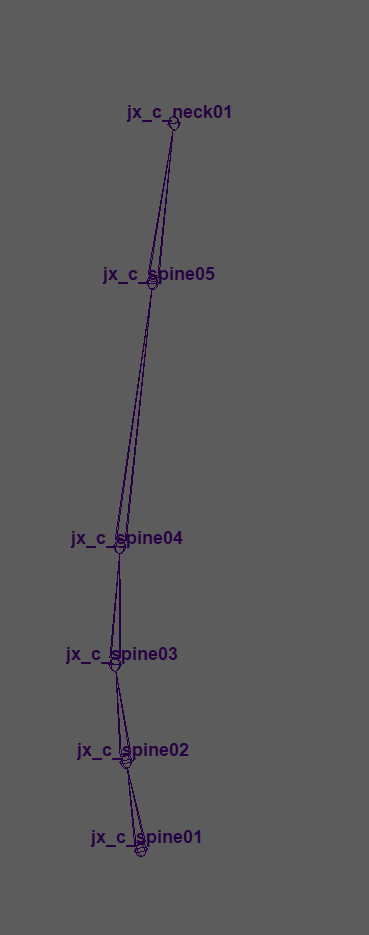
This function returns a linear hierarchy of nodes between a start (parent) and end (child). In the situation of an arm, for instance, the start is the shoulder and the end is the wrist, sure, but there could be a dozen other descendants of shoulder that aren’t ancestors of wrist. So this function works backwards and collects parents of end until it gets to start and inserts them backwards in the list.
As a check to make sure that start is actually an ancestor of end, we get the full path of each. If end is a descendant of start, then the full path of start will be a substring of end’s full path string. We raise a RuntimeError if there’s not a linear hierarchy between start and end.
def get_chain(start: (str | om2.MObject),
              end: (str | om2.MObject)) -> list[str | om2.MObject]:
    """
    return a list of maya objects that are descendants
    of start and ancestors of end
    """
    start_obj = mobject(start)
    end_obj = mobject(end)
    start_path = pathname(start_obj, full_path=True)
    end_path = pathname(end_obj, full_path=True)
    chain = []

    if start_path not in end_path:
        raise RuntimeError(f"({end_path}) not a child of ({start_path})")

    obj = end_obj
    while om2.MFnDagNode(obj).parentCount() > 0:
        chain.insert(0, obj)
        if obj == start_obj:
            break
        obj = om2.MFnDagNode(obj).parent(0)

    return chain
Miscellaneous
This function calculates the position of the Pole Vector for a 3-joint IK limb. I talked about this in my 2018 GDC talk “Rigging with Triangles” and this is where the “triangle” part is obvious.
- We want to project another vector, from the shoulder to the elbow, onto the vector between the shoulder and the wrist. The return statement is confusing since the asterisk operator is a multiplication when float * float or float * vector, but a dot product if both operands are vectors.
- The point_line_projection() function (in CATS.core.math) does the calculations
def point_line_projection(start: om2.MVector,
                          end: om2.MVector, point: om2.MVector) -> om2.MVector:
    """returns the closest point on a line from given point"""
    vector = end - start
    diagonal = point - start
    perp = vector.normal() * diagonal.normal()
return (start + (vector * (perp * (diagonal.length() / vector.length()))))- The form in the return statement is a shortcut form I found somewhere, but basically the formula is:
- p = start + ((vector diagonal) / (vector.length()^2) * vector)
- vector is the line from shoulder to wrist (AC)
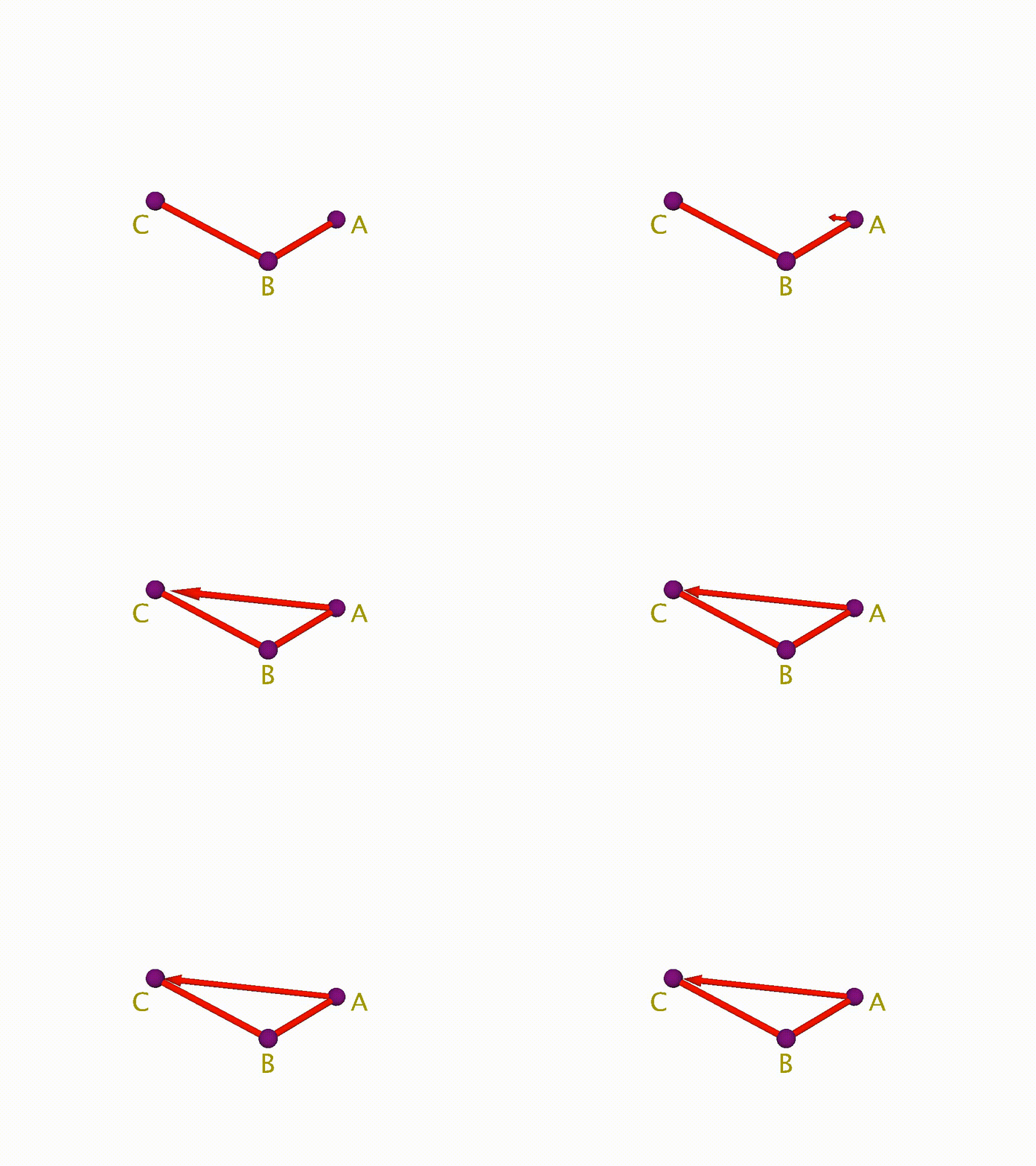
vector = end - start- diagonal is the line from shoulder to elbow (AB)
diagonal = point - start- Get the dot product of the two normalized vectors
perp = vector.normal() * diagonal.normal()- Multiply that dot product by the fraction of the lengths of AB over AC
perp * (diagonal.length() / vector.length())- Multiply that float value (the fraction of the distance of vector)
vector * (perp * (diagonal.length() / vector.length())- Add that vector to the original start position to get the position in world space of the projected point onto vector
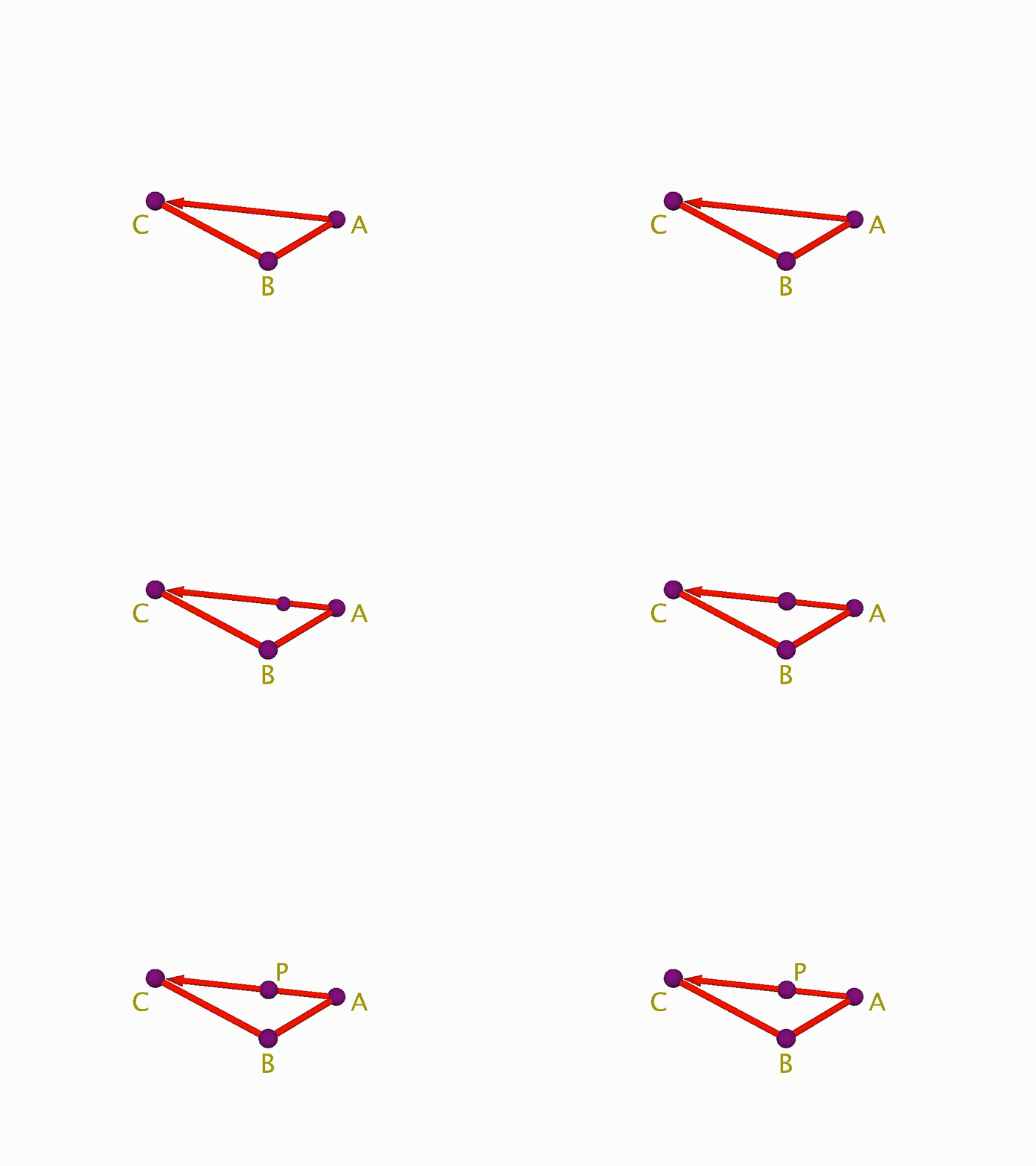
start + (vector * (perp * (diagonal.length() / vector.length())))- Then we create a normalized vector from the elbow (point) through that projection point
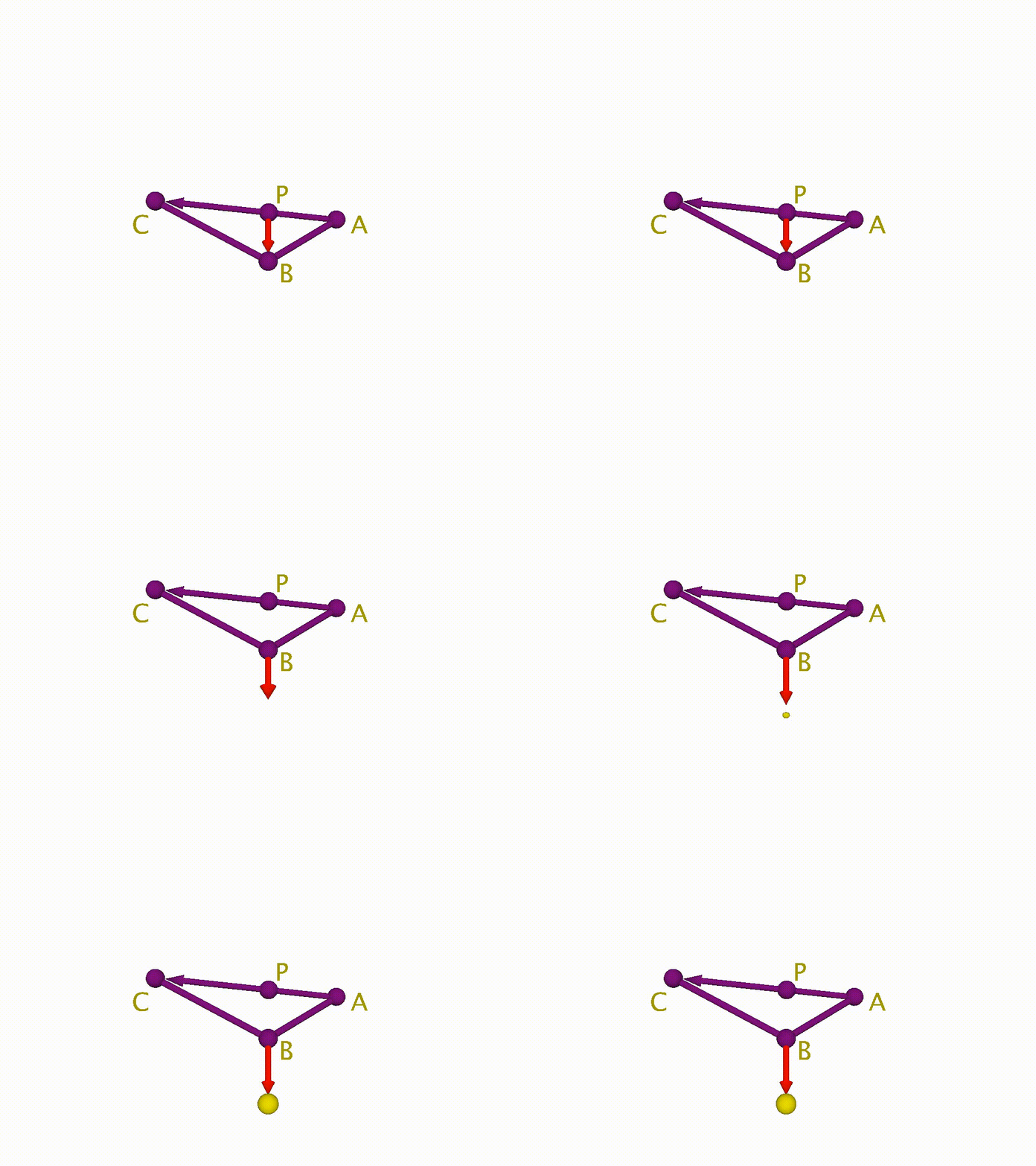
pv_vector = point_line_projection(start, end, point)- point is the “elbow” or “B” in the diagram.
point - pv_vectoris the vector from P to B
(point - pv_vector).normal()- pv_dist is the total length of the limb (AB + BC)
pv_dist = (start - point).length() + (end - point).length()- We put it all together in the return statement.
- The normalized vector above (projected point P on the vector AC to the elbow)
- Multiplied by half of the length of the entire ABC limb
- Added to the elbow (point) to get the position in world space
point + ((point - pv_vector).normal() * pv_dist * 0.5)The whole function that puts all of the steps together.
def pole_vector_position(chain: list[str]):
    """
    return a position in world space
    for placing a pole vector for a joint chain
    """
    start = world_position(chain[0]) # shoulder
    end = world_position(chain[2]) # wrist
    point = world_position(chain[1]) # elbow
    pv_vector = point_line_projection(start, end, point)
    pv_dist = (start - point).length() + (end - point).length()
    return point + ((point - pv_vector).normal() * pv_dist * 0.5)
Get_control_axis
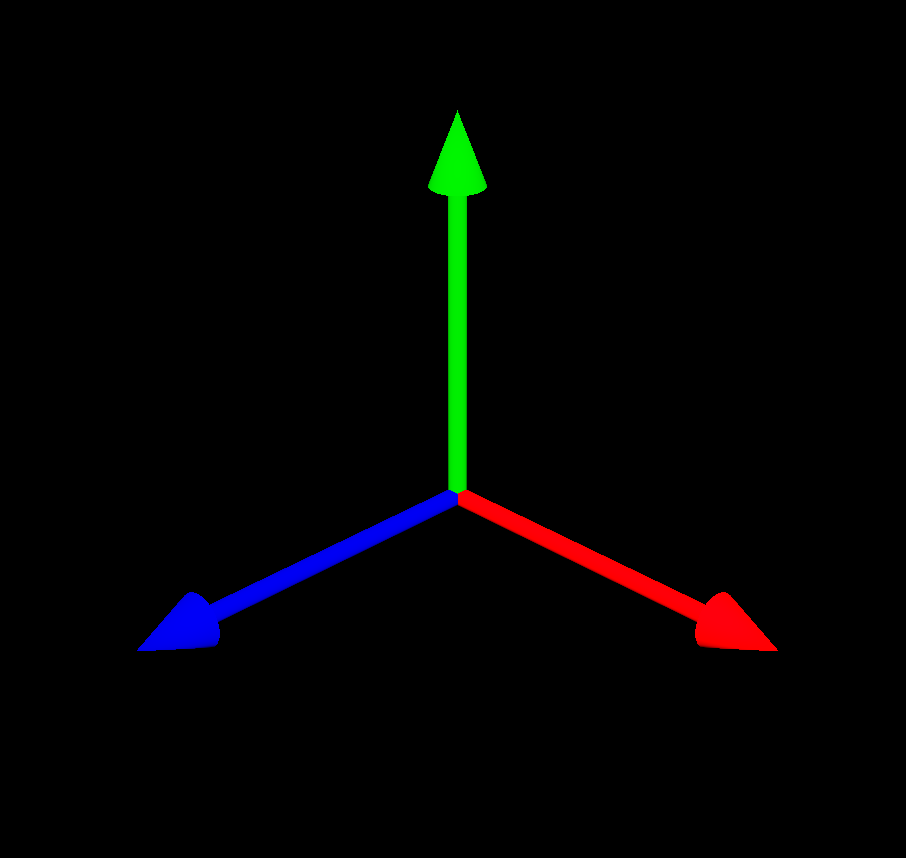
Given a source object and a target object, what is the transform axis of source that most closely aims toward the target? The class method in the Axis class does the work, but I left this function in here because it deals with nodes and not purely the axis values, so I’m not sure if there’s a best place for it to live.
def get_control_axis(source: (str | om2.MObject),
                     target: (str | om2.MObject | None) = None,
                     primary_axis: int = 0) -> om2.MVector:
    """return the primary axis of source that points toward target"""

    matrix = world_matrix(source)

    if target is not None:
        vector = (world_position(target) - world_position(source)).normal()
        axis = Axis.get_closest_axis(vector, matrix)
    else:
        axis = Axis(primary_axis)

    return get_matrix_vector(matrix, axis.to_int())
Get_closest_uv (api)
During development of this project, I discovered a bunch of “new” python scripts that are included with Maya, and this function is based off of something I found in there. But another cool thing that I discovered is that the MFnNurbsSurface function set includes built-in methods to get closest points on a surface. In the past, I’ve used pointOnSurfaceInfo nodes and do a lot of connectAttrs to get this info, this is way faster and easier.
Those new Python scripts included with Maya are in “C:\Program Files\Autodesk\MayaXXXX\Python\Lib\site-packages\maya\internal”.
def get_closest_uv(mesh: om2.MObject | str,
                   targets: list[str|om2.MObject]) -> list | None:
    """
    from maya.internal.common.utils.geometry.getUvsFromClosestPointToTransforms
    Returns the closest uv on a mesh to a given object
    """
    mesh_shape = get_shape(mesh)
    if mesh_shape is None:
        return None

    shape_dag = mdagpath(mesh_shape)
    if shape_dag is None:
        return None
If the shape passed to this function is a NURBS surface, then we use the MFnNurbsSurface.closestPoint() method to get the closest UV coordinates of the provided target to the surface.
# nurbs UVs
if shape_dag.hasFn(om2.MFn.kNurbsSurface):
    fn_surf = om2.MFnNurbsSurface(shape_dag)
    domain = [ fn_surf.knotDomainInU, fn_surf.knotDomainInV ]

    for p in sample_pos:
        closest_point = fn_surf.closestPoint(p, space=om2.MSpace.kWorld)
        uv = [closest_point[1], closest_point[2]]
        #  Normalize when needed
        if domain is not None:
            uv = [(uv[j]-domain[j][0])/(domain[j][1]-domain[j][0])
                  for j in [ 0, 1 ] ]
        uvs.append(uv)
If the shape is a mesh, we use MFnMesh.getUVAtPoint() to get the closest UV on the mesh.
We assume we’re using the first UV Set on the mesh. UV Sets allow meshes to have more than one UV texture arrangement.
# mesh UVs
elif shape_dag.hasFn(om2.MFn.kMesh):
    uv_set = cmds.polyUVSet(mesh_shape, query=True, currentUVSet=True)
    uv_set = uv_set[0] if len(uv_set) > 0 else None

    fn_mesh = om2.MFnMesh(shape_dag)

    for p in sample_pos:
        closest_uv = fn_mesh.getUVAtPoint(p,
                                          space=om2.MSpace.kWorld,
                                          uvSet=uv_set)
        uvs.append([closest_uv[0], closest_uv[1]])
Finally, for completeness, the function supports returning the closest U-Coordinate on a nurbs curve. Curves don’t have a V-Coordinate since they’re 1-dimensional.
# u-coord of a nurbsCurve
elif shape_dag.hasFn(om2.MFn.kNurbsCurve):
    fn_curve = om2.MFnNurbsCurve(shape_dag)
    domain = fn_curve.knotDomain

    for p in sample_pos:
        closest_point = fn_curve.closestPoint(p, space=om2.MSpace.kWorld)
        u = closest_point[1]
        #  Normalize when needed
        if domain is not None:
            u = (u-domain[0])/(domain[1]-domain[0])
        uvs.append([u, 0.0])
Name Class
Inspired by a Name class I’ve used previously. Naming consistency is important in a rigging system, and this class helps.
- All node names in the rig will be in a format like: “type_side_base_iterator”, so a lower spine joint could be “jnt_c_spine_01”.
- I added some flexibility in the iterators, so they could omit the underscore between the base name and the iterator. So “jnt_c_spine01” would be a valid name too.
- Managing namespaces isn’t something we need to do on the rigging side, but is very important when building tools to support the animators later. This class supports namespaces for future tool development.
class Name:
    """
    class for creating and accessing elements
    from a standardized Maya node name format
    """
    NAME_COMPONENTS = ['namespace', 'node_type', 'side', 'base', 'iterator']
    VALID_SIDES = ['r', 'l', 'c'] # right, left, center
    VALID_NODE_TYPES = [
        'jnt', # joint
        'def', # deformation (joint)
        'jx', # non-deforming joint
        'ikh', # ik handle
        'crv', # curve
        'mesh', # mesh
        'bshp', # blendShape
        ...
    ]
PRIVATE_ATTRS = ['_data', '_orig_data', '_orig_obj', '_name']- A repr that returns a string that can be used to rebuild the object:
   def __repr__(self):
        repr_string = [f"{name}='{self._data.get(name)}'"
                       for name in self.NAME_COMPONENTS
                       if self._data.get(name)]
return f"{self.__module__}.{self.__class__.__name__} ({','.join(repr_string)})"- Standard node type prefixes
- The Name class prevents names that aren’t in the list of supported node_types
   def __setattr__(self, item, value):
        if item in self.NAME_COMPONENTS:
            if item == 'node_type':
                if value not in self.VALID_NODE_TYPES:
                    raise AttributeError(f"'{value}' is not a valid node type")
            elif item == 'side':
                if value not in self.VALID_SIDES:
                    raise AttributeError(f"'{value}' is not a valid side")

            self._data[item] = value

        elif item in self.PRIVATE_ATTRS:
            super().__setattr__(item, value)

        else:
raise AttributeError(f"'{item}' is not a valid attribute")- The convenience method “change()” is one of the most-used functions in the project. If I have a joint, and want to build a control around it with consistent naming, I could do something like:
joint_name = Name('jnt_c_head01')
control_name = joint_name.change(node_type='ctrl')
# returns: 'ctrl_c_head01'
Or to append suffixes to the base name:
mult_matrix_name = joint_name.change(base=joint_name.base+"Mult", node_type='mmx')
# returns: 'mmx_c_headMult01'
Python kwargs unpacks into a dictionary within a function or method. Here we use the dict.get() method to either get a passed argument with a name element or fall back to a default of the previous element value if that element isn’t supplied. Then we just instantiate a new Name instance with the updated element values.
   def change(self, **kwargs) -> NameType:
        """
        replace elements of the name in this object
        and return a new Name object
        """
        namespace = kwargs.get('namespace', self.namespace)
        node_type = kwargs.get('node_type', self.node_type)
        side = kwargs.get('side', self.side)
        base = kwargs.get('base', self.base)
        iterator = kwargs.get('iterator', self.iterator)
        return Name(namespace=namespace,
                    node_type=node_type,
                    side=side,
                    base=base,
                    iterator=iterator)
Easy parsing and construction
joint_name = Name('jnt_c_head01')

joint_name.node_type
// returns 'jnt'

new_name = Name(namespace='char', node_type='ctrl', side='c', base='root', iterator='01')
// creates a Name object for the path 'char:ctrl_c_root_01'

New_name.side = 'r'
// sets the name to 'char:ctrl_r_root_01'
Utility
This module contains shortcuts for creating, naming, and connecting nodes.
For instance, let’s take the distanceBetween node. Every time I create that node, I’m going to want to connect 2 other nodes to it, so it actually calculates a distance. This function takes those two input nodes as arguments and performs the connecting and returns the distanceBetween node already wired up.
def distance_between(source: (str | om2.MObject),
                     target: (str | om2.MObject),
                     name: Name) -> om2.MObject:
    """create a distanceBetween node and connect to two transforms"""
    source = pathname(source)
    target = pathname(target)
    dst_name = Name(node_type="dist",
                    side=name.side,
                    base=name.base,
                    iterator=name.iterator).build()

    dist_node = cmds.createNode("distanceBetween", name=dst_name)
    cmds.connectAttr(f"{source}.worldMatrix", f"{dist_node}.inMatrix1")
    cmds.connectAttr(f"{target}.worldMatrix", f"{dist_node}.inMatrix2")
    return mobject(dist_node)
Unfortunately, I don’t make consistent use of these helper functions within the project. Sometimes I need a slightly different set of inputs or sometimes I just forgot I had written these.
Here’s what else is in the utility module:
def vector_product(input1: (str | om2.MObject | om2.MVector | list[float] | None) = None,
                   input2: (str | om2.MObject | om2.MVector | list[float] | None) = None,
                   matrix: (str | om2.MObject | om2.MMatrix | list[float] | None) = None,
                   name: (Name | str) = None,
                   operation: int = 3) -> om2.MObject:
   """creates a vectorProduct node driven by input vectors or matrix"""

def worldspace_position(source: (str | om2.MObject),
                        name: (Name | str | None) = None) -> om2.MObject:
    """creates a translationFromMatrix node driven by source.worldMatrix"""


def vector_between(source: (str | om2.MObject),
                   target: (str | om2.MObject),
                   name: str) -> om2.MObject:
    """
    creates a plusMinusAverage node
    returns vector between two translationFromMatrix nodes
    """


def decompose(source: (str | om2.MObject),
              name: Name) -> om2.MObject:
    """create a decomposeMatrix node driven by source.worldMatrix"""


def hold_matrix(source_attr: str,
                name: Name) -> om2.MObject:
    """create a holdMatrix node that stores the value from a matrix attribute"""

def pick_matrix(source_attr: str,
                target_attr: str, name: Name,
                translate: bool = True,
                rotate: bool = True,
                scale: bool = True,
                shear: bool = True) -> om2.MObject:
   """create a pickMatrix node that filters the matrix output from source_attr"""
I also wrote stubs for a closest_point, condition, and follicle factory functions but haven’t needed to write them yet. Follicles might not be necessary, since I’m using the uvPin matrix node in the project as a substitute for it.
There are more core modules in the next chapter.
If you find this retrospective informative, useful, enjoyable, or some other adjective, you can buy me a coffee here.