Modules referenced in this chapter:
Continuing the breakdown of modules in the CATS.core subpackage.
Connect
As one of the pillars of the rigging system was going to be using Maya 2020+’s matrix nodes instead of constraints, I needed to have a central location for functions that do the work of connecting nodes with matrix node networks.
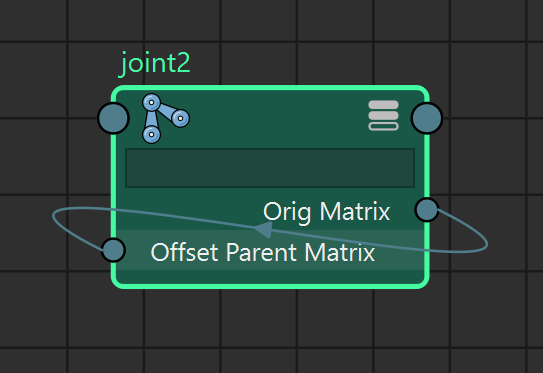
I also wanted to be able to “zero out” controls without additional parent group hierarchies. If we move a node’s local transformation into the offsetParentMatrix attribute, then we can zero out the translate and rotate channels and maintain the node’s offset from its parent and also have zeroed-out transform channels.
So we have three levels of connections for nodes:
- At the simplest level, we create a local offset for the node (worldMatrix * parentInverseMatrix) and store it in an attribute. Then we just plug that attribute into the node’s own offsetParentMatrix attribute. This doesn’t seem to be an issue with creating dependency loops in the graph since _orig_matrix is a constant and not used elsewhere by the node in its transformation calculations.
ORIG_MATRIX_ATTR = "_orig_matrix"

def _set_orig_matrix(node: (str | om2.MObject), world: bool = False):
    """cache a node's original local matrix to an attribute"""
    node_name = pathname(node)
    if not cmds.attributeQuery(ORIG_MATRIX_ATTR, node=node_name, exists=True):
        cmds.addAttr(node_name, longName=ORIG_MATRIX_ATTR, dt="matrix")

    if world:
        node_matrix = cmds.getAttr(f"{node_name}.worldMatrix")
    else:
        node_matrix = cmds.getAttr(f"{node_name}.worldMatrix")

        node_parent = cmds.listRelatives(node_name, parent=True)
        if node_parent:
            parent_matrix = cmds.getAttr(f"{node_parent[0]}.worldMatrix")
            node_matrix = om2.MMatrix(node_matrix) * om2.MMatrix(parent_matrix).inverse()

cmds.setAttr(f"{node_name}.{ORIG_MATRIX_ATTR}", node_matrix, type="matrix")- For some situations, we need to create a multMatrix node to modify the offsetParentMatrix. So the _orig_matrix attribute connects to the multMatrix as well as other matrices that need to be multiplied to transform the node into the desired space.

- Finally, we can build upon a number of multMatrix nodes and create a space switching system using blendMatrix nodes.

The initial setup for these various connection strategies is done in the freeze() function that calls _set_orig_matrix if necessary.
def freeze(node: (str | om2.MObject)):
    """
    bake local transformation matrix into parentOffsetMatrix
    and zero out transform channels
    """
    node_name = pathname(node)

    current_connections = cmds.listConnections(f"{node_name}.offsetParentMatrix",
                                               source=True,
                                               destination=False,
                                               plugs=True) or []
    if current_connections:
        return

    _set_orig_matrix(node)

    if cmds.objectType(node_name, isType='joint'):
        cmds.setAttr(f"{node_name}.jointOrient", 0, 0, 0)

    cmds.connectAttr(f'{node_name}.{ORIG_MATRIX_ATTR}',
                     f'{node_name}.offsetParentMatrix', force=True)

    cmds.setAttr(f'{node_name}.translate', 0, 0, 0)
    cmds.setAttr(f'{node_name}.rotate', 0, 0, 0)
    cmds.setAttr(f'{node_name}.scale', 1, 1, 1)
This is the simple connect.connect() function that mimics what a one-to-one parentConstraint would be used for. It attaches a node to a target node, with an option offset, so it follows another object’s transformation outside of a DAG hierarchy.
def connect(node: (str | om2.MObject, None),
            target: (str | om2.MObject, None),
            keep_offset: bool = False):
    """equivalent of a parentConstraint with matrix nodes"""
    node_name = pathname(node)
    target_name = pathname(target)
    freeze(node_name)
    node_parent = cmds.listRelatives(node_name, parent=True)
    node_transform = om2.MMatrix(cmds.xform(node_name, q=True, m=True, ws=True))

    # source_attrs is a list of attributes to connect to the multMatrix node
    # to multiply in order
    source_attrs = []

    # if target is a node, use its worldMatrix attribute
    if cmds.objExists(target_name) and ('.' not in target_name):
        source_attrs = [f'{target_name}.worldMatrix']

        if keep_offset:
            target_transform = om2.MMatrix(cmds.xform(target_name,
                                           q=True,
                                           m=True,
                                           ws=True))
            offset_transform = node_transform * target_transform.inverse()
            source_attrs = [offset_transform] + source_attrs

    # if target is a specific attribute
    elif cmds.objExists(target):
        targets = target_name.split('.')
        if (len(targets) > 1):
            raw_attr = targets[1] if ('[' not in targets[1]) \
                       else targets[1].split('[')[0]
            if cmds.objExists(f'{targets[0]}') and cmds.attributeQuery(raw_attr,
                                                   node=targets[0], exists=True):
                source_attrs = [target]

    # multiply into node's parent's space
    if node_parent:
        source_attrs.append(f'{node_parent[0]}.worldInverseMatrix')

    mult_matrix = create_blend_multmatrix(name=Name(node).change_type('mmx'),
                                          source_attrs=source_attrs)

    cmds.connectAttr(f"{mult_matrix}.matrixSum",
                     f'{node_name}.offsetParentMatrix', force=True)
Blend spaces are managed by a few functions:
def create_blend_multmatrix(name: str = None,
                            source_attrs: (list[str] | None) = None) -> str | None:
    """creates a multMatrix node and makes connections for use with blend spaces"""

def get_blend_space(node: (str | om2.MObject)) -> str | None:
    """return the blendMatrix that drives node's offsetParentMatrix"""

def create_blend_space(node: (str | om2.MObject)):
    """create or return a node's blend space blendMatrix"""

def _get_next_blend_index(node: (str | om2.MObject, None)) -> int:
    """get next available index on node's blendMatrix"""

def add_blend_space(node: (str | om2.MObject, None),
                    target: (str | om2.MObject, None),
                    default_value=0.0,
                    rotate_only=False,
                    explicit=False) -> str | None:
    """add a blend space to node"""
The logic I settled on works like this:
- add_blend_space(node, target) is called to get the next available blend index on node and connect target to the next index.
- add_blend_space calls create_blend_space(node) to create or get a blendMatrix node driving node‘s offsetParentMatrix.
- create_blend_space() calls get_blend_space(node).
- If a blendMatrix node already exists, it returns it to create_blend_space()
- If no blendMatrix exists for this blendSpace, create_blend_space() creates it
- create_blend_space() calls get_blend_space(node).
- add_blend_space calls _get_next_blend_index() and connects target to the next index.
- add_blend_space returns the weight attribute for the new blend index
get_blend_space is only called by create_blend_space to see if it needs to create it or pass along an existing blendMatrix node. create_blend_space is only called within add_blend_space to get or create a blendMatrix to append to. So the user will only need to call add_bend_space and any additional work should happen under the hood to create additional nodes as necessary.
The connect module also contains a function to compensate for jointOrient transformations, but I ended up not using it.
- (Note: I refactored some of the blend space functionality here when I worked on formalizing a Control Space system recently).
ik_blend and pin
I added functions to do IK/FK switching in this module since it makes use of the blend, as well as a pin() function that uses the uvPin matrix node to attach nodes to a mesh or nurbsSurface.
def ik_blend(fk_chain: list[str | om2.MObject],
             ik_chain: list[str | om2.MObject],
             blend_chain: list[str | om2.MObject],
             blend_attr: str) -> dict[int, str]:
   """create blend setup between fk and ik chains"""

def pin(node: (str | om2.MObject), target: (str | om2.MObject)):
   """ pin node to mesh or nurbs surface """
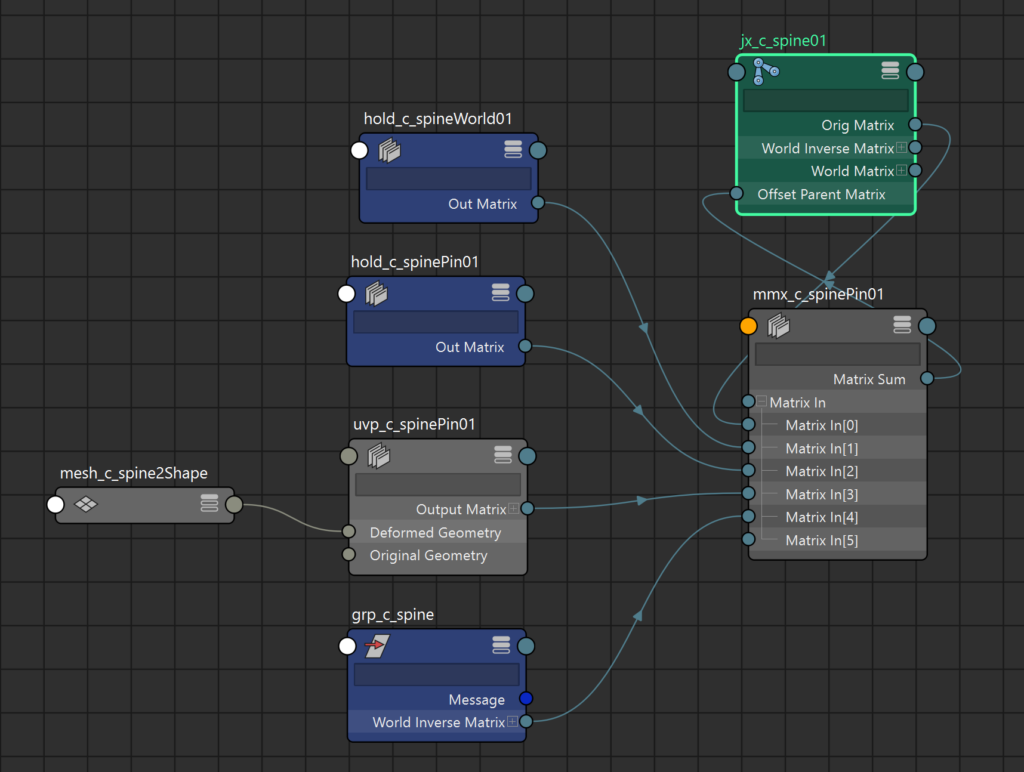
For pin(), it took some trial and error to find the correct multiplication order for the matrices. What I ended up with looks like this:
   if node_parent:
        connections = [
            f'{pathname(node)}.{ORIG_MATRIX_ATTR}',
            f'{parent_hold}.outMatrix',
            f'{inv_hold}.outMatrix',
            f'{uvpin}.outputMatrix[0]',
            f"{node_parent[0]}.worldInverseMatrix",
]- The original local transform attribute of the pinned node
- parent_hold = The initial state of the world parentInverseMatrix (original world transform of node)
- inv_hold = The inverse of the uvPin’s original matrix (transforms to initial uvPin matrix space)
- The current uvPin matrix value
- Transform back into node’s parent’s current world space
Data
This module is small and simple, just a central location for definitions of file and directory paths for the rigging project, template files, and user documents.
class Data:
    """rig data paths"""
    @staticmethod
    def base_path() -> str:
        return os.path.normpath(
                   os.path.join(
                       os.path.dirname(
                           os.path.realpath(__file__)
                       ),
                       '..'
                   )
               )

    @classmethod
    def data_path(cls) -> str:
        return os.path.join(cls.base_path(), 'data')

    @classmethod
    def characters_path(cls) -> str:
        """Character root path, in CATS_CHARACTER_PATH environment variable"""
        return os.environ.get('CATS_CHARACTER_PATH',
                              os.path.join(cls.user_documents(),
                              'characters'))

    @staticmethod
    def user_documents() -> str:
        """windows internal call to get current user's documents directory"""
        #return shell.SHGetFolderPath(0, shellcon.CSIDL_PERSONAL, None, 0)
        return os.path.expanduser(r'~\documents')

    @classmethod
    def character_path(cls, character_name: str) -> str:
        """returns rig data path for a character"""
        return os.path.join(cls.characters_path(), character_name)

    @classmethod
    def settings_file(cls):
        """
        settings file path
        stores UI window geometry and recently loaded rig description files
        """
        appdata = os.environ.get("LOCALAPPDATA")
        settings_dir = os.path.join(appdata, "CATS")
        if not os.path.exists(settings_dir):
            os.makedirs(settings_dir)
        settings_file = os.path.join(settings_dir, "settings.json")
return settings_file- The user_documents() method was a fun tidbit: it gets the current user’s documents folder from windows calls rather than piecing it together (potentially incorrectly) from guessing the location based on the username.
Source: https://stackoverflow.com/questions/3858851/how-to-get-windows-special-folders-for-currently-logged-in-user - I ended up not using that approach since it required an external package win32com, and just used the default documents folder via os.path.expanduser() instead.
Logging
A solid foundation for logging is a must for any large project. This module uses the standard library Logging module to fork log output to file, buffer, and stdout.
During development, I ended up with duplicate logging handlers writing the same info to multiple places, so I had to write some extra cleanup methods, and I think I got them all sorted out.
I created my own singleton to manage the “cats_logger” logger and the StreamHandlers that get attached to it.
LOGGER_NAME = "cats_logger"
LOGGER_LEVEL = logging.DEBUG
_log_file = os.path.join(os.environ.get('LOCALAPPDATA'), 'cats', 'logs', LOGGER_NAME + '.log')

class Logger(object):
    """logging wrapper - write log output to stdout, file, and UI"""
    _logger = None
    _stream = io.StringIO()
    _stdout_handler = logging.StreamHandler(sys.stdout)
    _stream_handler = logging.StreamHandler(_stream)
    _file_handler = logging.FileHandler(_log_file)
    _streams = []
    fmt = logging.Formatter(fmt='[%(asctime)s] %(message)s',
                            datefmt='%Y-%m-%d %H:%M:%S')

    def __init__(self):
        if not self._logger:
            self.init_handlers()

    def __new__(cls):
        if not hasattr(cls, '_instance'):
            cls._instance = super().__new__(cls)
            cls._logger = logging.getLogger(LOGGER_NAME)
            cls.clean_handlers()
        return cls._instance

    def __getattr__(self, item):
        if hasattr(self._logger, item):
            return self._logger.__getattribute__(item)
        else:
            return super().__getattribute__(item)
The init and cleanup methods here try to prevent superfluous streams from hanging around.
   @classmethod
    def clean_handlers(cls):
        """
        prevent duplicate logging handlers
        happened a lot while reloading modules during development
        """
        if not cls._logger.handlers:
            return
        for handler in reversed(cls._logger.handlers):
            if handler.get_name() == LOGGER_NAME:
                cls._logger.removeHandler(handler)

    def init_handlers(self):
        """sets up logging handlers"""
        # write to stdout
        if self._stdout_handler not in self._logger.handlers:
            self._logger.addHandler(logging.StreamHandler(sys.stdout))

        # save to var
        if self._stream_handler not in self._logger.handlers:
            self._logger.addHandler(self._stream_handler)

        # save to file
        if self._file_handler not in self._logger.handlers:
            if not os.path.exists(os.path.dirname(_log_file)):
                os.makedirs(os.path.dirname(_log_file))
            self._file_handler = logging.FileHandler(_log_file)
            self._file_handler.setLevel(logging.DEBUG)
            self._file_handler.setFormatter(self.fmt)
            self._logger.addHandler(self._file_handler)
The Logger class has a subscribe() method for attaching the log directly to the UI window.
   def subscribe(self, stream: io.StringIO):
        """create a StreamHandler for a Qt widget"""
        _stream_handler = logging.StreamHandler(stream)
        _stream_handler.set_name(stream.name)
        _stream_handler.setLevel(logging.INFO)
        _stream_handler.setFormatter(self.fmt)
        self.addHandler(_stream_handler)
        self._streams.append(_stream_handler)
        stream.widget.destroyed.connect(partial(self.remove_stream, stream))

   def remove_stream(self, stream_handler: logging.StreamHandler):
        """remove a StreamHandler"""
        self.removeHandler(stream_handler)
        self._streams.remove(stream_handler)
So all log entries get output to stdout (the maya script editor), the UI QTextEdit control, and a log file in appdata.
The stream type that subscribe() expects is this subclass of io.StringIO. It re-implements write() to prevent extra line breaks in the window, and adds the widget as a property to track the widget that the log is attached to and to remove the stream when the widget is destroyed.
class LogStream(io.StringIO):
    """
    stream for connecting the window log output widget
    to the python logging system
    """
    def __init__(self, widget, name='rig_build'):
        super().__init__()
        self.widget = widget
        self.name = name

    def write(self, s):
        self.widget.append(str(s).strip())
Axis
The Axis class allows for standardized conversions for vector axes. Maya isn’t exactly consistent with how you interact with various functions and nodes.
- Sometimes you want a list form of a vector like [1, 0, 0]
- Sometimes you want an index of the correct axis, like “0” for X.
- Sometimes you want a string representation, like “-z”.
- And sometimes I want to take one of those values and convert it into an MVector.
The constructor takes any of the above as an argument and converts it into the internal format (list)
class Axis(object):
    """helper class for translating vectors into different formats"""
    str_table = {
        'x': [1,0,0],
        'y': [0,1,0],
        'z': [0,0,1],
        '-x': [-1,0,0],
        '-y': [0,-1,0],
        '-z': [0,0,-1]
    }
    int_table = [
        [1, 0, 0],
        [0, 1, 0],
        [0, 0, 1]
    ]
    def __init__(self, value: (int | list | om2.MVector | str)):
        self._value = self._convert(value)

    def __repr__(self):
        return f"{self.__class__.__name__}({self._value})"

    def _convert(self, value: (int | list | om2.MVector | str)) -> list:
        """convert an axis vector into internal format"""
        if isinstance(value, list) and len(value) == 3:
            return value

        if isinstance(value, om2.MVector):
            return list(value)

        if isinstance(value, str) and value.lower() in self.str_table:
            return self.str_table[value.lower()]

        if isinstance(value, int) and (0 <= value <= 2):
            return self.int_table[value]

        raise ValueError(f"Unsupported value {value}")
There are a few methods for conversion to other formats:
   def to_char(self) -> str:
        """return a string representation of the major axis"""
        index = self.to_int()
        sign = "-" if self._value[index] < 0 else ""
        return (sign + ['x','y','z'][index])

    def to_list(self) -> list:
        """return a list representation of the major axis"""
        return self._value

    def to_vector(self) -> om2.MVector:
        """return this axis in OpenMaya MVector format"""
        return om2.MVector(self.to_list())

    def to_int(self) -> int:
        """return a single integer representation [0 | 1 | 2] of the major axis"""
        for i,v in enumerate(self._value):
            if v != 0:
                return i
        raise ValueError(f"unknown integer value {self._value}")

    def is_negative(self) -> bool:
       """return True if the axis has any negative values"""
        for v in self._value:
            if v < 0:
                return True
        return False
I refactored some other functions together into this class method that returns an Axis instance for the row of a matrix that points closest to a world space vector. It’s used in a few places in the project:
- Figuring out where to position IK foot controls based on guides
- Positioning the head aim control
- Orienting the plane for the spine ribbon
- Some other stuff related to orienting control shapes
@staticmethod
def get_closest_index(vector: (list[float] | om2.MVector),
                      matrix: (list[float] | om2.MMatrix)) -> int:
    """returns the matrix row index of the closest axis to the vector"""
    axis_list = [om2.MVector(list(matrix)[0:3]),
                 om2.MVector(list(matrix)[4:7]),
                 om2.MVector(list(matrix)[8:11])]
    dot_list = [abs(a * om2.MVector(vector)) for a in axis_list]
    closest = max(dot_list)
    return dot_list.index(closest)

@classmethod
def get_closest_axis(cls,
                     vector: (list[float] | om2.MVector),
                     matrix: (list[float] | om2.MMatrix)) -> AxisType:
    """returns the closest matrix axis to given world space vector"""
    node_axis = cls.get_closest_index(vector, matrix)

    node_vector = get_matrix_vector(matrix=om2.MMatrix(matrix), row=node_axis)
    aim_axis = cls(node_axis) if ((node_vector * om2.MVector(vector)) > 0) \
                              else cls(list(Axis(node_axis).to_vector() * -1))

    return aim_axis
Curve
This module contains some functions for calculating points on Hermite and Bezier (cubic and quadratic) curves. These aren’t really used in the rigs, but I did use them for testing and they may be useful in the future.
def cubic(A: typing.Iterable[float],
          B: typing.Iterable[float],
          C: typing.Iterable[float],
          D: typing.Iterable[float],
          t: float) -> om2.MVector:
    """
    cubic bezier curve, parametric form
    Args:
        A: first control point
        B: second control point
        C: third control point
        D: fourth control point
        t: 't' value between 0 and 1, normalized position on curve

    Returns:
        A point on the curve with given control points
    """
    return (
             (((1 - t) ** 3) * om2.MVector(A)) +
             ((3 * (1 - t) ** 2) * t * om2.MVector(B)) +
             (3 * (1 - t) * t ** 2 * om2.MVector(C)) +
             (t ** 3 * om2.MVector(D))
           )

def quadratic(A: typing.Iterable[float],
              B: typing.Iterable[float],
              C: typing.Iterable[float],
              t: float) -> om2.MVector:
    # B(t) = (1 - t)²P0 + 2(1 - t) tP1 + t²P2
    return (
             (1 - t)**2)*om2.MVector(A) +
             ((2*(1 - t)) * t * om2.MVector(B)) +
             (t**2 * om2.MVector(C)
           )


def hermite_basis(t: float) -> typing.List[float]:
    """hermite basis function for a given t value"""
    h1 = (2.0 * t**3) - (3.0 * t**2) + 1.0
    h2 = (-2.0 * t**3) + (3.0 * t**2)
    h3 = t**3 - (2.0 * t**2) + t
    h4 = t**3 - t**2
    return [h1, h2, h3, h4]


def hermite(p0: typing.Iterable[float],
            p1: typing.Iterable[float],
            t0: typing.Iterable[float],
            t1: typing.Iterable[float],
            t: float,
            a: float = 3.0) -> om2.MVector:
    """
    Args:
        p0: first cv
        p1: second cv
        t0: first cv's tangent vector
        t1: second cv's tangent vector
        t: 0-1 parameter
        a: tension value

    Returns: world position at t along curve
    """
    h1, h2, h3, h4 = hermite_basis(t)
    return (
             (h1 * om2.MVector(p0)) +
             (h2 * om2.MVector(p1)) +
             (a * h3 * (om2.MVector(p0) - om2.MVector(t0))) +
             (a * h4 * (om2.MVector(t1) - om2.MVector(p1)))
           )
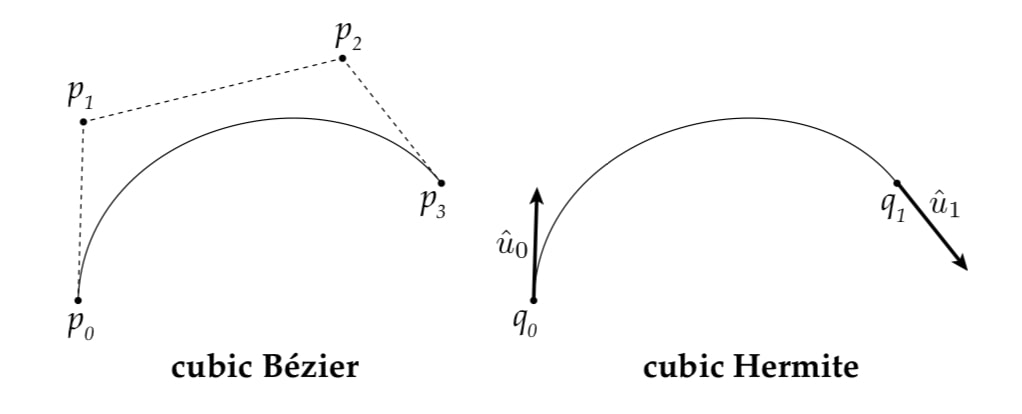
I got into a “Hermite phase” and wrote a function to build out a node network to drive a chain as a Hermite curve. Hermite curves work as a start and end point, and direction vectors on each end point instead of inner control points like bezier curves. But they’re not really that different, since the inner control points of a bezier curve kind of act in a pretty similar way, changing the continuity of the in and out flow of the curves. Hermite curves also include a bias value (“a”) that can affect the shape of the curve.
def hermite_nodes(p0: str,
                  p1: str,
                  t0: str,
                  t1: str,
                  t: str,
                  a: str):
    """create a hermite node network in Maya to drive node 't'"""
I also wrote a Maya Python Plugin that did the same calculations in a single node rather than a network of over 100 nodes, but it was considerably slower than the large Maya network. I’d be interested in trying to see if a C++ plugin version would be competitive with the node network. Maya “thinks” in nodes, the DG is Maya’s native language, so of course it runs much faster than what’s basically a Python script trying to run in realtime.
I plan to create a similar function for constructing a bezier curve node network for future components.
I did a little R&D after talking with some other Tech Artists about how to do curve fitting to match a Bezier curve’s controls (CV’s) to an existing baked curve. Consider a rig where you drive a tentacle component that consists of 16 joints with 4 CV-like controls, then bake out that data. Then you want to re-import the baked joint matrices and snap the controls to the correct positions that would generate that curve. I did a bit of back and forth with ChatGPT and some source reference material, I ended up with a function that gave predictable, reliable results.
def fit(t_list: list[Tuple[float,float,float]]) \
        -> Tuple[Tuple[float, float, float],Tuple[float, float, float]]:
    """
    Find P1 and P2 control points assuming P0 == t_list[0] and P4 == t_list[-1]
    Args:
        t_list: list of tuples (x,y,z) of curve points, assuming uniform spacing

    Returns:
        tuple of control points P1 and P2
    """
Here are some of the reference links I used in the process of writing this function:
- https://numpy.org/devdocs/reference/generated/numpy.matrix.html
- https://chatgpt.com/c/6893d19c-81c4-832f-a86c-9d8424af861c
- https://math.stackexchange.com/questions/2720000/how-to-understand-equation-parallel-x-x-prime2-2?noredirect=1&lq=1
- https://www.youtube.com/watch?v=xavgv1m9feE&t=8s
- https://math.stackexchange.com/questions/301736/how-do-i-find-a-bezier-curve-that-goes-through-a-series-of-points?rq=1
- https://stackoverflow.com/questions/5936953/how-to-calculate-control-points-in-cubic-beizer-curve?noredirect=1&lq=1
- https://en.wikipedia.org/wiki/B%C3%A9zier_curve#
- https://geometrictools.com/Documentation/BSplineCurveLeastSquaresFit.pdf
- https://math.stackexchange.com/questions/2599669/find-control-points-to-produce-a-given-curve
- https://en.wikipedia.org/wiki/Bernstein_polynomial
Visual Lines for Rig
This function is only curve-adjacent, but it seemed the best place to put it for now. It just creates a 1-degree curve and attaches the two ends to two nodes with cluster deformers. A use-case example is for showing the relationship of a pole vector control to the IK joint chain.
Creating clusters (cluster deformers, not skinClusters) from scratch in code wasn’t as easy as I thought, and I had to dig into Maya’s MEL scripts to figure out how Maya was doing it through the UI. I wanted to just create the cluster deformers without accompanying parent transforms, but I guess I settled on doing it through maya.cmds and then deleting the transform it automatically creates.
def create_line(source, dest, suffix='_link', parent=None, allow_dupes=False):
    """creates a deforming 1-degree ep curve between two nodes"""
    # create 1 degree ep curve
    base_name = Name(dest).base
    crv_name = Name(dest).change(node_type='crv',
                                 base=(base_name + suffix)).build()

    if (not allow_dupes) and (cmds.objExists(crv_name)):
        cmds.delete(crv_name)

    curve_line = cmds.curve(name=crv_name,
                            degree=1,
                            editPoint=[[0, 0, 0], [0, 0, 0]])

    crv_shape = cmds.listRelatives(curve_line, shapes=1)
    cmds.setAttr((crv_shape[0] + '.drawOverride.overrideEnabled'), True)
    # reference
    cmds.setAttr((crv_shape[0] + '.drawOverride.overrideDisplayType'), 2)

    cmds.setAttr((curve_line + '.inheritsTransform'), False)

    # create clusters, assign cvs
    for index, obj in enumerate([source, dest]):
        cmds.select(clear=True)
        cls0 = cmds.cluster(name=Name(crv_name).change(node_type='cls'))
        cmds.cluster(cls0[0], edit=1, geometry=f'{crv_shape[0]}.cv[{index}]')
        cmds.connectAttr(f'{pathname(obj)}.worldMatrix',
                         f'{cls0[0]}.matrix', force=True)
        cmds.disconnectAttr(f'{cls0[1]}.clusterTransforms[0]',
                            f'{cls0[0]}.clusterXforms')
        cmds.delete(cls0[1])

    cmds.parent(curve_line, parent)
    cmds.lockNode(curve_line)

    return curve_line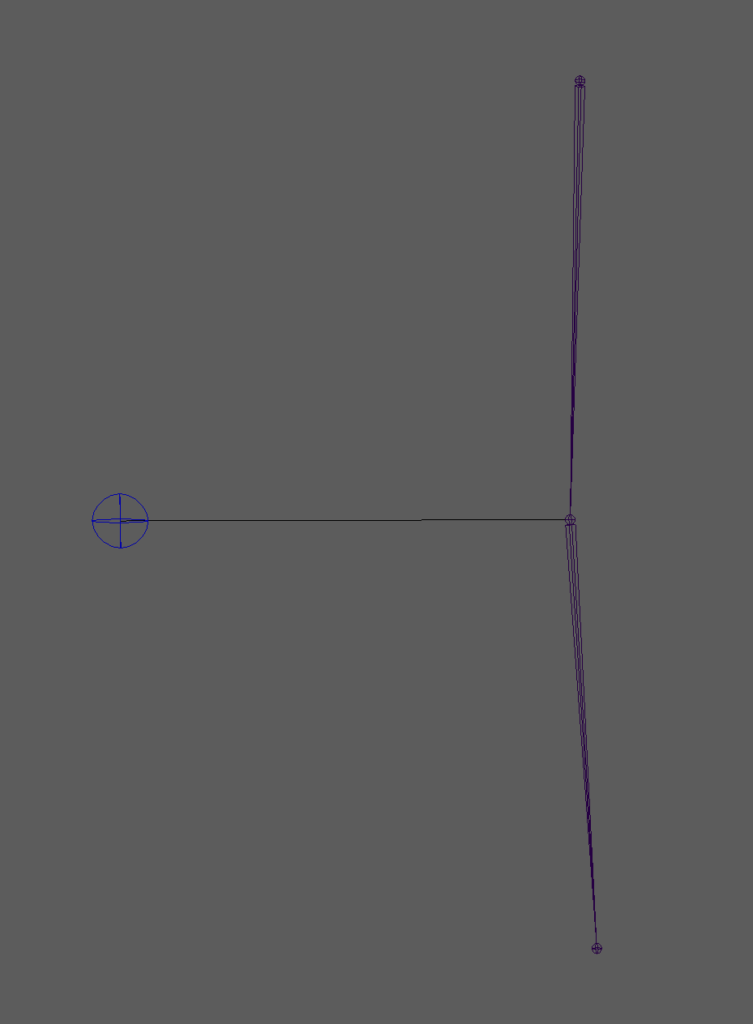
Math
A few matrix/vector utility functions.
def get_plane_normal(plane: typing.Iterable[om2.MVector]) -> om2.MVector:
    """returns a normal of a plane given 3 points"""
    plane_vector1 = (plane[1] - plane[0]).normal()
    plane_vector2 = (plane[2] - plane[0]).normal()
    return (plane_vector1 ^ plane_vector2).normal()
def project_point_on_plane(point: om2.MVector,
                           plane: typing.Iterable[om2.MVector]) -> om2.MVector:
    """returns the closest point on a plane from given point"""
    plane_normal = get_plane_normal(plane)
    shortest_dist = plane_normal * (point - plane[0])
    vector_to_plane = plane_normal * shortest_dist
    return point + (vector_to_plane * -1)
def get_matrix_vector(matrix: om2.MMatrix, row: int = 3) -> om2.MVector:
    """return a single MMatrix row as a MVector"""
    start_index = (row * 4)
    end_index = start_index + 3
    return om2.MVector(list(matrix)[start_index:end_index])


def point_line_projection(start: om2.MVector,
                          end: om2.MVector,
                          point: om2.MVector) -> om2.MVector:
    """returns the closest point on a line from given point"""
    vector = end - start
    diagonal = point - start
    perp = vector.normal() * diagonal.normal()
    return (start + (vector * (perp * (diagonal.length() / vector.length()))))
Undo
By default, OpenMaya API calls don’t get added to the undo buffer. Marcus Ottosson of Qt.py fame wrote a Python plugin that lets you manually add undo/redo stubs into Maya’s undo cache. But it’s a lot of work.
https://github.com/mottosso/apiundo
I spent some time testing this when I was going to do more API-based manipulation, but I had mixed results, probably due to user error. Maybe it was overkill even when using API calls? If I’m building a rig in code, there’s nothing I need to immediately undo. I might need to revisit this when I build more tools that utilize some of the API functionality in this project.
Core Summary
The nature of a library like this is that while it should form a solid base, it will grow as the project grows. It grew while I was working on it, as I found reusable pieces of code while developing the higher-level rigging components I would transplant them into appropriate places in the Core subpackage. I’d like to revisit the Node module in particular and break it up into several parts now that it’s grown much larger than originally designed.
In the next chapter, we’ll take a look at the “Class” modules meant to wrap Maya nodes or sets of nodes.
If you find this retrospective informative, useful, enjoyable, or some other adjective, you can buy me a coffee here.