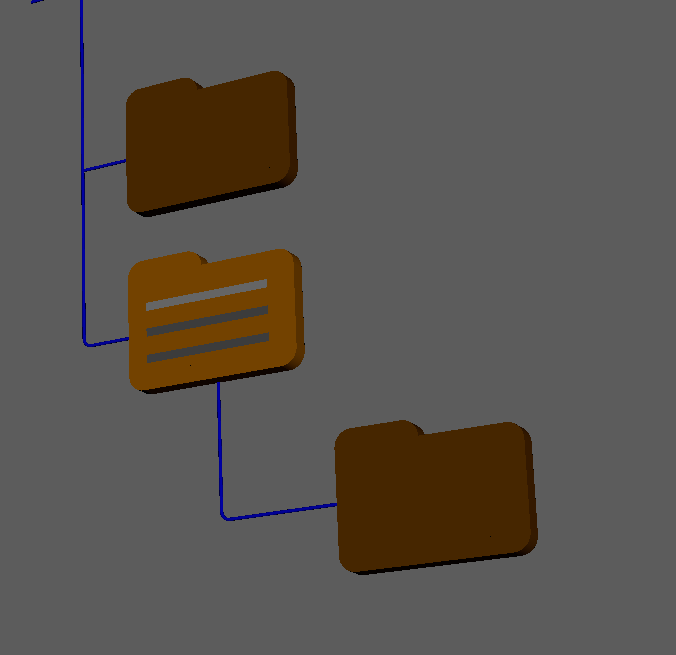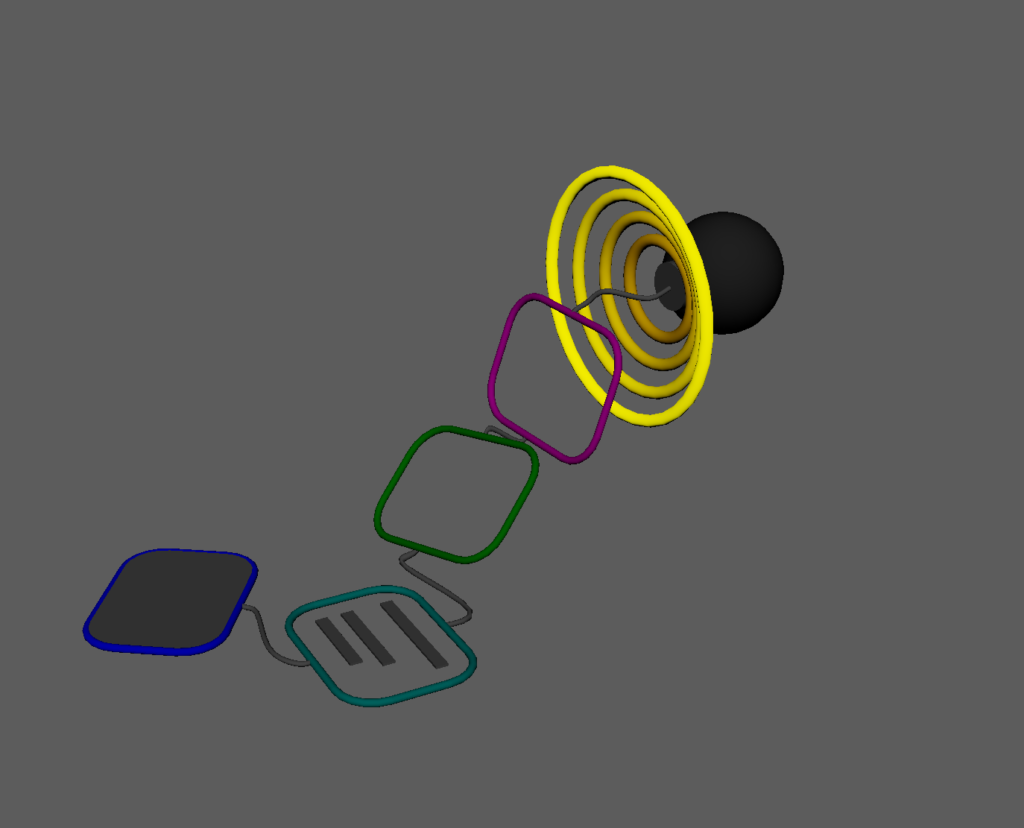
Modules referenced in this chapter:
components/base.py
collection.py
processor.py
data.py
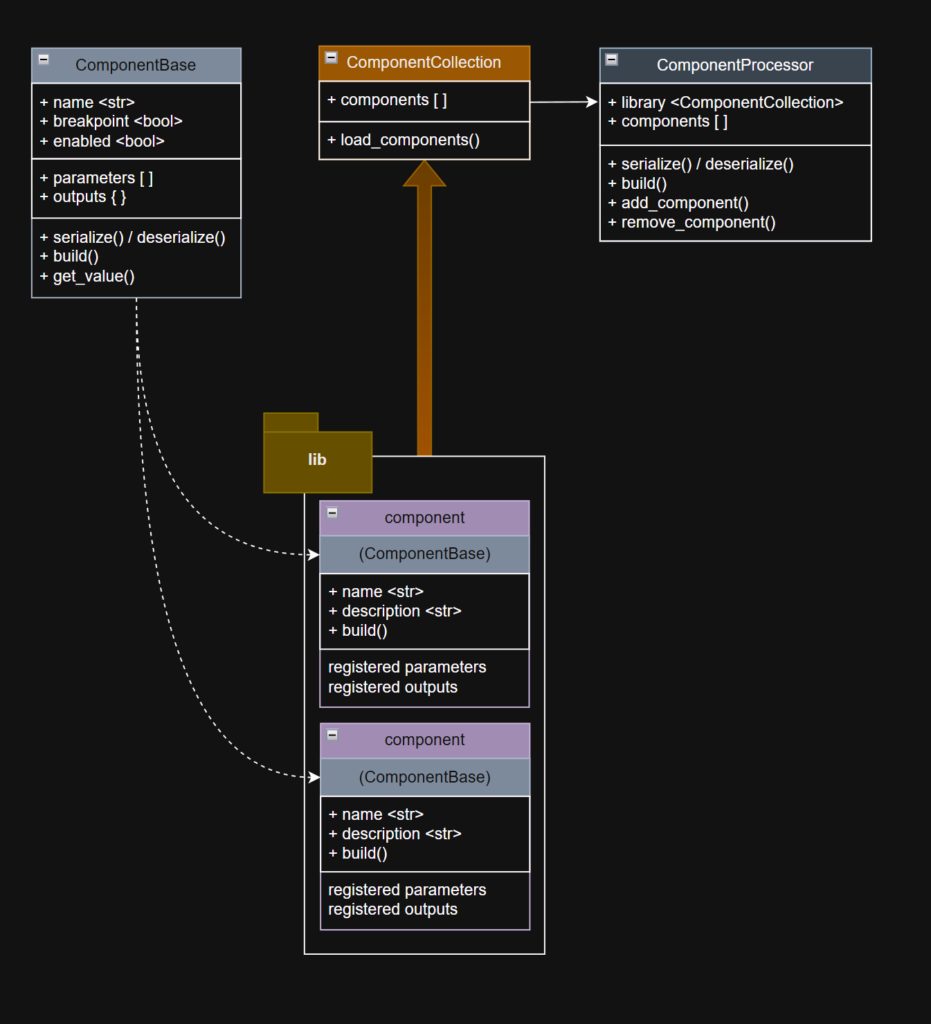
I would call this the “core component” of the rigging system, but we already have things in the project called “core” and “component”, so let’s say the “central part” of the rigging system are these Component classes and the system to load and use them.
The goals of this system:
- Create a Python Abstract Base Class
- All of the components subclass from the ABC
- The components should be discoverable, so all of the components intended to be used in the component library reside in a single folder
- The library can be refreshed and reloaded dynamically
ComponentBase
The ComponentBase class uses Python’s Abstract Base Class (ABC) to define a contract for the “concrete” classes that subclass from it.
I could have created the same system without using abstract classes. I would just re-implement the same methods and it would work exactly the same way.
Then why use abstract classes at all?
- Enforce a “Contract”. Components in this system are required to re-implement specific abstract methods or it will raise a TypeError.
- Create a Template. Subclassed components only need to re-implement the specific abstract methods to work in the system.
- Improve readability. It’s self-documenting in that a component author can look at the ComponentBase and know what they must re-implement specific methods.
When writing this section about “Why Abstract Classes”, I realized that I hadn’t built them the way I had intended. Originally build() was the abstract method, and it had a forced structure where I assumed every concrete implementation of build() would include a try-except clause and return true or false based on whether it caught an exception. I feel like that goes against the nature of the whole framework.
I broke out the actual rig component creation into an abstract _build() method, left scaffolding in the build() method, and made build() non-abstract. Now component authors don’t need to bother with the expected exception catching, it’s already implemented in the public-facing build() method, they just need to implement the actual business of constructing the component in the abstract _build() method.
Let’s take a look at the Abstract Base Class for component classes. It uses the “new” metaclass syntax for use with Python 3.
class ComponentBase(metaclass=ABCMeta):
    _link_handler = None

    def __init__(self):
        self._name = self.__class__.__name__
        self._result = None
        self.building: bool = False
        self.outputs = {}
        self._parameters = {}
        self.breakpoint: bool = False
        self.enabled: bool = True
        self.children = []
The base class contains 3 abstract methods:
    @property
    @abstractmethod
    def _component_name(self) -> str:
        """Return User-facing name of the component"""
        pass

    @property
    @abstractmethod
    def _component_description(self) -> str:
        """Return User-facing information of the component"""
        pass

    @abstractmethod
    def _build(self, *args, **kwargs) -> None:
        """run component"""
        pass
The public-facing build() method contains the try-except “scaffolding” for building the components. This is what is called from the ComponentProcessor and in turn it calls a re-implemented _build() method for that specific component.
   def build(self, *args, **kwargs) -> bool:
        """public run component"""
        try:
            self._build(*args, **kwargs)
        except Exception as exception:
            self._result = traceback.format_exc()
            return False
        return True
This class_name property doesn’t need to be re-implemented in subclasses, so it’s not abstract. Even though class_name is in the parent abstract class, subclasses will correctly return their own class name and not the parent class’s name.
    @property
    def class_name(self):
        return self.__class__.__name__
We’ll need to have multiple instances of the same components in the rig. For instance, a standard rig could have 4 limbs that are all instances of a Limb component, so we want to be able to identify a “Left Arm” from a “Right Leg” in the rig. We want to be able to give the instances unique, user-facing names.
    @property
    def name(self):
        return self._name

    @name.setter
    def name(self, name: str):
        self._name = name
Also, we’ll add a few methods to get the results of a component’s build for logging or to see what went wrong if it fails.
    def status(self) -> bool:
       """False if this component failed to build"""
        return (self._result is None)

    def result(self) -> str:
        """Retrieve error traceback if build failed"""
        return self._result if self._result else "Success"

    def reset_result(self):
        """ clear last result from building this component """
        self._result = None
When subclassing, we want to be able to easily add and retrieve arguments to each specific component. The ComponentBase abstract class contains functionality for registering parameters that the subclassed component instances will use. For each component, we’ll be able to define these parameters on the class and set their values in the instance in the rig description.
Let’s define a parameter class using Python 3’s dataclass decorator. https://docs.python.org/3/library/dataclasses.html
@dataclass
class ComponentParameter(object):
    """
    supported types: str, int, float, bool, list, dict,
    CVector, CMatrix, ComponentAction
    """
    name: str
    type_: Any
    default: Any = None
    value: Any = None
    items: list | None = None
    action: str | Callable[[],bool] = None
    arguments: list[str] = None
Dataclasses take care of some boilerplate dunder methods, but in this case also signifies that this class will be primarily used as data.
And a method in ComponentBase that registers the parameter for the class instance.
   def register_parameter(self,
                          name: str,
                          type_: Any,
                          default: Any = None,
                          items: list = None) -> None:
        """ adds a parameter definition to this component """
        self._parameters[name] = ComponentParameter(name=name,
                                                    type_=type_,
                                                    default=default,
                                                    items=items)
        if default is None:
            self._parameters[name].value = type_()
Now comes the fun part.
We want the components to be able to share data. When putting together the rig, we’ll have a Hub component that will contain links to the controls and the export joints. Every subsequent component that is built needs to be able to add any controls it constructs to the rig’s Hub via message attributes. We don’t want to hard-code names in the code or make assumptions about the Hub’s naming in the Maya scene.
So a ComponentParameter.value can reference parameters of other components in the rig.
- Originally output parameters were just going to be their own thing, and the property that contained them was just a list called controls. But as the build system evolved, I realized not all outputs would be controls, and also I wanted to be able to name them instead of trying to find the correct index of an output list.
- I refactored the outputs so that they had to be registered like parameters (inputs), they would share some functionality, so they are also stored internally as a ComponentParameter. This felt logical to me, so I could envision a component like a Maya DG Node or Unreal Blueprint Node, with input plugs and output plugs and the system could easily determine the purpose for each plug.
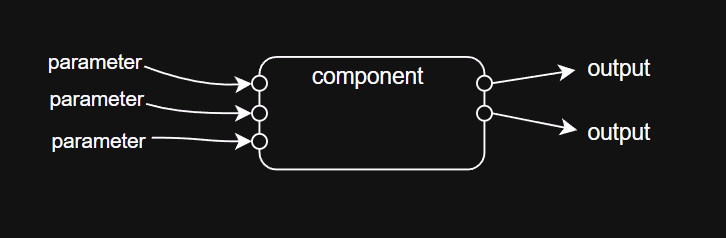
The public get_value method looks like this. First let’s get the “raw” value of the parameter from itself
   def get_value(self, param_name: str) -> Any:
        """
        get parameter value, including local and remote links and indexed values
        """
        # get raw local value
        raw_value = self._get_local_value(param_name)
If the value is a list or dictionary, iterate through them and recurse through the elements.
        if isinstance(raw_value, list):
            raw_value = [self.get_value(rv) if isinstance(rv,str) else rv
                         for rv in raw_value]
        elif isinstance(raw_value, dict):
            raw_value = {k:self.get_value(v) if isinstance(v,str) else v
                         for k,v in raw_value.items()}
Now the value is going to be picked through to look for links to other parameters (or outputs, which are also accessed like parameters). The _replace_links method uses a Regular Expression (or “regex”, using Python’s re module) to find open and close curly brackets.
A link could reference a parameter within the same component, which would look like {param_value}. If the parameter string doesn’t contain a period (“.”), it will try to retrieve a value from itself. The rig’s RigData component contains a base path, and a character name, and then a skeleton_file parameter that gets built out of the other two parameters:
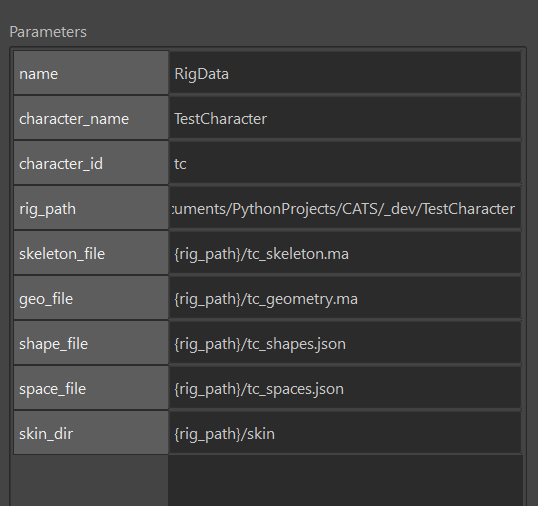
A simple link in a parameter value that is referencing another component could look like this: {other_object.output_value}. In the example I gave of a Hub component, a subsequent component could reference it in its own parameter by using {hub.control} (the control parameter of the hub component).
p.components[0].parameter_list['geo_file'].value
# Result: {rig_path}/tc_geometry.ma
p.components[0].get_value('geo_file')
# Result: C:/Users/katz3/Documents/PythonProjects/CATS/_dev/TestCharacter/tc_geometry.ma
In the Processor class, the processor will inject a reference to a method that will perform the communication between components (more on that later). _replace_links will send the link off to the injected method from the processor and get the value from the other component’s (“other_object”) get_value method.
        # replace links
        raw_value = self._replace_links(raw_value)
Similarly, we’ll allow for indexed parameter values. It works similarly to _replace_links, and a RegEx will find any values between square brackets: {hips.controls[0]}
        # indexed types
final_value = self._get_indexed_value(raw_value)ComponentParameters store the parameter’s desired type. We’ll need to cast the results of the previous string lookups to the type specified in the parameter registration.
The eval() line forces string representations of complex types like list or dict back to the evaluated type. A string “[‘a’, ‘b’]” will be evaluated into a list of two strings [‘a’,’b’].
The second cast forces certain types to very specific expected types. There is a CMatrix type which behaves exactly like a 16 element list of floats, but the CMatrix tells the UI to treat it differently and to use a special Matrix Editor when editing that value.
        # force required type
        if param_name in self.outputs:
            final_value = self.outputs[param_name].value
            if not isinstance(final_value, self.outputs[param_name].type_):
                final_value = self.outputs[param_name].type_(final_value)

        elif ((param_name in self._parameters) and
              (type(final_value) != self._parameters[param_name].type_)):
            if isinstance(final_value, str):
                final_value = eval(final_value)
            final_value = self._parameters[param_name].type_(final_value)

return final_valueComponentBase‘s set_value() method is comparatively simple:
   def set_value(self, param_name: str, value: Any) -> None:
        """set parameter value"""
        if param_name not in self._parameters:
            setattr(self, param_name, value)
        else:
            self._parameters[param_name].value = value
Outputs have their own methods for registering and setting, but are retrieved with get_value().
    def output_exists(self, name: str) -> bool:
        return (self.outputs.get(name) is not None)

    def get_outputs(self) -> list:
        """get all output names for this component"""
        return list(self.outputs.keys())

    def get_output(self, name: str) -> Any:
        """get a single output value from this component"""
        return self.get_value(name)

    def register_output(self, name: str, type_: Any) -> None:
        """
        register output slot for this component.
        outputs are like parameters but get populated after build() runs
        """
        self.outputs[name] = ComponentParameter(name=name, type_=type_)

    def set_output(self, name: str, value: Any):
        """set a single output value on this component"""
        if self.outputs.get(name) is None:
            raise Exception(f"set_output: output {name} not found")

        self.outputs[name].value = value
A later addition to ComponentBase is the “Action” type of parameter. It will appear in the UI as a button, attached to a Callable (function, method, lambda, etc) and be used to embed a save for different data files or whatever is needed.
   def register_action(self,
                       name: str,
                       action: str | Callable[[],bool],
                       arguments: list[str]) -> None:
        """ adds a parameter definition to this component """
        self._parameters[name] = ComponentParameter(name=name,
                                                    action=action,
                                                    arguments=arguments,
                                                    type_=ComponentAction)
Components contain their own serialization/deserialization methods. To serialize the entire rig build template, the processor just has to append the results of each component’s serialize() method and then dump it out as a json file.
   def serialize(self) -> dict:
        """serialize this component and its parameters to dictionary"""
        param_data = {'name': self.name,
                      'breakpoint': self.breakpoint,
                      'enabled': self.enabled}
        for _, parameter in self._parameters.items():
            param_data[parameter.name] = parameter.value
        return param_data

    def deserialize(self, data) -> None:
        """applies serialized data to this component"""
        for param_name, param_value in data.items():
            self.set_value(param_name, param_value)
Collection
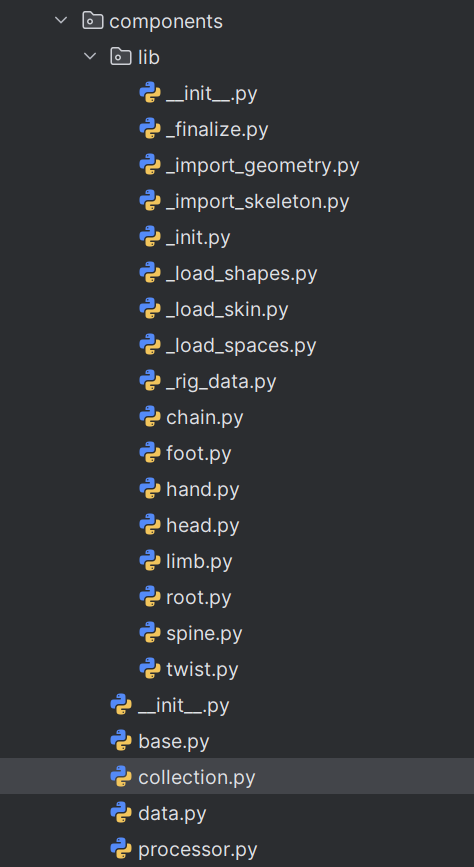
The ComponentCollection class is the component library which loads, reloads, and manages component class definitions (not instances).
COMPONENT_LIBRARY_DIR = os.path.normpath(
                            os.path.join(os.path.dirname(__file__), 'lib'))

class ComponentCollection:
    """Component Library - contains class types for rig components"""
    def __init__(self):
        self._components = []
ComponentCollection has a method for dynamically discovering the components in the project’s lib folder (CATS/components/lib).
   def get_component_modules(self) -> list[str]:
        """Returns a list of python files under .lib subdirectory"""
        component_modules = []
path_prefix is this module’s Python path up to the module’s name. The module’s path as imported is “CATS.components.collection“, so path_prefix becomes “CATS.components“. str.rsplit(sep, 1) will break a string at the right-most separator (“.”), and the [0] index tells Python that I only want the first element of the split.
path_prefix = self.__class__.__module__.rsplit('.',1)[0]Then we walk through the COMPONENT_LIBRARY_DIR to find all .py files that aren’t __init__.py.
        for root, dirs, files in os.walk(COMPONENT_LIBRARY_DIR):
            for file in files:
                if file.endswith('.py') and not file.startswith('__init__'):
                    component_module = os.path.join(root, file)
                    # remove .py ext
                    base_name = component_module.rsplit('.', 1)[0]
                    # get relative path
                    base_name = os.path.relpath(base_name,
                                                os.path.dirname(__file__))
                    # replace slashes with .'s
                    base_name = base_name.replace(os.sep, '.')
                    full_name = '.'.join([path_prefix, base_name])
                    component_modules.append(full_name)

        return component_modules
The returned module names will look like “CATS.components.lib.limb” or something along those lines.
The load_components method uses the module list returned from get_component_modules, and uses Python’s inspect module to get a list of classes in the module. We only want the classes that subclass from ComponentBase. If the module is already loaded, then we’ll force a reload and replace the collection reference to the component class with one from the reloaded module.
   def load_components(self, component_modules: list[str] | None = None):
        """load or reload component class types from library subdirectory"""
        if component_modules is None:
            component_modules = self.get_component_modules()

        for module in component_modules:
            if module not in sys.modules:
                m = importlib.import_module(module)
                # inspect.getmembers returns a list of tuples
                # ex. [("ClassName", ClassType)]
                classmembers = inspect.getmembers(m,
                                 predicate=lambda c: inspect.isclass(c) and
                                 issubclass(c, ComponentBase) and
                                 hasattr(c, '_component_name') and
                                 not inspect.isabstract(c))
                for classmember in classmembers:
                    # classmember[1] is the ClassType
                    if classmember[1] not in self._components:
                        self._components.append(classmember[1])
            else:
                # update currently-loaded component module
                m = importlib.reload(sys.modules[module])
                classmembers = inspect.getmembers(m,
                                 predicate=lambda c: inspect.isclass(c) and
                                 issubclass(c, ComponentBase) and
                                 hasattr(c, '_component_name') and
                                 not inspect.isabstract(c))
                component_names = {n.__name__:n for n in self._components}
                for classmember in classmembers:
                    # replace existing class in library
                    if classmember[1].__name__ in component_names:
                         self._components.remove(
                             component_names[classmember[1].__name__])
                    self._components.append(classmember[1])
The rest of ComponentCollection consists of a few convenience methods for reloading the component classes and getting a specific class by name.
   def reload_components(self):
        """load library component types"""
        components = self.get_component_modules()
        self.load_components(components)

    def get_component_by_name(self, name: str) -> ComponentBase | None:
        """find loaded library component type by name"""
        for component in self._components:
            if component.__name__ == name:
                return component
        return None

    def get_component_names(self) -> list[str]:
        """returns list of currently loaded component type names"""
        return [c.__name__ for c in self._components]

    def get_component_keys(self) -> dict[str,str]:
        """return module path filename"""
        return {c.__name__:c.__module__.rsplit('.',1)[-1]
                for c in self._components}
Processor
The Processor module is a collection of component INSTANCES created from Collection library.
I intended the rig to support hierarchical relationships of components, so components could have other components as children, but I pulled back a little from that initially. I justified it to myself by assuming I’d get through a first pass of the system with the rig components held in a list in the processor and just processing it sequentially, and then at some later date I would add parent-child component relationships. Some of the code I wrote assumed that it would eventually support parent-child components, but a lot of it didn’t.
When I started writing this overview of the system, and I got to this section, I thought it would sound lame to say that this is just the first pass and I intend to expand it later. So I took a break from writing and added full support to the processor and the UI for components to have child components.
The rig will still build sequentially, and the hierarchy will build depth-first: A top-level component’s descendants will all build before moving to the next top-level component. The main reason I wanted to support this was for component loops: I want to build a for-loop component that iterates through its children a number of times. Also visually, it’s nice to be able to represent hierarchies of components in the UI’s TreeView (i.e. spine-clavicle-arm-hand)
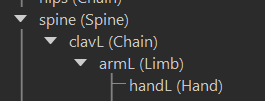
or even create a null group component and nest groups of components as children to visually separate parts in the TreeView.
In some places in this document or in the code comments/docstrings I’ll refer to the component list in the processor as the “Rig Description”, since it’s describing how the rig will be constructed.
ComponentProcessor
The ComponentProcessor class’s __init__() method includes a list of components, a local instance of the ComponentCollection library, and injects the link handler method into the ComponentBase class.
class ComponentProcessor(object):
    """Rig definition container"""
    def __init__(self):
        self.components = []
        self.library = ComponentCollection()
        self.reload_components()
        ComponentBase.set_link_handler(self.parameter_link)

        self._index = ComponentIndex(parent=None, index=0)
        self._breakpoints = []
self._index was originally an int, and was just the current index in the list during a build. I added ComponentIndex as part of the later update to support hierarchical rig descriptions. It’s similar to Qt/PySide’s QModelIndex, where if the parent is invalid or None, it’s a root-level component, otherwise ComponentIndex.index is the index under a specific parent. It also allowed me to keep ComponentProcessor.components and ComponentBase.children as lists, instead of trying to crawl through a nested dictionary.
@dataclass
class ComponentIndex(object):
    parent: ComponentBase | None
    index: int
I originally built the Processor without a UI, and some remnants of that are still in the class. It has its own build() method that steps through all of the components. It could be useful later on for automating building rigs without the UI.
    def build_component(self, component: ComponentBase) -> bool:
        """build a single rig component"""
        component.building = True
        result = component.build()
        component.building = False
        if not result:
            Logger().error("Component '{}' failed".format(component.name))
            Logger().error(f"{component.result()}")
            return result
        else:
            Logger().info(f"Component '{component.name}' built successfully")
        return result

    def build(self, components: (list[ComponentBase] | None) = None) -> None:
        """step through components and run the build() method on each component"""
        Logger().info("ComponentProcessor: Building components")
        if components is None:
            components = self.components

        for component in components:
            result = self.build_component(component)
            if not result:
                Logger().error(f"Build Failed: Component '{component.name}'")
                raise RuntimeError(component.result())

            if len(component.children) > 0:
                self.build(component.children)

   def get_result(self) -> dict[str, str]:
        """return previous build results for all currently loaded components"""
        for component in self.get_all_components():
            if not component.building:
                return {component.name: "Build not completed"}
            if not component.status():
                return {component.name: component.result()}
        return {"": "Success"}
As a small exercise, I made the processor class iterable. I’m not sure if it’s a useful feature, but it was a fun learning exercise. As with some of the other features that assumed a flat component list when I initially wrote it, I had to update it to support nested components.
    def __iter__(self):
        return self

    def __next__(self):
        if ((self._index is None) or
              ((self._index.parent is None) and
              (self._index.index >= len(self.components))):
            raise StopIteration

        value = self.get_component_by_index(self._index)
        if value is None:
            raise StopIteration

        self._index = self.get_next_index(self._index)
        return value
Using it as an iterator could look something like this:
processor = ComponentProcessor()
load_data(processor, rig_path=rig_path)

for p in processor:
    print(p.name)
Back to ComponentProcessor, it has a convenience method for reloading the library since it maintains its own instance of the ComponentCollection.
    def reload_components(self):
        """reload component library from .lib subdirectory"""
        self.library.reload_components()
It includes several methods for adding and removing components.
    def new_component(self,
                     component_class: str,
                     name: str = None,
                     parameters: dict[str, Any] = None):
        """create and return a new component instance from a library class name"""
        ...
    def add_component(self,
                      component_class: str,
                      name: str = None,
                      parameters: dict[str, Any] = None,
                      parent: (ComponentBase | None) = None) -> ComponentBase:
        """
        create and append a new component instance
        to the end of the rig description
        """
        ...

    def insert_component(self,
                         component_class: str,
                         index: ComponentIndex,
                         name: str = None,
                         parameters: dict[str, Any] = None):
        """create and insert a new component instance into the rig description"""
        ...

    def insert_component_instance(self,
                                  component: ComponentBase,
                                  index: ComponentIndex):
        """insert an existing component instance into the rig description"""
        ...

    def duplicate_component(self,
                            component_name: str,
                            index: ComponentIndex = None):
        """
        create a copy of an existing component instance
        and insert it into the rig description
        """
        ...

    def remove_component(self, index: ComponentIndex) -> ComponentBase:
        """remove a component instance by index from the rig description"""
        ...

    def remove_component_by_name(self, name: str):
        """remove a component instance by name from the rig description"""
And a method for “resetting” the Processor after a failed build.
    def reset_components(self):
        """reset the build results for all currently loaded components"""
        for component in self.get_all_components():
            component.reset_result()
When I reworked the system to support component parent-child relationships, I had to rewrite these “get” methods. In an effort to reduce duplicate code, I came up with this solution, where one single method does all of the work no matter what object types you’re converting from or to, and a few “wrapper” user-facing methods that are more rigid.
   def _get_component(self, data: ComponentIndex | ComponentBase | str,
                       get_type: type(ComponentIndex) | type(ComponentBase),
                       current: (ComponentBase | None) = None
                     ) -> ComponentIndex | ComponentBase | None:
        """
        generic local method for getting components by name, type, or index,
        and returns either a component or index
        """

        if current is None:
            components = self.components
        else:
            components = current.children

        for index, child in enumerate(components):
            matched = None
            match data:
                case str():
                    if data == child.name:
                        matched = child

                case ComponentBase():
                    if data == child:
                        matched = child

                case ComponentIndex():
                    if (data.parent is None):
                        matched = self.components[data.index]
                    elif (data.parent == child):
                        matched = child.children[data.index]

            if matched is not None:
                if get_type == ComponentIndex:
                    return ComponentIndex(parent=current, index=index)
                elif get_type == ComponentBase:
                    return matched

            if len(child.children) > 0:
                child_index = self._get_component(data,
                                                  get_type=get_type,
                                                  current=child)
                if child_index is not None:
                    return child_index

return None- Pattern Matching
Python 3’s Pattern Matching feature resembles a switch-case from C or a series of if-then statements, but it actually behaves differently than you might expect. Instead of thinking of it like a series of if-then statements, think of it as asking “Is this thing like this other thing?”. In the first case clause, if the str was just a class type and not an instance, it would return false because data isn’t a class type. But comparing a string to an empty string matches because they’re the same type.
You can also unpack sequences and bind parts of the sequence to variables that can be used within the case clause.
This statement will print 100.
data = ['beta', 50]
match data:
    case ['alpha', value]:
        print(value)
    case ['beta', value]:
print(value * 2)- More about the match-case pattern
https://www.pythonmorsels.com/switch-case-in-python/
These user-facing methods all use the _get_component() method in various ways.
    def get_component_by_index(self,
                               index: ComponentIndex) -> ComponentBase | None:
        """
        return a component instance in the current rig description
        by ComponentIndex
        """
        return self._get_component(index, get_type=ComponentBase)

    def get_index_from_component(self,
            component: ComponentBase) -> ComponentIndex | None:
        """
        return a component index in the current rig description
        from its component instance
        """
        return self._get_component(component, get_type=ComponentIndex)

    def get_component(self, name: str) -> ComponentBase | None:
        """return a component instance in the current rig description by name"""
        return self._get_component(name, get_type=ComponentBase)

    def get_index(self, name: str) -> ComponentIndex | None:
        """
        return the index of a component by name
        within the current rig description
        """
        return self._get_component(name, get_type=ComponentIndex)
Similarly, ComponentProcessor has a couple of user-facing methods to get all of the components, which needs to employ recursion since it’s no longer a simple list.
   def _get_all(self,
                get_type: (type(str) | type(ComponentBase)),
                components: (list[ComponentBase] | None)
                ) -> list[ComponentBase | str]:
        data = []

        if components is None:
            components = self.components

        for component in components:
            if get_type == str:
                data.append(component.name)
            elif get_type == ComponentBase:
                data.append(component)

            if len(component.children) > 0:
                data += self._get_all(get_type=get_type,
                                      components=component.children)

        return data

    def get_component_names(self) -> list[str]:
        """
        return a flattened list of component names
        in the current rig description
        """
        return self._get_all(get_type=str, components=None)

    def get_all_components(self) -> list[ComponentBase]:
        """
        return a flattened list of ComponentBase instances
        in the current rig description
        """
        return self._get_all(get_type=ComponentBase, components=None)
I added get_next methods to support the functionality of building individual components in the GUI.
   def get_next_component(self,
                          current: ComponentBase | None) -> ComponentBase | None:
        """get next component in the current rig description"""
        all_components = self.get_all_components()
        if current not in all_components:
            return None

        index = all_components.index(current)
        if index >= len(all_components) - 1:
            return None

        next_component = all_components[index + 1]
        return next_component

   def get_next_index(self, index: ComponentIndex | None) -> ComponentIndex | None:
        """get next component by index"""
        current = self.get_component_by_index(index)
        next_component = self.get_next_component(current)
        if next_component is None:
            return None

        next_index = self.get_index_from_component(next_component)
return next_indexComponentProcessor‘s init method injected this method into the ComponentBase class. When ComponentBase.get_value() looks for links to other components, it goes through this method.
   def parameter_link(self, dest_attr: str) -> Any:
        """
        helper function to allow components to retrieve data
        from other components
        """
        link_name, link_param = dest_attr.split('.', maxsplit=1)
        component = self.get_component(link_name)
        if component is not None:
            value = component.get_value(link_param)
            if value is not None:
                return value
        return None
ComponentBase includes a method to validate component names so it doesn’t end up with any naming conflicts. Notice we’re making use of the Name class’s _extract_iterator() method, and incrementing that iterator if it exists to create a unique name.
   def validate_name(self, name: str) -> str:
        """
        function to prevent rig component name conflicts
        within the rig description
        """
        names = self.get_component_names()
        max_iter = 20
        cur_iter = 0
        while name in names:
            has_iterator = Name._extract_iterator(name)
            if has_iterator is None:
                name += "01"
            else:
                base_name, base_iter = has_iterator
                name = '{base_name}{i:0{bit}d}'.format(
                        base_name=base_name,
                        i=int(base_iter)+1,
                        bit=len(base_iter))

            cur_iter += 1
            if cur_iter >= max_iter:
                logging.Error(f'validate_name: infinite loop={name}')
                break

        return name
As mentioned earlier, ComponentProcessor has serialize and deserialize methods that in turn calls each component’s serialize or deserialize methods and appends them all to a list to create a rig description save file.
   def serialize(self, current: ComponentBase | None = None) -> list:
        """serialize the rig description"""
        if current is None:
            components = self.components
        else:
            components = current.children

        data = []
        for component in components:
            datum = {component.class_name: component.serialize()}
            if len(component.children) > 0:
                datum['children'] = self.serialize(current=component)

            data.append(datum)

        return data

    def deserialize(self,
                    data: list[dict[str, Any]],
                    parent: ComponentBase | None = None) -> None:
        """create a new rig from serialized data"""
        if parent == None:
            self.components = []

        for component in data:
            if 'children' in component:
                children = component.pop('children')
            else:
                children = None

            component_name, component_data = component.popitem()
            current = self.add_component(component_name,
                                         parameters=component_data,
                                         parent=parent)

            if children is not None:
                self.deserialize(children, parent=current)
The User Interface, which I’ll go into in a later section, makes heavy use of ComponentProcessor under the hood.
Data
The components.data module takes care of Saving and Loading rig build files. The functions take the ComponentProcessor instance as an argument. data.load() imports a Rig Definition json file directly into the supplied instance of ComponentProcessor. Some of the input/output paths are retrieved from core.data, which I described in an earlier chapter.
I wanted to separate the file system interactions from the ComponentProcessor logic to keep their concerns isolated. Structurally, there’s no reason for ComponentProcessor to touch the file system. It makes it conceptually easy to change the behavior of the load and save functions without even touching the processor class.
import os
import json

from .processor import ComponentProcessor
from ..core.data import Data


def save(processor: ComponentProcessor):
    """save a rig definition file"""
    data = processor.serialize()

    rig_data = processor.get_component('RigData')
    rig_name = rig_data.get_value('character_name')
    base_path = Data.character_path(rig_name)

    if not os.path.exists(base_path):
        os.makedirs(base_path)

    data_path = os.path.join(base_path, (rig_name + '.json'))

    with open(data_path, 'w') as f:
        json.dump(data, f, indent=4)


def load(processor: ComponentProcessor,
         rig_path: str = None,
         rig_name: str = None):
    """load a rig definition file"""
    if rig_name is not None:
        base_path = Data.character_path(rig_name)
        data_path = os.path.join(base_path, (rig_name + '.json'))
    elif rig_path is not None:
        data_path = rig_path

    if not os.path.exists(data_path):
        raise FileNotFoundError

    with open(data_path, 'r') as f:
        data = json.load(f)

    processor.deserialize(data)
Summary
The ComponentCollection holds references to the Component classes in the component library.
The ComponentProcessor keeps a reference to the ComponentCollection, and holds the current “Rig Description”‘s Component class instances and data.
The user interface only needs to directly interact with the ComponentProcessor.
In the next chapter, we’ll take a look at some of the rig Components that deal mostly with data